
KyuubiSoft Chatpresets
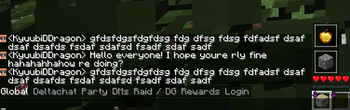
A simple mod to add button somewhere on the screen that writes text in the chat.
Screenshots
About this Mod
KyuubiSoft ChatPresets



Overview
KyuubiSoft ChatPresets is a client-side Fabric mod that revolutionizes your Minecraft chat experience with customizable quick-access buttons. Say goodbye to typing the same messages repeatedly!
Features
Core Features
- Quick Chat Buttons - Access your favorite messages with a single click
- Minecraft Item Icons - Use any Minecraft item as your button icon
- Drag & Drop - Position your button bar anywhere on screen
- Server-Specific Configs - Different presets for different servers
- RGB Color Picker - Customize text and background colors
Customization Options
- Horizontal/Vertical Layout - Arrange buttons your way
- Adjustable Button Size - From 8x8 to 64x64 pixels
- Background Toggle - Show or hide button backgrounds
- Chat-Only Mode - Buttons appear only when chat is open
- Per-Server Settings - Automatic preset switching
Getting Started
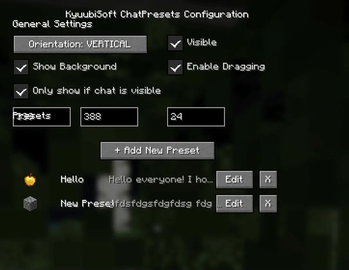
Open Configuration
- Press
P(default) or click the mod in Mod Menu - Access settings from the main menu or in-game
- Press
Create Your First Preset
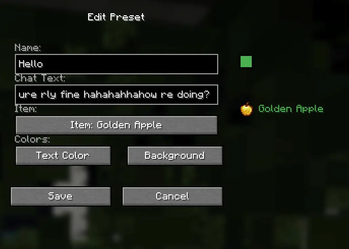
- Click "+ Add New Preset"
- Enter a name and your chat message
- Choose an icon from 100+ Minecraft items
- Pick your colors with the RGB picker
Use Your Presets
- Click any button to open chat with your message
- Drag the button bar to reposition
- Toggle visibility as needed
Configuration
General Settings
- Orientation: Horizontal or Vertical layout
- Position: X/Y coordinates or drag to move
- Button Size: 8-64 pixels
- Visibility: Toggle on/off
- Background: Show/hide button backgrounds
- Drag Mode: Enable/disable repositioning
Advanced Options
- Only Show if Chat Visible: Buttons appear only with chat open
- Server-Specific Configs: Separate settings per server
- Text Length: Up to 1000 characters per preset
Commands
All commands start with /chatpresets:
/chatpresets list - Show all presets
/chatpresets add <name> <text> - Create new preset
/chatpresets remove <name> - Delete preset
/chatpresets use <name> - Copy preset text to chat
/chatpresets reload - Reload configuration
Technical Details
- Minecraft Version: 1.21.1
- Mod Loader: Fabric
- Dependencies: Fabric API
- Client-Side Only: No server installation needed
- Performance: Minimal impact, efficient rendering
Compatibility
- ✅ Works with most client-side mods
- ✅ Compatible with Mod Menu
- ✅ No conflicts with chat mods
- ✅ Multiplayer friendly
License
This mod is licensed under the MIT License. Feel free to use it in modpacks!
Made with ❤️ by KyuubiSoft
Available Versions
How to Install KyuubiSoft Chatpresets on Your Server
Order Server
Order a Minecraft Java server with at least 3 GB RAM (4 GB recommended).
Set fabric Loader
In the panel under "Egg", select the fabric loader and matching Minecraft version (1.21.8).
Install Mod
Open the mod browser in the dashboard and search for "KyuubiSoft Chatpresets". Click "Install" – done! Alternatively, upload the .jar via SFTP to the /mods folder.
Compatibility
Mod Loaders
Minecraft Versions
1.21.8, 1.21.7, 1.21.6 (+5 more)
Server-side
✗ UnsupportedRecommended RAM
4 GB(min. 3 GB)Frequently Asked Questions
KyuubiSoft Chatpresets server crashes on startup – what to do?
Most common cause: wrong fabric version or insufficient RAM. Check the server log (latest.log) for "OutOfMemoryError" or "Mixin" errors. With Mado Hosting: ensure at least 3 GB RAM is allocated and the loader matches the mod version (1.21.8). You can switch loaders with one click in the panel.
Is KyuubiSoft Chatpresets compatible with fabric?
KyuubiSoft Chatpresets officially supports fabric for Minecraft 1.21.8, 1.21.7, 1.21.6. The Mado dashboard automatically detects incompatible loader combinations.
Server lagging with KyuubiSoft Chatpresets – how to optimize performance?
Recommended RAM: 4 GB (per 8 players). Use /spark profiler to check if KyuubiSoft Chatpresets consumes the most tick time. Common fixes: reduce server view-distance to 8-10, install "performant" or "starlight" as supplementary mods on Forge. With Mado Hosting, your server runs on NVMe SSDs with dedicated CPU cores for minimal latency.
Similar Mods




![[ETF] Entity Texture Features](https://cdn.modrinth.com/data/BVzZfTc1/af683d206d50b05258d865b0d6e4aa2f2cee12f2_96.webp)
![[EMF] Entity Model Features](https://cdn.modrinth.com/data/4I1XuqiY/6e5bbd0d06b1741bfdab6c0cfab6de8fdaf0064c_96.webp)
Rent Modded Server
Install KyuubiSoft Chatpresets with just one click on your server.