
LagLens
A lightweight client-side diagnostics HUD that helps you understand why Minecraft feels laggy.
Screenshots
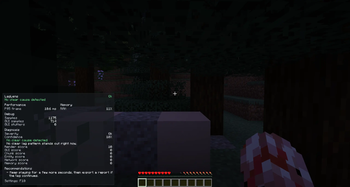
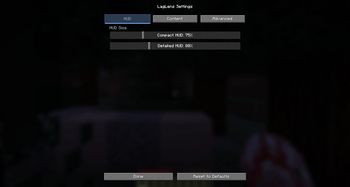
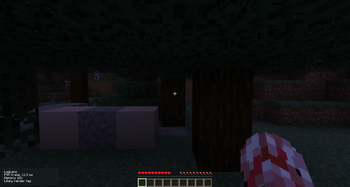
About this Mod
LagLens
LagLens is a lightweight client-side Fabric mod that helps you understand why Minecraft feels laggy.
Instead of simply showing FPS, LagLens tries to explain the possible cause of lag in a simple and readable way. It can detect signs of render lag, memory pressure, network lag, entity-heavy areas, chunk/loading stutters, and GUI-related lag.
LagLens is made for normal players who want to know what is going wrong without using complicated profiler tools.
Features
- Clean in-game HUD overlay
- Compact and detailed HUD modes
- Adjustable HUD size
- Toggleable HUD elements
- Simple lag diagnosis system
- FPS and frame time tracking
- P95 frame time display
- Stutter detection
- Memory usage monitoring
- Ping display when available
- Entity/world information when available
- Optional performance mod detection
- Built-in LagLens settings screen
- Configurable keybinds through Minecraft’s normal Controls menu
- Local diagnostic report export
- No telemetry
- No data uploads
- No server installation required
What LagLens can detect
LagLens can show possible causes such as:
- Likely render lag — high frame times or many stutters
- Likely memory pressure — high RAM usage
- Likely network lag — high or unstable ping
- Likely entity lag — many loaded entities nearby
- Likely chunk/loading lag — stutters while moving through the world
- Likely GUI lag — stutters that mainly happen while a screen is open
LagLens uses simple rule-based diagnostics. It does not magically fix lag, but it helps you understand what might be causing it.
Controls
Default keybinds:
- F8 — Toggle LagLens HUD
- F9 — Switch compact/detailed HUD mode
- F10 — Open LagLens settings
You can change these keybinds in Minecraft’s normal Controls / Key Binds menu.
Commands
/laglens status/laglens settings/laglens report/laglens reset/laglens overlay compact/laglens overlay detailed/laglens overlay toggle
Settings
LagLens includes an in-game settings screen where you can adjust:
- Compact HUD scale
- Detailed HUD scale
- HUD position
- Visible HUD elements
- Notification behavior
- Advanced display options
Privacy
LagLens is fully client-side.
It does not upload data.
It does not use telemetry.
It does not collect account data.
It does not require a server-side installation.
Diagnostic reports are only saved locally on your computer when you manually export them.
Optional recommendations
LagLens may recommend other performance mods depending on your diagnosis, for example Sodium, FerriteCore, Entity Culling, or other optimization mods.
These mods are optional. LagLens does not require them.
Compatibility
LagLens is designed for Minecraft Java Edition 1.21.x with Fabric.
Confirmed tested versions:
- Minecraft 1.21.1
Other 1.21.x versions may work, but they should only be considered confirmed after testing.
Important note
LagLens is a diagnostic helper, not a guaranteed lag fixer. It helps you understand possible causes of lag so you can decide what to change.
Available Versions
How to Install LagLens on Your Server
Order Server
Order a Minecraft Java server with at least 3 GB RAM (4 GB recommended).
Set fabric Loader
In the panel under "Egg", select the fabric loader and matching Minecraft version (1.21.1).
Install Mod
Open the mod browser in the dashboard and search for "LagLens". Click "Install" – done! Alternatively, upload the .jar via SFTP to the /mods folder.
Compatibility
Mod Loaders
Minecraft Versions
1.21.1
Server-side
✗ UnsupportedRecommended RAM
4 GB(min. 3 GB)Frequently Asked Questions
LagLens server crashes on startup – what to do?
Most common cause: wrong fabric version or insufficient RAM. Check the server log (latest.log) for "OutOfMemoryError" or "Mixin" errors. With Mado Hosting: ensure at least 3 GB RAM is allocated and the loader matches the mod version (1.21.1). You can switch loaders with one click in the panel.
Is LagLens compatible with fabric?
LagLens officially supports fabric for Minecraft 1.21.1. The Mado dashboard automatically detects incompatible loader combinations.
Server lagging with LagLens – how to optimize performance?
Recommended RAM: 4 GB (per 8 players). Use /spark profiler to check if LagLens consumes the most tick time. Common fixes: reduce server view-distance to 8-10, install "performant" or "starlight" as supplementary mods on Forge. With Mado Hosting, your server runs on NVMe SSDs with dedicated CPU cores for minimal latency.
Similar Mods




Rent Modded Server
Install LagLens with just one click on your server.