
Laminar
A low-overhead Fabric mod that unleashes your idle Integrated GPU to assist the CPU with heavy AI pathfinding, acoustics, and Line-of-Sight.
Screenshots
About this Mod
Laminar Engine


-orange.svg)

Asynchronous iGPU Co-Processing for Minecraft AI, Acoustics, and Line-of-Sight.
Laminar is an optimization suite designed to interface the CPU with the built-in integrated graphics processor (Intel HD Graphics, AMD Radeon) using explicit OpenCL 1.2 pipelines.
By offloading computationally intensive CPU tasks, Laminar assists in maintaining server tick rates (TPS) while reducing CPU utilization on the rendering and main logic threads.
⚠️ Note: Laminar doesn't increase the maximum FPS you can achieve. It simply improves stability and the ability to handle multiple mobs and sounds simultaneously without lag or significant FPS drops using parallel processing on the iGPU.
Developer's Note
A Solo Experiment
It's been a few days since this mod was released to the public and downloaded. I think it's time to be completely transparent with you all about how Laminar was created.
This project started purely as a personal experiment born out of curiosity: "Can we force the idle Integrated GPU to do the heavy lifting for the CPU in Minecraft?"
As a solo developer doing this in my free time, writing low-level JNI, OpenCL, and complex Mixin bytecode from scratch is an incredibly time-consuming process. To bring this architectural concept to life in a matter of days, I utilized AI (LLMs) as an advanced syntax generator.
However, the architecture is entirely human-led. Every memory map, every thread-safety lock, the zero-copy buffer routing, and the multi-layer AI throttling was manually conceptualized, strictly directed, tested, and rigorously debugged by me to ensure stability. AI was used merely as a tool to accelerate the boilerplate coding, but the hardware-level logic remains human.
And if you're curious about the logo asset, I designed it manually using Canva. I am personally very against the proliferation of AI-generated images without any clear context or artistic effort.
I am treating this project as a social and technical experiment, and the benchmark data speaks for itself. Whether you care about the development process or just want a lag-free server.
Lastly, if you notice any phrasing quirks in my documentations, English is not my native language, so I rely on translation tools to help me explain long technical things.
You can continue reading all the way down, or you can just leave because you already know something about this mod and don't like it.
Regards, and have a nice day.
Core Engine Architecture
1. Project "Hive" (GPU-Accelerated 3D Flow Field Pathfinding)
Standard pathfinding calculations can cause severe tick latency under high entity loads.
- Macro-Micro Handoff: Laminar offloads global pathing logic. The iGPU calculates a global 3D vector field within a 24-block radius (110,592 voxels) and traces the path asynchronously. Vanilla physics and navigation handle the local movement execution (jumping, swimming, and collision avoidance).
- Ocean Pathing Optimization: Inline voxel filtering bypasses kelp, seagrass, and water blocks, reducing pathfinding overhead in marine biomes.
- Acoustic Swarm Alert: Mobs communicate target states dynamically. When an entity detects a target, it alerts neighboring entities within a 12-block auditory radius that share an unoccluded physical path.
2. Project "Echo" (GPU-Accelerated Acoustics & Sound Physics)
Calculates real-time audio occlusion and reverberation without the CPU-side overhead associated with software raycasting.
- Multiplayer-Decoupled Voxel Grid: Echo performs independent, thread-safe voxel scanning on the client-side, isolated from server-side calculations. It utilizes a dedicated OpenCL buffer to prevent concurrency conflicts.
- Fibonacci Sphere Raycast: Dispatches 16 parallel rays per active sound directly on the iGPU, simulating wave propagation and room-size reflections.
- Zero-Allocation Cleanup: Uses a Iterator to clean up inactive sound slots, avoiding temporary allocations on the render thread to reduce GC frequency.
- Real-Time Volume Dampening: Dynamically updates the active OpenAL channel gain as the listener moves behind obstructions, simulating sound wave diffraction.
3. Project "Aura" (GPU-Accelerated Line-of-Sight)
Offloads entity line-of-sight calculations to the GPU.
- GPU Raymarching: Casts parallel rays from mob eye level to player eye level on the iGPU using a custom OpenCL kernel.
- Asymmetric Trust Fallback: If the GPU confirms visibility, it bypasses the CPU raycast. If it returns false or null (out of bounds), it falls back to vanilla CPU raycasting. This maintains target accuracy while reducing CPU raycast execution.
- Shadow Cache Lookups: Stores visibility states in a nested
ConcurrentHashMap(Player UUID -> Mob UUID -> Visible), providing O(1) lookups on the main server thread.
4. Adaptive Entity AI Throttling (Level of Detail AI)
- Dynamic 4-Zone LOD Engine:
- Zone 1a (Active Pursuit): Mobs with an active target run at 20 TPS.
- Zone 1b (Proximity Combat): Mobs within a 10-block radius of a player run at 20 TPS, preventing delayed aggro or inactive AI behaviors when players are close.
- Zone 2 (Close Idle): Mobs within a 24-block radius run at 5 TPS (delay = 4).
- Zone 3 (Far Idle): Mobs outside 24 blocks run at 1.6 TPS (delay = 12).
- Event-Driven Target Registry: Mobs register to an event-driven via hooks. This reduces the requirement for world scans on every tick, minimizing server CPU overhead.
- UUID-Staggered Ticking: Tick execution is staggered across frames using a positive bitwise modulo of the mob's UUID to flatten CPU usage spikes.
- Momentum & Animation Resets: On target loss (e.g., Creative mode transition), a 48-block sweep resets physical velocity, terminates active navigation paths, and resets aggressive state animations.
Performance Benchmarks
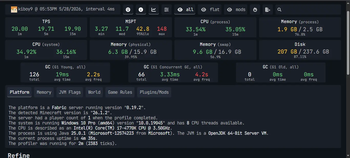
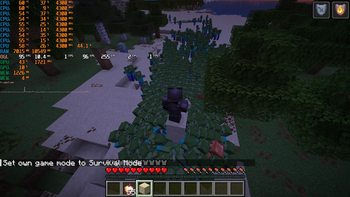
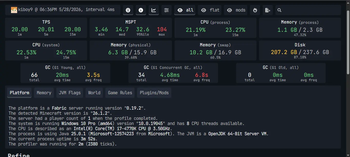
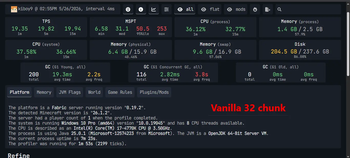
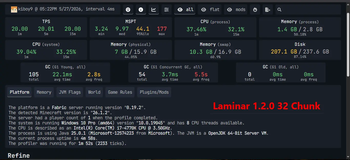
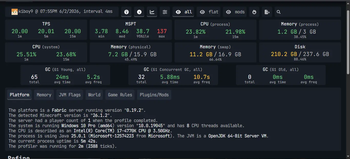
Tested on: Intel Core i7-4770K (Haswell @ 4.3 GHz OC, AVX2), Intel HD 4600 iGPU (OpenCL 1.2), NVIDIA GTX 1050. Scenario: 500 active Zombies, 32 Chunks loaded. Client optimization pack contains Sodium, FerriteCore, and Lithium.
| Performance Metric | Vanilla Minecraft | Laminar v1.2.7 + Pack | Net Improvement |
|---|---|---|---|
| Server Tick Rate | 19.35 TPS | 20.00 TPS | +0.65 TPS (Locked 20) |
| Median MSPT | 31.1 ms | 7.68 ms | -75.3% (4x faster) |
| 95th% MSPT | 50.5 ms | 27.8 ms | -44.9% (Smoother) |
| CPU Process Usage | 36.12% | 21.78% | -39.7% (Lower CPU overhead) |
| Memory Footprint | 1.4 GB | 1.0 GB | -28.5% (Less RAM allocation) |
| GC Young Frequency | 2.2s | 4.0s | +81.8% (Infrequent GCs) |
| GC Young Avg Pause | 19.3 ms | 17.1 ms | -11.4% (Shorter GC pauses) |
| GC Young Total Runs | 200 runs (in 113s) | 71 runs (in 120s) | -64.5% fewer GC events |
About benchmark v1.2.6b
While server-side tick metrics (MSPT, TPS, GC frequency) in version 1.2.6b remain tightly aligned with the optimized baseline of v1.2.5, this update delivers a measurable improvement to client-side rendering frame rates during active, high-density entity chases.
By increasing the maximum simultaneous audio occlusion capacity to 256 channels (previously 64) and the simultaneous Line-of-Sight Raymarching capacity to 1,024 active entities (previously 256), the rendering frame rate during dense crowd chases has increased.
Client Rendering Framerates during Dense Crowd Chases:
- Laminar v1.2.5: 64 - 71 FPS
- Laminar v1.2.6b (Current): 76 - 84 FPS
Result: A highly responsive +10 to +20 FPS gain under heavy entity stress, ensuring smoother camera movement and consistent frametimes when actively pursued by large hordes.
Note
Testing Note regarding ImmediatelyFast:
ImmediatelyFast has been excluded from our standardized benchmark environment. While it is an exceptional mod that successfully boosts client-side FPS and lowers overall CPU utilization, our testing indicates that its aggressive rendering buffer optimizations can introduce slight memory bandwidth contention when paired with Laminar's asynchronous OpenCL host-mapping on older architectures (causing a marginal increase in median MSPT and GC frequency).
It remains 100% compatible and safe to use alongside Laminar if you prioritize maximum visual frame rates over strict server-tick consistency.
Compatibility & Requirements
- Fabric Loader: v0.19.2+ (Minecraft 26.1.2)
- Hardware: A dual-GPU configuration (CPU + Integrated GPU) or an APU.
- OpenCL: The iGPU must support OpenCL 1.2 or higher.
- Java: Java 25 (GraalVM recommended for vectorization optimizations).
Compatible Modifications
Laminar is designed to operate alongside other render and system optimization modifications.
- Compatible with Sodium, Lithium, FerriteCore, and ImmediatelyFast.
- VulkanMod Compatible: Operates alongside Vulkan rendering by bypassing GPU memory conflicts through host memory-mapped buffers.
Incompatible
- CPU-Bound Sound Physics Modifications (
Sound Physics Remastered,Acoustic Overhaul). Project Echo serves as a hardware-accelerated alternative to these modifications.
FAQ (Frequently Asked Questions)
Q: Will this work on a Dedicated Server?
A: Most enterprise server CPUs (Xeon/EPYC) do not contain an integrated GPU. Laminar will detect this condition and disable itself without crashing. Laminar is designed for Single-Player, LAN, or Self-Hosted servers running on consumer desktop/laptop processors (Intel Core / AMD Ryzen).
Q: Does it change any vanilla behaviour?
A: For the most part, no. Mobs still walk, jump, and behave exactly like vanilla.
The only gameplay changes are:
- Sounds get muffled realistically when you are behind walls.
- Mobs nearby will alert each other to join the chase (like piglins when they are angry).
If you want 100% vanilla gameplay, you can easily disable both of these features in the config file (laminar.json).
Q: Do I need to configure anything?
A: Laminar operates with default configurations out of the box.
Q: What if I only have an Integrated GPU (iGPU) with no dedicated graphics card?
A: The effectiveness depends on current iGPU utilization:
- iGPU with headroom (Usage < 85% in vanilla): Laminar will utilize the remaining GPU cores to offload CPU calculations, resulting in lower tick latency.
- iGPU fully utilized (Usage ~ 100% in vanilla, e.g., due to shaders): Introducing OpenCL compute tasks may cause resource contention on the GPU silicon, which could lead to a reduction in visual FPS.
Note: If operating on an iGPU-only configuration, it is recommended to pair Laminar with performance modifications like Sodium and use optimized graphics settings to maintain sufficient GPU headroom.
Available Versions
How to Install Laminar on Your Server
Order Server
Order a Minecraft Java server with at least 3 GB RAM (4 GB recommended).
Set fabric Loader
In the panel under "Egg", select the fabric loader and matching Minecraft version (26.1.2).
Install Mod
Open the mod browser in the dashboard and search for "Laminar". Click "Install" – done! Alternatively, upload the .jar via SFTP to the /mods folder.
Compatibility
Mod Loaders
Minecraft Versions
26.1.2, 26.1.1, 26.1
Server-side
~ OptionalRecommended RAM
4 GB(min. 3 GB)Frequently Asked Questions
Laminar server crashes on startup – what to do?
Most common cause: wrong fabric version or insufficient RAM. Check the server log (latest.log) for "OutOfMemoryError" or "Mixin" errors. With Mado Hosting: ensure at least 3 GB RAM is allocated and the loader matches the mod version (26.1.2). You can switch loaders with one click in the panel.
Is Laminar compatible with fabric?
Laminar officially supports fabric for Minecraft 26.1.2, 26.1.1, 26.1. The Mado dashboard automatically detects incompatible loader combinations.
Server lagging with Laminar – how to optimize performance?
Recommended RAM: 4 GB (per 8 players). Use /spark profiler to check if Laminar consumes the most tick time. Common fixes: reduce server view-distance to 8-10, install "performant" or "starlight" as supplementary mods on Forge. With Mado Hosting, your server runs on NVMe SSDs with dedicated CPU cores for minimal latency.
Similar Mods




Rent Modded Server
Install Laminar with just one click on your server.