
Language Amend
Fallback to some language when selected language translation is missing.
About this Mod
Language Amend
Language Amend is a lightweight client-side mod that intelligently manages language fallbacks for Minecraft, ensuring a seamless multilingual experience by letting you define custom fallback chains for any language.
When using resource packs or mods that add translations in multiple languages, missing entries often default to English, breaking immersion. This mod allows you to automatically inject one or more fallback languages whenever a specific language code is detected—so every text remains readable and coherent, exactly as you intend.
✨ Features
- Smart Fallback: Automatically appends user‑defined fallback languages when a configured language code is present in the language list.
- Fully Configurable: Edit
config/lang_amend/lang_amend.jsonto create any number of mappings (e.g., maplzhto["zh_cn", "zh_tw"], oren_usto["en_pt"]). - Non-Intrusive: Works quietly behind the scenes without modifying game files or assets.
- Compatible: Plays nicely with other mods and resource packs.
🔧 How It Works
The mod hooks into Minecraft’s language loading system. If the current language list contains any key defined in your configuration, it appends the corresponding fallback languages—preserving the original order and avoiding duplicates. The result is a merged language list that respects your preferences.
📁 Configuration Example
{
  "lzh": ["zh_cn", "zh_tw"],
  "en_pt": ["en_us"]
}
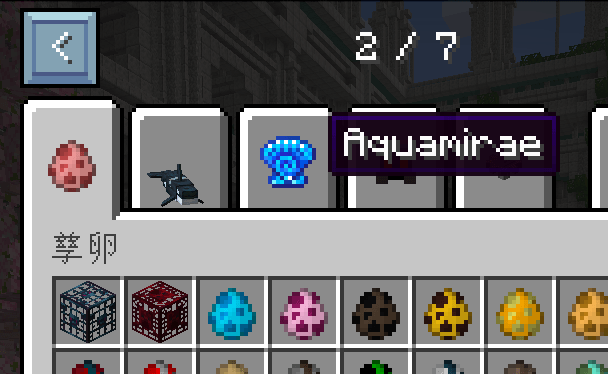
Before: Use English when failed to find Literary Chinese translation
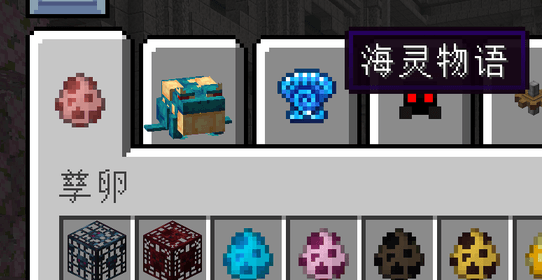
After: Use Chinese Simplfied when failed to find Literary Chinese translation
Available Versions
How to Install Language Amend on Your Server
Order Server
Order a Minecraft Java server with at least 3 GB RAM (4 GB recommended).
Set forge Loader
In the panel under "Egg", select the forge loader and matching Minecraft version (1.21.11).
Install Mod
Open the mod browser in the dashboard and search for "Language Amend". Click "Install" – done! Alternatively, upload the .jar via SFTP to the /mods folder.
Compatibility
Mod Loaders
Minecraft Versions
1.21.11, 1.21.10, 1.21.9 (+15 more)
Server-side
✗ UnsupportedRecommended RAM
4 GB(min. 3 GB)Frequently Asked Questions
Language Amend server crashes on startup – what to do?
Most common cause: wrong forge version or insufficient RAM. Check the server log (latest.log) for "OutOfMemoryError" or "Mixin" errors. With Mado Hosting: ensure at least 3 GB RAM is allocated and the loader matches the mod version (1.21.11). You can switch loaders with one click in the panel.
Is Language Amend compatible with forge and neoforge?
Language Amend officially supports forge, neoforge for Minecraft 1.21.11, 1.21.10, 1.21.9. The Mado dashboard automatically detects incompatible loader combinations.
Server lagging with Language Amend – how to optimize performance?
Recommended RAM: 4 GB (per 8 players). Use /spark profiler to check if Language Amend consumes the most tick time. Common fixes: reduce server view-distance to 8-10, install "performant" or "starlight" as supplementary mods on Forge. With Mado Hosting, your server runs on NVMe SSDs with dedicated CPU cores for minimal latency.
Similar Mods




![[ETF] Entity Texture Features](https://cdn.modrinth.com/data/BVzZfTc1/af683d206d50b05258d865b0d6e4aa2f2cee12f2_96.webp)

Rent Modded Server
Install Language Amend with just one click on your server.