
LastWords
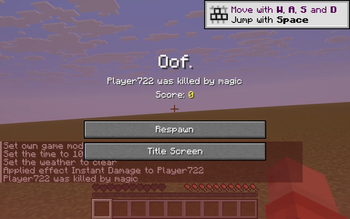
Replaces the 'You Died!' headline on the vanilla death screen with a random line from your own config file.
Screenshots
About this Mod
LastWords is a tiny, client-only Fabric mod that swaps out the giant "You Died!" headline on the vanilla death screen for a custom message picked at random from a list you control. Make every wipe a little more personal — or a little more annoying for your friends watching the stream.
Features
- Custom death title. Whenever the death screen opens, the big red headline is replaced with a random line from your config.
- Random pool. Provide as many messages as you want; the mod picks one uniformly at random per death.
- Vanilla fallback. If your message list is empty or the file is missing, the mod silently falls back to the vanilla "You Died!".
- Zero setup. On first launch the mod writes a default
config/lastwords.jsonwith ten sample lines so you can see it work immediately, then edit them later. - Client-only. Works on any server — singleplayer or multiplayer. No server install needed, no game rules touched.
Configuration
Edit config/lastwords.json:
{
  "messages": [
    "GAME OVER",
    "You blinked.",
    "Skill issue.",
    "Press F to respawn.",
    "Maybe next time.",
    "That was avoidable.",
    "Gravity wins.",
    "RIP.",
    "Better luck next life.",
    "Oof."
  ]
}
Add, remove, or replace lines freely. Each entry is plain text. The list is loaded once at game start; reload the game after edits to pick up changes.
How it works
A single Mixin intercepts the super(Text) call in DeathScreen's constructor and substitutes a random message from your config in place of the vanilla title. The death cause line ("Player was killed by …") below the title is untouched.
Cross-version
Tested on 1.21.8, 1.21.9, 1.21.10, 1.21.11. One JAR, one install.
Available Versions
How to Install LastWords on Your Server
Order Server
Order a Minecraft Java server with at least 3 GB RAM (4 GB recommended).
Set fabric Loader
In the panel under "Egg", select the fabric loader and matching Minecraft version (1.21.11).
Install Mod
Open the mod browser in the dashboard and search for "LastWords". Click "Install" – done! Alternatively, upload the .jar via SFTP to the /mods folder.
Compatibility
Mod Loaders
Minecraft Versions
1.21.11, 1.21.10, 1.21.9 (+1 more)
Server-side
✗ UnsupportedRecommended RAM
4 GB(min. 3 GB)Frequently Asked Questions
LastWords server crashes on startup – what to do?
Most common cause: wrong fabric version or insufficient RAM. Check the server log (latest.log) for "OutOfMemoryError" or "Mixin" errors. With Mado Hosting: ensure at least 3 GB RAM is allocated and the loader matches the mod version (1.21.11). You can switch loaders with one click in the panel.
Is LastWords compatible with fabric?
LastWords officially supports fabric for Minecraft 1.21.11, 1.21.10, 1.21.9. The Mado dashboard automatically detects incompatible loader combinations.
Server lagging with LastWords – how to optimize performance?
Recommended RAM: 4 GB (per 8 players). Use /spark profiler to check if LastWords consumes the most tick time. Common fixes: reduce server view-distance to 8-10, install "performant" or "starlight" as supplementary mods on Forge. With Mado Hosting, your server runs on NVMe SSDs with dedicated CPU cores for minimal latency.
Similar Mods




![[ETF] Entity Texture Features](https://cdn.modrinth.com/data/BVzZfTc1/af683d206d50b05258d865b0d6e4aa2f2cee12f2_96.webp)
![[EMF] Entity Model Features](https://cdn.modrinth.com/data/4I1XuqiY/6e5bbd0d06b1741bfdab6c0cfab6de8fdaf0064c_96.webp)
Rent Modded Server
Install LastWords with just one click on your server.