
Lava Particles | More
An immersive client-side mod that brings Minecraft lava to life with custom boiling bubbles, more!
Screenshots
About this Mod
🔥 Lava Particles | More
A simple client-side mod that makes Minecraft lava look and sound alive.




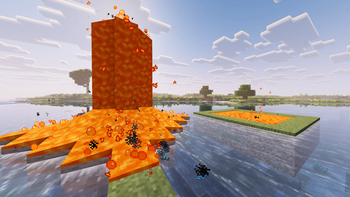
Lava Particles | More is a client-side mod that completely changes how Minecraft lava feels. It adds dynamic bubbles, sizzling effects, volcanic geysers, and splash physics to make caves and the Nether look much more immersive.
✨ Features
🌋 Lava Geysers & Eruptions
- Magma Geysers: Large lava pools occasionally erupt with rising columns of heat-distortion waves, bubbles, and hot flying droplets.
- Ambient Sounds: Eruptions are accompanied by deep, low-frequency volcanic rumbling.
🫧 Bubbling Effects
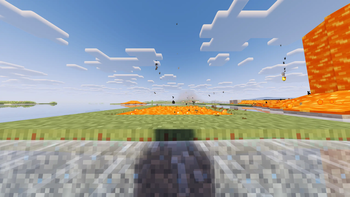
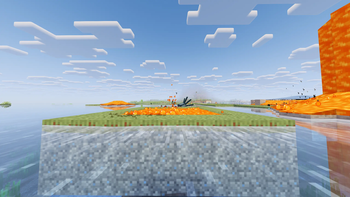
- Surface Bubbles: Lava pools bubble actively with tiny fizzing pops on the surface.
- Deep Magma Bubbles: Large magma bubbles rise slowly from the depths of lava lakes and burst at the surface.
☄️ Splash & Droplet Physics
- Landing Droplets: Flying magma drops land on blocks, slide around, and slowly cool down (changing color from bright red to dark basalt) before disappearing.
- Water Interactions: Droplets fizz and sizzle when landing in water, creating steam and rising water bubbles.
- Droplet Damage (Optional): Magma drops can deal minor fire damage (
0.5 hearts) to players, with a customizable cooldown.
💨 Realistic Combustion
- Lava Sizzling: Submerging or walking in lava creates dense columns of smoke, sparks, bubbling, and constant sizzling sound effects.
🛠️ Installation & Compatibility
[!NOTE]
This mod is purely client-side! You do not need to install it on servers to enjoy the visual atmospheric improvements in multiplayer.
- Supported Loaders: Fabric, Forge, NeoForge
- Supported Versions: Minecraft
1.20.1&1.21.1 - Dependencies:
- Fabric: Requires Fabric API and Cloth Config API for configuration GUI.
- Forge / NeoForge: Requires Cloth Config API.
⚙️ Configuration Options
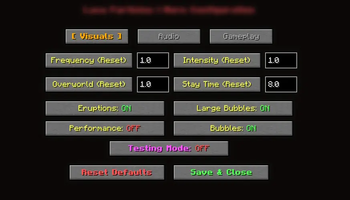
You can customize everything in-game using the configuration menu:
| Tab | Option Name | Description | Default Value |
|---|---|---|---|
| Visuals | Check Frequencies | Adjust update rates to optimize performance. | 1.0 |
| Particle Spawn Multipliers | Control the density of lava and smoke particles. | 1.0 |
|
| Overworld Activity Multipliers | Adjust eruption frequency outside the Nether. | 0.5 |
|
| Magma Floor Stay Time | How long droplets stay on the ground before cooling down. | 3.0s |
|
| Large Bubble Toggles | Enable or disable large bubbling effects. | true |
|
| Audio | Mod Volume Multiplier | Master volume control for custom sounds. | 1.0 |
| Pop Sound Toggle | Toggle the sound of small bursting bubbles. | true |
|
| Rumble Sound Toggle | Toggle deep volcanic rumbles. | true |
|
| Gameplay | Player Lava Sizzling | Toggle steam and sizzling effects when in lava. | true |
| Droplet Fire Damage | Toggle whether magma droplets deal minor fire damage. | true |
|
| Damage Cooldown | Cooldown time between droplet damage ticks. | 3.0s |
📄 License & Modpacks
Distributed under the GNU Lesser General Public License v3.0 (LGPL-3.0-only).
Modpacks: You are free to include this mod in any public or private modpack! Please credit stepqq as the author.
Available Versions
How to Install Lava Particles | More on Your Server
Order Server
Order a Minecraft Java server with at least 3 GB RAM (4 GB recommended).
Set fabric Loader
In the panel under "Egg", select the fabric loader and matching Minecraft version (1.21.1).
Install Mod
Open the mod browser in the dashboard and search for "Lava Particles | More". Click "Install" – done! Alternatively, upload the .jar via SFTP to the /mods folder.
Compatibility
Mod Loaders
Minecraft Versions
1.21.1, 1.20.1
Server-side
✗ UnsupportedRecommended RAM
4 GB(min. 3 GB)Frequently Asked Questions
Lava Particles | More server crashes on startup – what to do?
Most common cause: wrong fabric version or insufficient RAM. Check the server log (latest.log) for "OutOfMemoryError" or "Mixin" errors. With Mado Hosting: ensure at least 3 GB RAM is allocated and the loader matches the mod version (1.21.1). You can switch loaders with one click in the panel.
Is Lava Particles | More compatible with fabric and forge and neoforge?
Lava Particles | More officially supports fabric, forge, neoforge for Minecraft 1.21.1, 1.20.1. Note: Forge and Fabric mods are NOT cross-compatible – pick one loader and stick with it. The Mado dashboard automatically detects incompatible loader combinations.
Server lagging with Lava Particles | More – how to optimize performance?
Recommended RAM: 4 GB (per 8 players). Use /spark profiler to check if Lava Particles | More consumes the most tick time. Common fixes: reduce server view-distance to 8-10, install "performant" or "starlight" as supplementary mods on Forge. With Mado Hosting, your server runs on NVMe SSDs with dedicated CPU cores for minimal latency.
Similar Mods




Rent Modded Server
Install Lava Particles | More with just one click on your server.