
Leaf Decay Instant
Leaves decay instantly when trees are cut. Chain mode, extra drops, in-game commands, 20+ config options. No floating leaf blobs!
Screenshots

About this Mod
Leaf Decay Instant


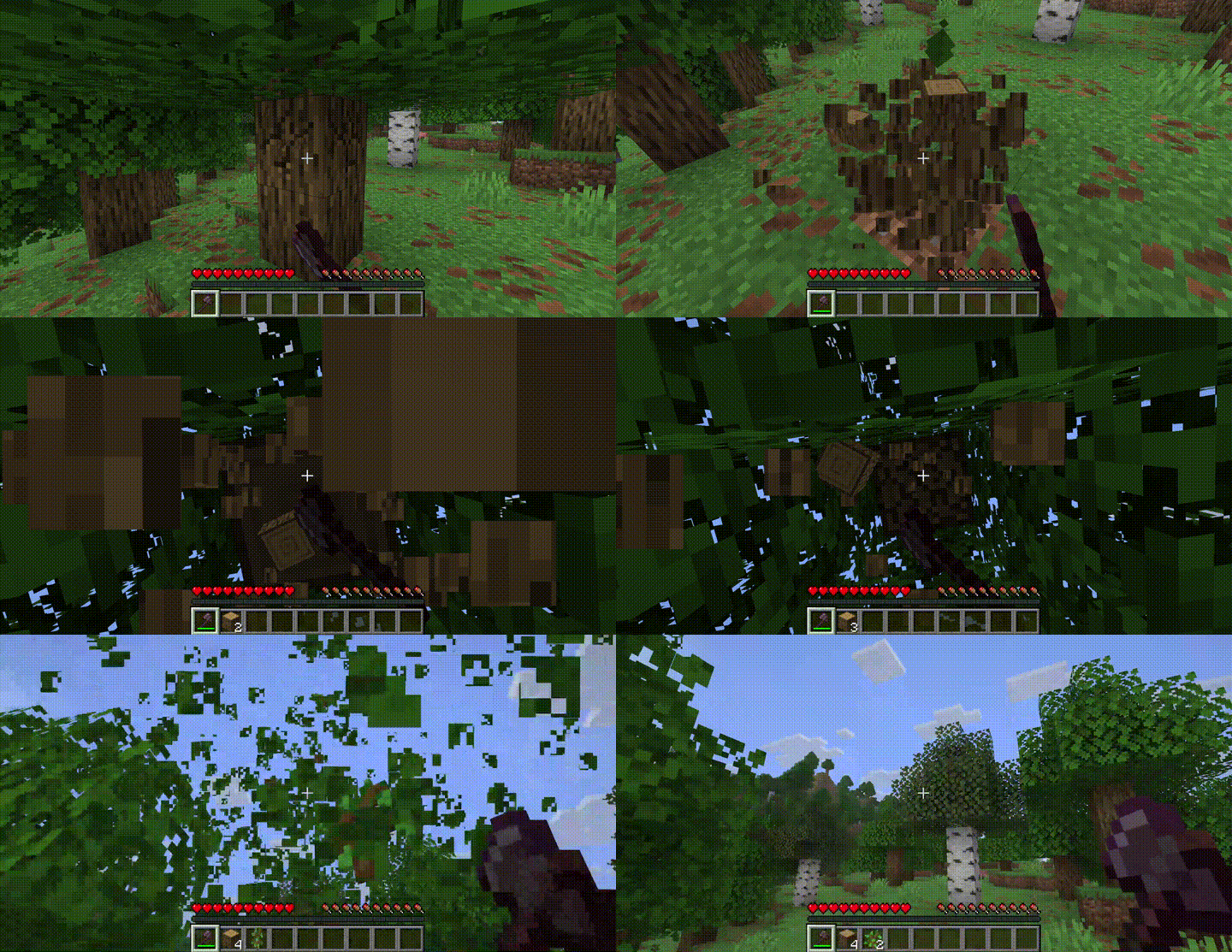
Tired of floating leaves after cutting down a tree? Leaf Decay Instant removes them immediately — no more ugly leaf blobs hovering in the sky.
Features
- Instant decay — leaves disappear the moment they lose connection to a log
- Chain decay mode — watch leaves cascade in a satisfying wave from the trunk outwards
- Extra drops — configurable bonus chance for saplings, sticks, and apples
- Sound variety — multiple break sounds with configurable chance and pitch
- Particle options — choose between leaf texture, composter, or happy villager particles
- In-game commands — change any setting at runtime with
/leafdecay set <option> <value> - Performance friendly — uses Minecraft's native tick system, minimal overhead
- Highly configurable — 20+ options to tune the mod to your taste
- Mod compatible — works with any mod that extends the base
LeavesBlock - Server-side — clients don't need the mod installed
Commands
Note: Commands require OP level 2. On multiplayer servers, use LuckPerms to restrict
/leafdecayto staff.
/leafdecay reload
/leafdecay set <option> <value>
Examples:
/leafdecay set chainDecay true
/leafdecay set chainDelay 3
/leafdecay set soundChance 0.5
/leafdecay set particleType composter
/leafdecay set extraSaplingChance 2.0
/leafdecay reload
Configuration
Config file is created on first launch at config/instant_leaf_decay.json.
Core
| Option | Type | Default | Description |
|---|---|---|---|
enabled |
bool | true |
Master toggle |
decayTicks |
int | 2 |
Ticks to wait before leaves decay |
Particles
| Option | Type | Default | Description |
|---|---|---|---|
particles |
bool | true |
Enable particle effects |
particleCount |
int | 8 |
Number of particles per decay |
particleType |
string | "block" |
"block", "composter", or "happy" |
Sound
| Option | Type | Default | Description |
|---|---|---|---|
sound |
bool | true |
Enable sound effects |
soundVolume |
float | 0.8 |
Volume (0.0 – 1.0) |
soundPitchMin |
float | 1.0 |
Minimum pitch |
soundPitchMax |
float | 1.2 |
Maximum pitch |
soundChance |
float | 0.3 |
Chance per leaf to play sound |
Supported sound IDs:minecraft:block.grass.break, minecraft:block.azalea_leaves.break, minecraft:block.moss.break, minecraft:block.azalea.break, minecraft:block.flowering_azalea.break, minecraft:block.cherry_leaves.break, minecraft:block.sweet_berry_bush.break
Chain Decay
| Option | Type | Default | Description |
|---|---|---|---|
chainDecay |
bool | false |
Enable cascading wave decay |
chainDelay |
int | 2 |
Spread factor (higher = slower wave) |
Extra Drops
| Option | Type | Default | Description |
|---|---|---|---|
extraSaplingChance |
float | 0.0 |
Bonus sapling roll multiplier |
extraStickChance |
float | 0.0 |
Bonus stick roll multiplier |
extraAppleChance |
float | 0.0 |
Bonus apple roll (oak/dark oak only) |
Filters
| Option | Type | Default | Description |
|---|---|---|---|
blacklistedLeaves |
list | [] |
Block IDs to exclude |
disabledDimensions |
list | [] |
Dimension IDs to disable in |
Performance
| Option | Type | Default | Description |
|---|---|---|---|
requirePlayerNearby |
bool | false |
Only decay near players |
playerRadius |
float | 64.0 |
Player detection radius |
License
MIT — free to use, modify, and include in modpacks. No permission needed.
Available Versions
How to Install Leaf Decay Instant on Your Server
Order Server
Order a Minecraft Java server with at least 3 GB RAM (4 GB recommended).
Set fabric Loader
In the panel under "Egg", select the fabric loader and matching Minecraft version (26.2-snapshot-2).
Install Mod
Open the mod browser in the dashboard and search for "Leaf Decay Instant". Click "Install" – done! Alternatively, upload the .jar via SFTP to the /mods folder.
Compatibility
Mod Loaders
Minecraft Versions
26.2-snapshot-2, 26.1.2, 26.2-snapshot-1 (+2 more)
Server-side
✓ RequiredRecommended RAM
4 GB(min. 3 GB)Frequently Asked Questions
Leaf Decay Instant server crashes on startup – what to do?
Most common cause: wrong fabric version or insufficient RAM. Check the server log (latest.log) for "OutOfMemoryError" or "Mixin" errors. With Mado Hosting: ensure at least 3 GB RAM is allocated and the loader matches the mod version (26.2-snapshot-2). You can switch loaders with one click in the panel.
Is Leaf Decay Instant compatible with fabric and forge and neoforge?
Leaf Decay Instant officially supports fabric, forge, neoforge for Minecraft 26.2-snapshot-2, 26.1.2, 26.2-snapshot-1. Note: Forge and Fabric mods are NOT cross-compatible – pick one loader and stick with it. The Mado dashboard automatically detects incompatible loader combinations.
Server lagging with Leaf Decay Instant – how to optimize performance?
Recommended RAM: 4 GB (per 8 players). Use /spark profiler to check if Leaf Decay Instant consumes the most tick time. Common fixes: reduce server view-distance to 8-10, install "performant" or "starlight" as supplementary mods on Forge. With Mado Hosting, your server runs on NVMe SSDs with dedicated CPU cores for minimal latency.
Similar Mods


Rent Modded Server
Install Leaf Decay Instant with just one click on your server.