Leather Overhaul
Leather armor can be repaired/reinforced with armor kits, adds craftable/dyeable bundles, and allows for recycling of leather items.
Screenshots
About this Mod
Leather Overhaul
This mod is an attempt at fixing issues with leather as an in-game resource as well as giving the armor unique mechanics to incentivize its usage.
Leather Armor Kits:
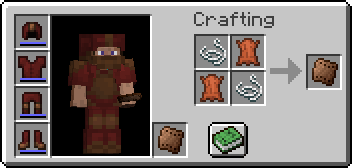
- Used to reinforce leather armor currently worn by the player. Each kit has 4 uses, with 1 consumed for each piece.
- Reinforced armor gains a second layer of durability represented by a blue bar. This is not affected by Unbreaking or Mending enchantments.
- Armor gains an additional point of protection until the reinforcement wears off.
- Applying an armor kit in a smithing table increases the amount of bonus durability and repairs the base durability by a small amount.
- The amount of extra durability is configurable.
Armor Kit Potion Effects:
- Potions with a positive effect and duration can be applied to leather armor with armor kits.
- Potion effects from leather armor are applied every time the armor is damaged.
- Effect is removed if bonus durability is depleted, or another armor kit is used.
Leather Recycling:
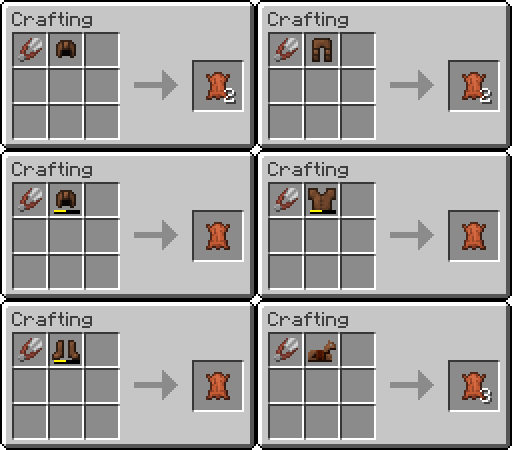
- Leather items can be placed in a crafting table with shears to recycle them for leather. Shears lose 3 durability per use.
- Leather armor above 50% durability gives 2 pieces of leather, 1 otherwise. Saddles and horse armor give 3 pieces.
Bundles:
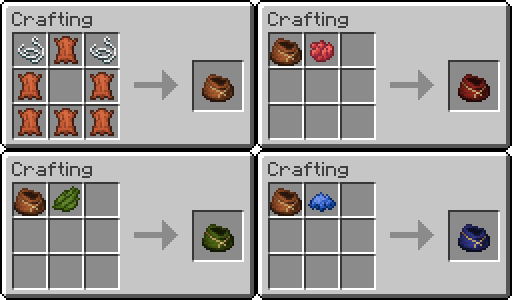
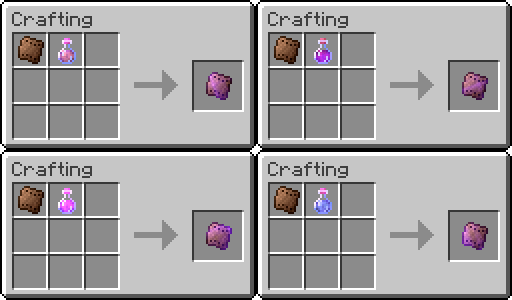
- Bundles can be crafted with leather or rabbit hides. This is configurable to prevent overlap with other mods such as Quark.
- Bundles can be dyed for easier inventory management.
- Colors can be removed by using a dyed bundle on a cauldron with water.
Leather Drops:
- Cows and Mooshrooms are guaranteed to drop 2 pieces of leather in addition to the base 0-2 drops to incentivize early game use.
- The amount of leather drops is configurable between 0-4.
Compatibility:
- Mod is only compatible with Forge for now. I can't guarantee it will ever be ported to Fabric, and if so will be done at my own discretion.
- Not compatible with any mod which overrides leather armor or bundles.
Modpacks:
- This mod can be included in any Modrinth modpack.
Available Versions
How to Install Leather Overhaul on Your Server
Order Server
Order a Minecraft Java server with at least 3 GB RAM (4 GB recommended).
Set forge Loader
In the panel under "Egg", select the forge loader and matching Minecraft version (1.20.1).
Install Mod
Open the mod browser in the dashboard and search for "Leather Overhaul". Click "Install" – done! Alternatively, upload the .jar via SFTP to the /mods folder.
Compatibility
Mod Loaders
Minecraft Versions
1.20.1, 1.19.2, 1.18.2
Server-side
✓ RequiredRecommended RAM
4 GB(min. 3 GB)Frequently Asked Questions
Leather Overhaul server crashes on startup – what to do?
Most common cause: wrong forge version or insufficient RAM. Check the server log (latest.log) for "OutOfMemoryError" or "Mixin" errors. With Mado Hosting: ensure at least 3 GB RAM is allocated and the loader matches the mod version (1.20.1). You can switch loaders with one click in the panel.
Is Leather Overhaul compatible with forge and neoforge?
Leather Overhaul officially supports forge, neoforge for Minecraft 1.20.1, 1.19.2, 1.18.2. The Mado dashboard automatically detects incompatible loader combinations.
Server lagging with Leather Overhaul – how to optimize performance?
Recommended RAM: 4 GB (per 8 players). Use /spark profiler to check if Leather Overhaul consumes the most tick time. Common fixes: reduce server view-distance to 8-10, install "performant" or "starlight" as supplementary mods on Forge. With Mado Hosting, your server runs on NVMe SSDs with dedicated CPU cores for minimal latency.
Similar Mods

![[ETF] Entity Texture Features](https://cdn.modrinth.com/data/BVzZfTc1/af683d206d50b05258d865b0d6e4aa2f2cee12f2_96.webp)
![[EMF] Entity Model Features](https://cdn.modrinth.com/data/4I1XuqiY/6e5bbd0d06b1741bfdab6c0cfab6de8fdaf0064c_96.webp)



Rent Modded Server
Install Leather Overhaul with just one click on your server.