
Legacy Nether
Brings back the old nether from the console versions of Minecraft!
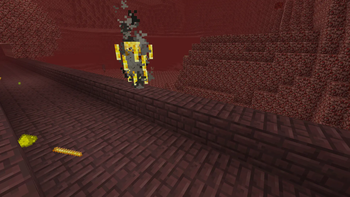
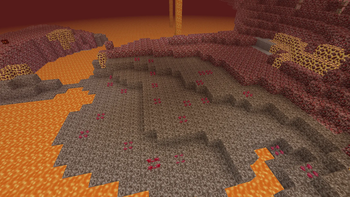
Screenshots
About this Mod
📖 Description
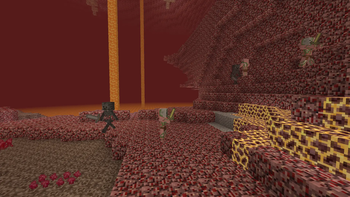
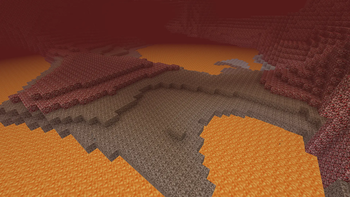
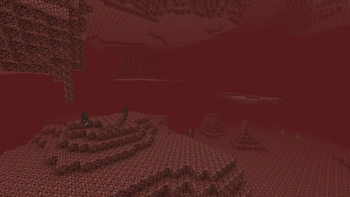
Legacy Nether is a mod/datapack that aims to faithfully recreate the classic Nether from the Legacy Console Editions of Minecraft (Xbox 360, PS3, Wii U, and others). This project is intended for nostalgic players who want to relive the atmosphere of the pre–1.16 Nether, or for those seeking a simpler, more dangerous, and barren Nether experience that focuses on survival and exploration rather than modern structures and biomes.
This mod removes all of the newer Nether content introduced in Minecraft Java Edition after 1.16, and restores the gameplay loop of the console versions:
- The Nether is composed only of Nether Wastes, with no Crimson or Warped Forests, Basalt Deltas, or Soul Sand Valleys.
- Bastion Remnants are removed, along with Piglins, Hoglins, Striders, Zoglins, and other modern mobs.
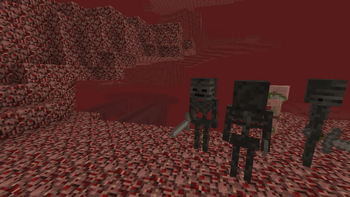
- The only mobs you’ll encounter are Zombified Piglins, Ghasts, Magma Cubes, and Wither Skeletons (which now spawn everywhere, not just in fortresses).
- Blazes drop Glowstone Dust, recreating the original console farming method.
- Nether Wart patches generate naturally on Soul Sand, just like in older editions. (Thanks to @Soupio777)
- Ancient Debris and Netherite are absent, restoring the classic Nether resource balance.
✨ Feature list
Feature List
Key:
✅ - Implemented
☑️ - Planned
❌ - Not Implemented
| Feature | Implemented | Planned |
|---|---|---|
| Nether Wastes only (with soul sand & gravel patches) | ✅ | ☑️ |
| Bastion Remnants removed | ✅ | ☑️ |
| Classic mobs only (Zombified Piglins, Ghasts, Magma Cubes) | ✅ | ☑️ |
| Wither Skeletons spawn everywhere | ✅ | ☑️ |
| Nether Wart generates on Soul Sand (Thanks to @Soupio777) | ✅ | ☑️ |
| Blazes drop 0–2 Glowstone Dust | ✅ | ☑️ |
| No modern biomes (Crimson/Warped Forest, Soul Sand Valley, Basalt Deltas) | ✅ | ☑️ |
| Remove Ancient Debris / Netherite | ✅ | ☑️ |
| Disable newer advancements | ✅ | ☑️ |
| Remove other Nether structures (ruined portals, etc.) | ✅ | ☑️ |
🌌 Nostalgia
For the best nostalgic experience, Legacy Nether pairs well with resource packs and mods that restore classic visuals and mechanics, such as:
- Legacy4J to bring back every aspect of Legacy Console Edition to modern versions.
- Golden Days by PoeticRainbow for authentic pre-1.14 textures.
- Nostalgic Tweaks by Adrenix to bring back old fog, lighting, skies, and combat.
- Moderner Beta for recreating Alpha/Beta terrain alongside the console-style Nether.
⚙️ Compatibility
- ✅ Works in Minecraft 1.21.x. No backports planned as of now.
- ❌ Not compatible with mods/datapacks that overhaul Nether biomes or structures.
- 🔧 Should be safe on servers as long as all players have the mod installed.
📦 Installation
- Download the mod.
- Place it in your
mods/folder. - Launch Minecraft with your preferred loader.
- Generate a new Nether (new chunks only!) to see the classic console Nether in action.
📸 Screenshots
Images
💡 Notes
- Existing Nether chunks will not retroactively change, explore new chunks or reset your Nether to experience the full effect.
- Blaze glowstone drops are balanced around the old console mechanics.
🤝 Support
🔄 Want Modern Features Too?
Prefer to keep Netherite, Bastions, and the new biomes? Check out the extended version:
Legacy Nether: Extended
Available Versions
How to Install Legacy Nether on Your Server
Order Server
Order a Minecraft Java server with at least 4 GB RAM (6 GB recommended).
Set datapack Loader
In the panel under "Egg", select the datapack loader and matching Minecraft version (26.1.2).
Install Mod
Open the mod browser in the dashboard and search for "Legacy Nether". Click "Install" – done! Alternatively, upload the .jar via SFTP to the /mods folder.
Compatibility
Mod Loaders
Minecraft Versions
26.1.2, 26.1.1, 26.1 (+12 more)
Server-side
✓ RequiredRecommended RAM
6 GB(min. 4 GB)Frequently Asked Questions
Legacy Nether server crashes on startup – what to do?
Most common cause: wrong datapack version or insufficient RAM. Check the server log (latest.log) for "OutOfMemoryError" or "Mixin" errors. With Mado Hosting: ensure at least 4 GB RAM is allocated and the loader matches the mod version (26.1.2). You can switch loaders with one click in the panel.
Is Legacy Nether compatible with datapack and fabric and forge and neoforge and quilt?
Legacy Nether officially supports datapack, fabric, forge, neoforge, quilt for Minecraft 26.1.2, 26.1.1, 26.1. Note: Forge and Fabric mods are NOT cross-compatible – pick one loader and stick with it. The Mado dashboard automatically detects incompatible loader combinations.
Server lagging with Legacy Nether – how to optimize performance?
Recommended RAM: 6 GB (per 5 players). Use /spark profiler to check if Legacy Nether consumes the most tick time. Common fixes: reduce server view-distance to 8-10, install "performant" or "starlight" as supplementary mods on Forge. With Mado Hosting, your server runs on NVMe SSDs with dedicated CPU cores for minimal latency.
Similar Mods




Rent Modded Server
Install Legacy Nether with just one click on your server.
Details
- License
- Creative Commons Attribution Share Alike 4.0 International
- Server-side
- Required