
Legendary Titles
Completing achievements will grant the player rewards and titles that appear above the player's head.
Screenshots


About this Mod
Legendary Titles
Legendary Titles transforms Minecraft’s achievement system into a fully customizable and richer experience. What began as a title mod has evolved into a comprehensive tool that redefines how players engage with achievements, offering unique and visible rewards.
In addition, players receive a title that appears above their character’s head. This title can be easily customized through a configuration file that is automatically generated.
Player Experience
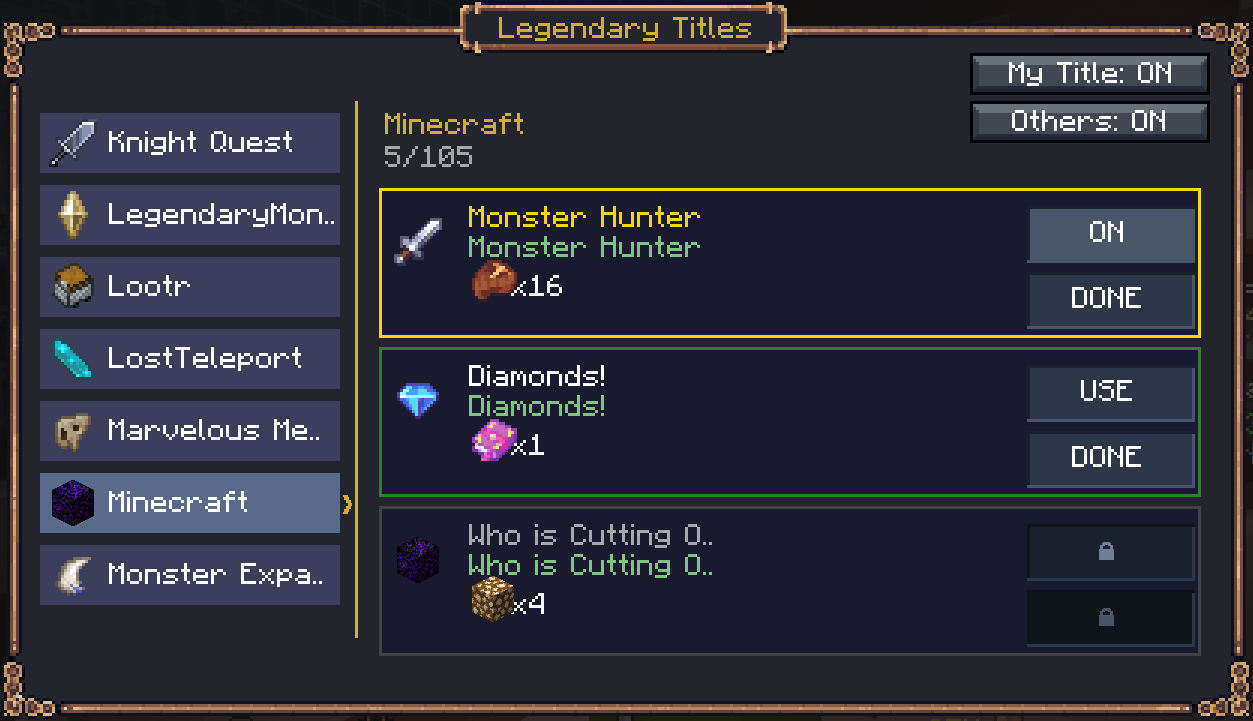
Achievements are no longer just simple notifications—they’ve become milestones with tangible rewards and visible titles.
Players can claim their rewards in a personalized window, enjoying a system that blends the vanilla foundation
with advanced customization options.
The window opens when you press the i key
Key Features
Automatic and customizable titles: Each achievement generates a title that appears above the player. Modpack creators can edit these titles in the configuration files, adjusting names and styles to fit their design.
Configurable rewards: Achievements can grant attributes, special items, or linked titles.
Smart detection system: Recognizes achievements from Minecraft and compatible mods, creating configuration files automatically.
Intuitive interface: Files are stored in config/everydayxp/legendarytitles, easy to edit for names, icons, rewards, and more.
Configuration example: Each mod has its own JSON file, such as minecraft.json or twilightforest.json.
Example Achievement (Lootr Mod)
"1chest": {
  "display_name": "\u0027X\u0027 Marks  test the Spot",
  "original_name": "\u0027X\u0027 Marks the Spot",
  "enabled": true,
  "icon": "lootr:lootr_chest",
  "rewards": {
    "attributes": {"attributecore:magic_find": 150.0},
    "items": [{"item": "minecraft:nether_star", "count": 3}]
  }
}
• display_name: Reward title shown in-game when completing the achievement. (Change this, and the title in the game will change.)
• original_name: The original name of the achievement.
• enabled: true = visible in the GUI; false = hidden.
• icon: Icon displayed in the achievement window.
• attributes: (optional) Attribute reward.
• items: (optional) Item reward.
Title Editing Option
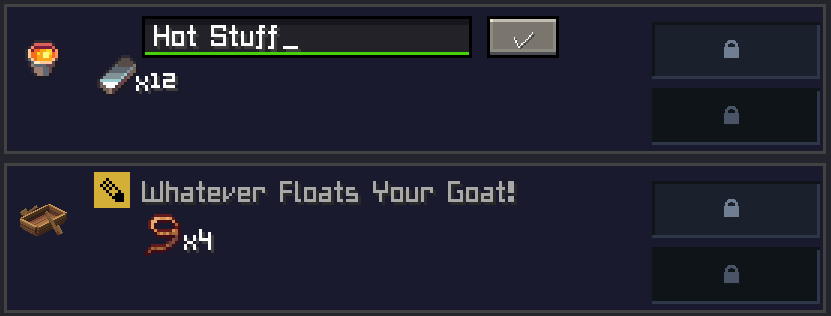
Since version 1.0.5, the mod adds a new in-game option. Players with OP + Creative can edit the names of titles directly from the titles window. This feature was implemented for modpack creators.
It does not change server settings, only local ones. For others to see the changes, the edited file must be manually shared with each member. This option was designed for modpacks, not for servers.
Tip: The mod menu opens by default with the J key, but you can change this in the keybind configuration.
🌐 Join Our Discord Community
Do you have new ideas, improvements for my mods, or have you found a bug? This is the perfect place to share them!
In our Discord community you can:
💡 Submit proposals and suggestions for improving the mods.
🛠️ Report problems and bugs so we can fix them together.
🎮 Show your creativity: you're free to use my mods in your own modpacks.
📢 Share your modpack on the server and show the community your unique style.
This space is designed for us to grow together, with respect and enthusiasm for creating mods and modpacks. Your contribution is always welcome!

Available Versions
How to Install Legendary Titles on Your Server
Order Server
Order a Minecraft Java server with at least 3 GB RAM (4 GB recommended).
Set forge Loader
In the panel under "Egg", select the forge loader and matching Minecraft version (1.21.1).
Install Mod
Open the mod browser in the dashboard and search for "Legendary Titles". Click "Install" – done! Alternatively, upload the .jar via SFTP to the /mods folder.
Compatibility
Mod Loaders
Minecraft Versions
1.21.1, 1.20.1
Server-side
✓ RequiredRecommended RAM
4 GB(min. 3 GB)Frequently Asked Questions
Legendary Titles server crashes on startup – what to do?
Most common cause: wrong forge version or insufficient RAM. Check the server log (latest.log) for "OutOfMemoryError" or "Mixin" errors. With Mado Hosting: ensure at least 3 GB RAM is allocated and the loader matches the mod version (1.21.1). You can switch loaders with one click in the panel.
Is Legendary Titles compatible with forge and neoforge?
Legendary Titles officially supports forge, neoforge for Minecraft 1.21.1, 1.20.1. The Mado dashboard automatically detects incompatible loader combinations.
Server lagging with Legendary Titles – how to optimize performance?
Recommended RAM: 4 GB (per 8 players). Use /spark profiler to check if Legendary Titles consumes the most tick time. Common fixes: reduce server view-distance to 8-10, install "performant" or "starlight" as supplementary mods on Forge. With Mado Hosting, your server runs on NVMe SSDs with dedicated CPU cores for minimal latency.
Similar Mods

![[ETF] Entity Texture Features](https://cdn.modrinth.com/data/BVzZfTc1/af683d206d50b05258d865b0d6e4aa2f2cee12f2_96.webp)
![[EMF] Entity Model Features](https://cdn.modrinth.com/data/4I1XuqiY/6e5bbd0d06b1741bfdab6c0cfab6de8fdaf0064c_96.webp)



Rent Modded Server
Install Legendary Titles with just one click on your server.