
LegendWatch
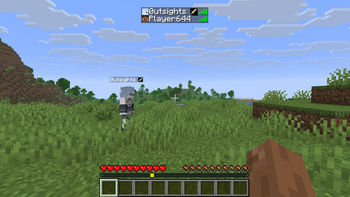
A Hoplite mod that shows any legendary a player has craft in their nametag
Screenshots
About this Mod
LegendWatch
A client-side Fabric mod for the Hoplite server. Listens to chat for legendary craft announcements and displays a small icon of the crafted legendary directly on that player's nametag and in the tab list — so you always know who's carrying a legendary without digging through chat.
Features
- Legendary icons appear on nametags above players' heads
- Legendary icons appear in the tab list
- If a player crafts multiple legendaries, all icons show side by side
- All 48 (+5) current Hoplite legendaries supported with unique icons
- Falls back to gold text for any unrecognized legendary
- Tracks legendary transfers — when a player is eliminated, their legendaries move to the killer's tag as predicted (shown with a
?) - Keybind to disable the mod entirely
- Keybind to switch between icon mode and name-only mode
- Keybind to toggle predicted legendary visibility
- Data clears automatically when a new match begins
- All keybinds are unbound by default and can be set in Options → Controls → LegendWatch
Available Versions
How to Install LegendWatch on Your Server
Order Server
Order a Minecraft Java server with at least 3 GB RAM (4 GB recommended).
Set fabric Loader
In the panel under "Egg", select the fabric loader and matching Minecraft version (1.21.11).
Install Mod
Open the mod browser in the dashboard and search for "LegendWatch". Click "Install" – done! Alternatively, upload the .jar via SFTP to the /mods folder.
Compatibility
Mod Loaders
Minecraft Versions
1.21.11, 1.21.10, 1.21.9 (+1 more)
Server-side
✗ UnsupportedRecommended RAM
4 GB(min. 3 GB)Frequently Asked Questions
LegendWatch server crashes on startup – what to do?
Most common cause: wrong fabric version or insufficient RAM. Check the server log (latest.log) for "OutOfMemoryError" or "Mixin" errors. With Mado Hosting: ensure at least 3 GB RAM is allocated and the loader matches the mod version (1.21.11). You can switch loaders with one click in the panel.
Is LegendWatch compatible with fabric?
LegendWatch officially supports fabric for Minecraft 1.21.11, 1.21.10, 1.21.9. The Mado dashboard automatically detects incompatible loader combinations.
Server lagging with LegendWatch – how to optimize performance?
Recommended RAM: 4 GB (per 8 players). Use /spark profiler to check if LegendWatch consumes the most tick time. Common fixes: reduce server view-distance to 8-10, install "performant" or "starlight" as supplementary mods on Forge. With Mado Hosting, your server runs on NVMe SSDs with dedicated CPU cores for minimal latency.
Similar Mods


Rent Modded Server
Install LegendWatch with just one click on your server.