
Legiti Browser
Adds a world browser and searcher menu for the Legitermoose server, amongst other features.
Screenshots


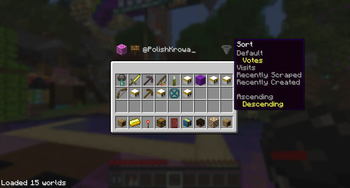
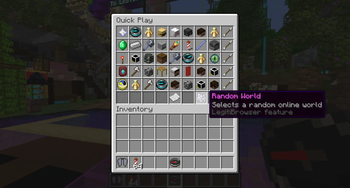
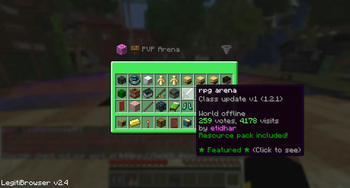
About this Mod
Adds a client side world browser, player searcher, random world chooser, and a selection of clientside options.
To open the world menu type /legitibrowse

To open the player list type /legitiwho
To open the config menu type /legiticonfig
To select a random, online world type /legitirandom
Browser Features
Easy world searching, by user or by world name, and detailed world information, various ways to sort the worlds.
A menu of all players, with rank information and some other features.
3 different world icon formats and an option of 6 coloured backgrounds.
Extra Features
The /legiticode command which automatically opens the browser editor and copies the password.
Optional Auto /trigger elytra and auto /trigger beg on lobby joins
Hand swing animation for the navigator when you right click
Option to replace the big bold [SHOUT] text with a classic globe icon
Option to set the compass menu to either the default /play menu, the /browse menu or the /nav menu
Option to prefix all messages sent in the lobby with :: to avoid them being sent to discord
Option to open the menu listing a players' worlds when you shift right click on them in the lobby
Option to remove the /vote confirmation screen when voting on a world
Bot related features: a Brigadier-Style command list when you start typing a bot command, and an option for consecutive bot messages to be clumped together.
Option to add a Random world icon to the /play menu
Later
Many more features will be introducted once API V4 is out.
Changelog
29/01/26 v1.0 Initial Release
01/03/26 v2.0 Complete redesign and many new features
08/03/26 v2.1 Added some more features and bug fix
22/03/26 v2.2 Many new features, bug fixes, more customisability
29/03/26 v2.3 Seperation and improvement of feature and browser configs, bug fixes
07/04/26 v2.4 New features, small improvements and more customisability.
27/04/26 v2.5 Small changes, /legiticode command.
Available Versions
How to Install Legiti Browser on Your Server
Order Server
Order a Minecraft Java server with at least 3 GB RAM (4 GB recommended).
Set fabric Loader
In the panel under "Egg", select the fabric loader and matching Minecraft version (1.21.11).
Install Mod
Open the mod browser in the dashboard and search for "Legiti Browser". Click "Install" – done! Alternatively, upload the .jar via SFTP to the /mods folder.
Compatibility
Mod Loaders
Minecraft Versions
1.21.11, 1.21.10
Server-side
✗ UnsupportedRecommended RAM
4 GB(min. 3 GB)Frequently Asked Questions
Legiti Browser server crashes on startup – what to do?
Most common cause: wrong fabric version or insufficient RAM. Check the server log (latest.log) for "OutOfMemoryError" or "Mixin" errors. With Mado Hosting: ensure at least 3 GB RAM is allocated and the loader matches the mod version (1.21.11). You can switch loaders with one click in the panel.
Is Legiti Browser compatible with fabric?
Legiti Browser officially supports fabric for Minecraft 1.21.11, 1.21.10. The Mado dashboard automatically detects incompatible loader combinations.
Server lagging with Legiti Browser – how to optimize performance?
Recommended RAM: 4 GB (per 8 players). Use /spark profiler to check if Legiti Browser consumes the most tick time. Common fixes: reduce server view-distance to 8-10, install "performant" or "starlight" as supplementary mods on Forge. With Mado Hosting, your server runs on NVMe SSDs with dedicated CPU cores for minimal latency.
Similar Mods




![[ETF] Entity Texture Features](https://cdn.modrinth.com/data/BVzZfTc1/af683d206d50b05258d865b0d6e4aa2f2cee12f2_96.webp)

Rent Modded Server
Install Legiti Browser with just one click on your server.