
Let Me Click And Send for Server
A simple Minecraft server-side mod, that replaces all non-command `run_command` content with a custom command, to bypass client-side restrictions since 1.19.1-rc1
Screenshots
About this Mod
A simple Minecraft server-side mod, that replaces all non-command run_command content with a custom command,
to bypass client-side restrictions since 1.19.1-rc1
If you want a more direct solution, here's a client-side only mod that does the same thing:
LetMeClickAndSend
| Mod | Side | Advantage | Disadvantage |
|---|---|---|---|
| LetMeClickAndSend | client | Exactly the same behavior as pre mc1.19.1 | Needs to be installed on all players' clients |
| LetMeClickAndSendForServer | server | No need to install on client | Reduces maximum chat message length by 7 |
Example
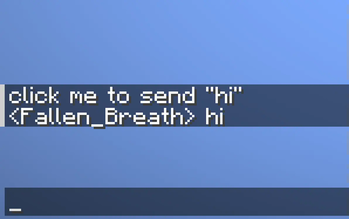
Let's run the following command, and then click the shown text
# Minecraft [1.7, 1.21.5)
/tellraw @a {"text":"click me to send \"hi\"","clickEvent":{"action":"run_command","value":"hi"}}
In vanilla 1.19.1 ~ 1.21.4, after clicking, you are not able to say anything since hi is not a valid command (not starts with /)
With this mod, the server will automatically replace the value field in the click event above with /lmcas hi,
so the client can "send" the message without any issue after the click
On command received, the server will broadcast a message with the same format as a player message, simulating the player saying "hi" in chat
MC 1.21.5+
Since MC 1.21.5, the run_command behavior has changed a lot
First is the change in command syntax, which has little impact:
# Minecraft [1.21.5, ~)
/tellraw @a {"text":"click me to send \"hi\"","click_event":{"action":"run_command","command":"hi"}}
Next is the change in behavior, which has a greater impact:
- The
commandvalue is always valid, regardless of whether it starts with a/or not - The client will strip the
/prefix from thecommandvalue and send the remaining string as a command
It's no longer possible to correctly distinguish between "a run_command for sending chat message" and "a run_command for sending command"
As a workaround, LetMeClickAndSendForServer for MC >= 1.21.5 will only replace certain command with the /lmcas command.
By default, only command value starting with !!, which is a commonly-used command prefix
in MCDReforged plugin ecosystem, will be replaced
A config file located at ./config/letmeclickandsendforserver/config.json is added for customizing the replacing behavior
{
    "replacePattern": "!!.*"
}
The replacePattern should be a valid regex pattern. All command values that fully match the pattern will be replaced with the /lmcas command
To test with the default configuration, you can use:
/tellraw @a {"text":"click me to send \"!!MCDR\"","click_event":{"action":"run_command","command":"!!MCDR"}}
Requirements
It's a server-side only mod. It requires 0 extra dependency
Available Versions
How to Install Let Me Click And Send for Server on Your Server
Order Server
Order a Minecraft Java server with at least 3 GB RAM (4 GB recommended).
Set fabric Loader
In the panel under "Egg", select the fabric loader and matching Minecraft version (26.2).
Install Mod
Open the mod browser in the dashboard and search for "Let Me Click And Send for Server". Click "Install" – done! Alternatively, upload the .jar via SFTP to the /mods folder.
Compatibility
Mod Loaders
Minecraft Versions
26.2, 26.1.2, 26.1.1 (+38 more)
Server-side
✓ RequiredRecommended RAM
4 GB(min. 3 GB)Frequently Asked Questions
Let Me Click And Send for Server server crashes on startup – what to do?
Most common cause: wrong fabric version or insufficient RAM. Check the server log (latest.log) for "OutOfMemoryError" or "Mixin" errors. With Mado Hosting: ensure at least 3 GB RAM is allocated and the loader matches the mod version (26.2). You can switch loaders with one click in the panel.
Is Let Me Click And Send for Server compatible with fabric and forge and neoforge?
Let Me Click And Send for Server officially supports fabric, forge, neoforge for Minecraft 26.2, 26.1.2, 26.1.1. Note: Forge and Fabric mods are NOT cross-compatible – pick one loader and stick with it. The Mado dashboard automatically detects incompatible loader combinations.
Server lagging with Let Me Click And Send for Server – how to optimize performance?
Recommended RAM: 4 GB (per 8 players). Use /spark profiler to check if Let Me Click And Send for Server consumes the most tick time. Common fixes: reduce server view-distance to 8-10, install "performant" or "starlight" as supplementary mods on Forge. With Mado Hosting, your server runs on NVMe SSDs with dedicated CPU cores for minimal latency.
Similar Mods




![[ETF] Entity Texture Features](https://cdn.modrinth.com/data/BVzZfTc1/af683d206d50b05258d865b0d6e4aa2f2cee12f2_96.webp)
![[EMF] Entity Model Features](https://cdn.modrinth.com/data/4I1XuqiY/6e5bbd0d06b1741bfdab6c0cfab6de8fdaf0064c_96.webp)
Rent Modded Server
Install Let Me Click And Send for Server with just one click on your server.