
Letterboxing
A mod that adds customizable letter- and pillarboxing for more immersive gameplay.
Screenshots
About this Mod
Letterboxing
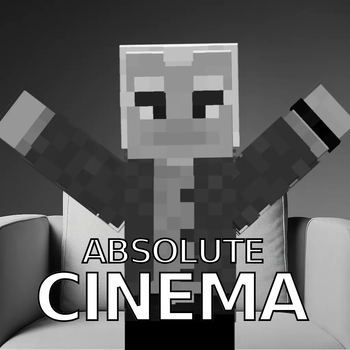
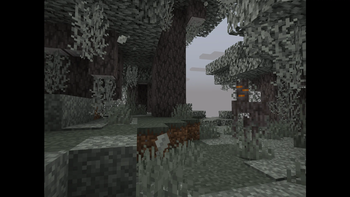
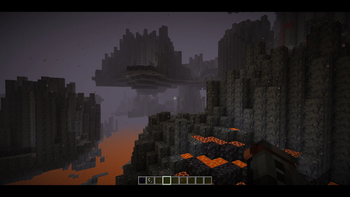
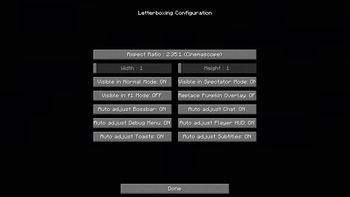
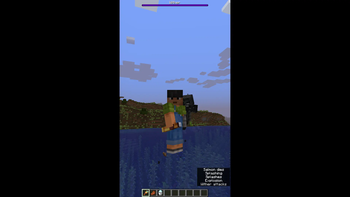
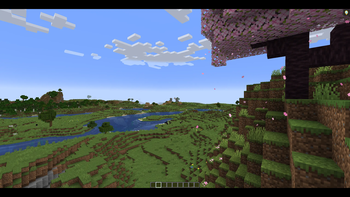
A Minecraft mod that adds customizable letter- and pillarboxing for more immersive gameplay. Select from presets of popular aspect ratios or customize it to your own liking. Experience absolute cinema whether in f1-mode or in normal game modes (survival, creative, adventure). Spectator mode can become truly cinematic too. Additionally, the carved pumpkin overlay can be replaced with cinema bars, as inspired by this texture pack.
This mod requires Mod Menu to access the mod's configuration menu. If you don't want to install Mod Menu, you can alternatively edit this mod's configuration file located in
.minecraft/config/after the first boot with this mod.
How do I install this mod?
For instructions on installing mods with Fabric, please refer to the Fabric Documentation. To make the mod work, you also need to install its dependencies.
What are the mod's dependencies?
This mod requires the Fabric API, as well as Mod Menu to access its configuration menu.
Which mods are compatible?
This mod makes heavy use of Fabric API's Mixin system, which modifies existing code in the base game.
If another mod also affects the same lines of code, issues may occur.
Therefore, I added the option to disable the Mixins for auto-adjusting individual GUI elements, namely:
Bossbar, Chat, Debug Menu, Player HUD, Toasts, and Subtitles. It is left to the user to check compatibility with other mods.
Are there any bugs or problems?
Please refer to Issues on GitHub.
Why was this mod created? Aren't there already other mods that do the same?
To my knowledge, there aren't other mods that add the letter- and pillarboxing effect, particularly when it comes to customizability. This motivated the creation of this mod as well as getting into Minecraft modding in general. Maybe the mod will also inspire some players to find new ways of playing the game (e.g., with the phone aspect ratio).
Can I include this mod in my modpack?
Sure! This mod is distributed under the MIT License. As long as you include the respective license text and credit me (CopyTheNerd), you are good to go.
Available Versions
How to Install Letterboxing on Your Server
Order Server
Order a Minecraft Java server with at least 3 GB RAM (4 GB recommended).
Set fabric Loader
In the panel under "Egg", select the fabric loader and matching Minecraft version (1.21.9).
Install Mod
Open the mod browser in the dashboard and search for "Letterboxing". Click "Install" – done! Alternatively, upload the .jar via SFTP to the /mods folder.
Compatibility
Mod Loaders
Minecraft Versions
1.21.9, 1.21.8, 1.21.7 (+3 more)
Server-side
✗ UnsupportedRecommended RAM
4 GB(min. 3 GB)Frequently Asked Questions
Letterboxing server crashes on startup – what to do?
Most common cause: wrong fabric version or insufficient RAM. Check the server log (latest.log) for "OutOfMemoryError" or "Mixin" errors. With Mado Hosting: ensure at least 3 GB RAM is allocated and the loader matches the mod version (1.21.9). You can switch loaders with one click in the panel.
Is Letterboxing compatible with fabric?
Letterboxing officially supports fabric for Minecraft 1.21.9, 1.21.8, 1.21.7. The Mado dashboard automatically detects incompatible loader combinations.
Server lagging with Letterboxing – how to optimize performance?
Recommended RAM: 4 GB (per 8 players). Use /spark profiler to check if Letterboxing consumes the most tick time. Common fixes: reduce server view-distance to 8-10, install "performant" or "starlight" as supplementary mods on Forge. With Mado Hosting, your server runs on NVMe SSDs with dedicated CPU cores for minimal latency.
Similar Mods

![[ETF] Entity Texture Features](https://cdn.modrinth.com/data/BVzZfTc1/af683d206d50b05258d865b0d6e4aa2f2cee12f2_96.webp)
![[EMF] Entity Model Features](https://cdn.modrinth.com/data/4I1XuqiY/6e5bbd0d06b1741bfdab6c0cfab6de8fdaf0064c_96.webp)



Rent Modded Server
Install Letterboxing with just one click on your server.