
Level Fix
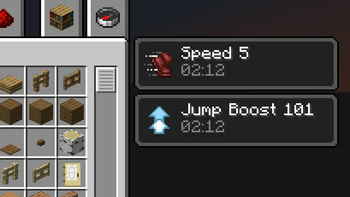
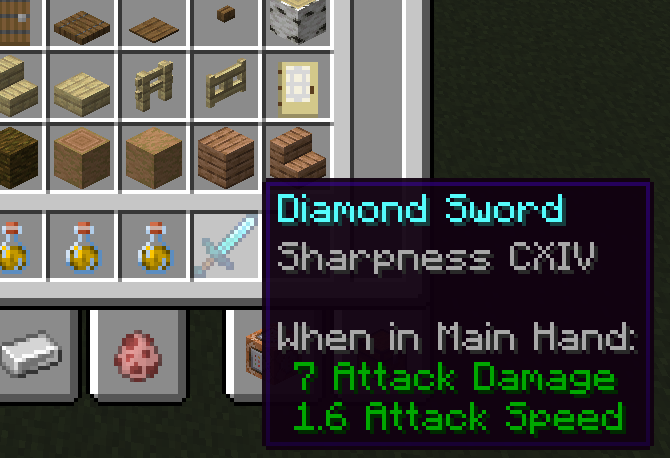
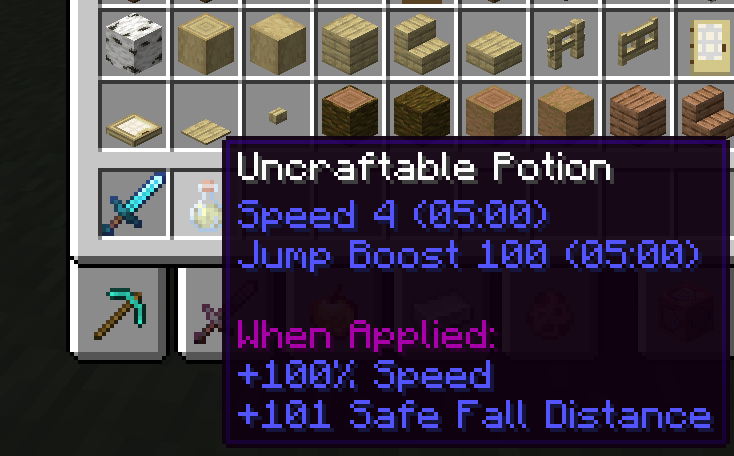
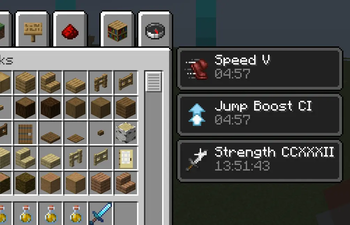
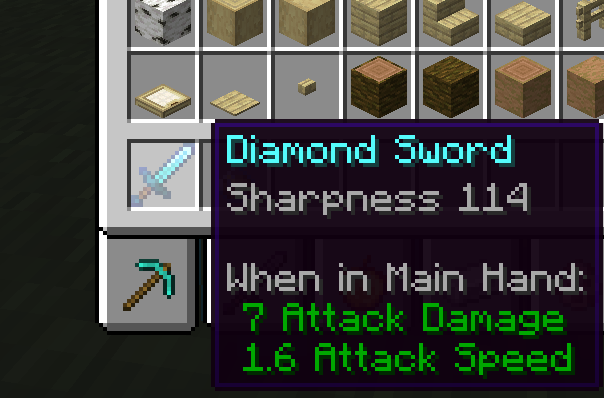
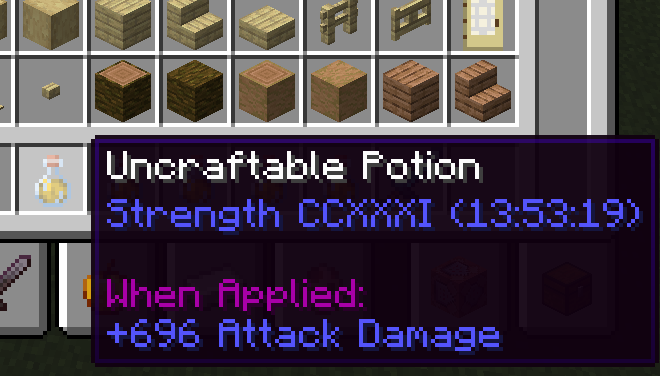
Fix the display of Roman numerals for enchantment and potion effect levels.
Screenshots
About this Mod

LevelFix
LevelFix 是一个轻量级的 Minecraft 模组,旨在修复 Minecraft 中附魔等级与药水效果等级的罗马数字显示问题。原版游戏在等级超过 10 后会显示为 enchantment.level.255 这类占位符,而药水效果在屏幕上的等级显示甚至会完全消失。本模组将这些占位符替换为准确的罗马数字(如 CCLV),并让效果 UI 中的等级重新出现,使游戏界面回归自然、清晰。
LevelFix is a lightweight Minecraft mod designed to fix the display of Roman numerals for enchantment and potion effect levels in Minecraft. In vanilla, when levels exceed 10, placeholders such as enchantment.level.255 appear, and potion effect levels may even disappear entirely from the UI. This mod replaces those placeholders with accurate Roman numerals (e.g., CCLV) and restores the missing level display in the effects UI, bringing the interface back to a natural and clear state.
功能特点 / Features
修复附魔等级显示:将附魔等级占位符(如
enchantment.level.255)转换为正确的罗马数字,最高支持 256 级。修复药水效果等级显示:同样修复药水效果等级占位符(如
potion.potency.255),以罗马数字显示。修复效果 UI 等级显示:修复效果 UI 界面中,超过 10 级的药水效果等级无法显示的问题,使其正确呈现罗马数字。
可视化配置:通过模组菜单即可分别控制附魔、药水、效果 UI 的显示方式(罗马数字/阿拉伯数字),无需手动编辑文件,所有选项默认开启。
兼容性:仅修改客户端显示,不改变游戏机制,完美兼容其他模组。
轻量高效:通过 Mixin 和语言文件实现,无性能开销。
Fixes Enchantment Level Display: Converts enchantment level placeholders (like
enchantment.level.255) into correct Roman numerals, supporting up to level 256.Fixes Potion Effect Level Display: Similarly converts potion effect level placeholders (like
potion.potency.255) to Roman numerals.Fixes Effect UI Level Display: Resolves the issue where potion effect levels above 10 are not shown in the effects UI, ensuring they are correctly displayed as Roman numerals.
In-Game Configuration: Easily toggle the display format (Roman/Arabic numerals) for enchantments, potions, and effect UI via the mod menu—no manual file editing required. All options are enabled by default.
Compatibility: Only modifies client-side visuals; does not alter game mechanics and works seamlessly with other mods.
Lightweight and Efficient: Implemented via Mixin and language files with zero performance overhead.
配置 / Configuration
模组的所有选项均可通过模组菜单界面进行调整:
- 附魔等级启用罗马数字:默认开启。关闭后附魔等级将显示为阿拉伯数字。
- 药水等级启用罗马数字:默认开启。关闭后药水效果等级将显示为阿拉伯数字。
- 效果 UI 等级启用罗马数字:默认开启。关闭后玩家当前效果列表中的等级将显示为阿拉伯数字。
All options can be adjusted directly through the mod menu:
- Enchantment Level Roman Numerals: Enabled by default. When disabled, enchantment levels will be displayed as Arabic numerals.
- Potion Level Roman Numerals: Enabled by default. When disabled, potion effect levels will be displayed as Arabic numerals.
- Effect UI Level Roman Numerals: Enabled by default. When disabled, effect levels in the player's UI will be displayed as Arabic numerals.
安装方法 / Installation
确保已安装模组加载器的对应版本(需与模组支持的 Minecraft 版本匹配)。
从 Modrinth 页面下载最新版本的 Level Fix。
将下载的
.jar文件放入游戏目录的mods文件夹中。启动游戏,模组将自动生效。
Ensure you have the corresponding version of mod loader installed (matching the mod's supported Minecraft version).
Download the latest Level Fix from Modrinth page.
Place the downloaded
.jarfile into themodsfolder of your game directory.Launch the game; the mod will take effect automatically.
兼容性 / Compatibility
Minecraft 版本:1.21.x,1.20.1
加载器:NeoForge,Fabric
环境:只需客户端安装
Minecraft Version: 1.21.x,1.20.1
Loader: NeoForge, Fabric
Environment: Client-side only installation required
问题反馈 / Feedback
如果你在使用过程中遇到任何 Bug 或有功能建议,欢迎通过以下方式反馈:
If you encounter any bugs or have feature suggestions, please report them via:
Available Versions
How to Install Level Fix on Your Server
Order Server
Order a Minecraft Java server with at least 3 GB RAM (4 GB recommended).
Set fabric Loader
In the panel under "Egg", select the fabric loader and matching Minecraft version (1.21.11).
Install Mod
Open the mod browser in the dashboard and search for "Level Fix". Click "Install" – done! Alternatively, upload the .jar via SFTP to the /mods folder.
Compatibility
Mod Loaders
Minecraft Versions
1.21.11, 1.21.10, 1.21.9 (+10 more)
Server-side
✗ UnsupportedRecommended RAM
4 GB(min. 3 GB)Frequently Asked Questions
Level Fix server crashes on startup – what to do?
Most common cause: wrong fabric version or insufficient RAM. Check the server log (latest.log) for "OutOfMemoryError" or "Mixin" errors. With Mado Hosting: ensure at least 3 GB RAM is allocated and the loader matches the mod version (1.21.11). You can switch loaders with one click in the panel.
Is Level Fix compatible with fabric and neoforge?
Level Fix officially supports fabric, neoforge for Minecraft 1.21.11, 1.21.10, 1.21.9. The Mado dashboard automatically detects incompatible loader combinations.
Server lagging with Level Fix – how to optimize performance?
Recommended RAM: 4 GB (per 8 players). Use /spark profiler to check if Level Fix consumes the most tick time. Common fixes: reduce server view-distance to 8-10, install "performant" or "starlight" as supplementary mods on Forge. With Mado Hosting, your server runs on NVMe SSDs with dedicated CPU cores for minimal latency.
Similar Mods


Rent Modded Server
Install Level Fix with just one click on your server.