
Leveled Drops
this mod is a remake of the datapack "minecraft but your xp = your multiplier" by bittu5134
Screenshots
About this Mod
Leveled Drops — 1.0.0
Background
This mod is a Forge port of the datapack
"Minecraft but your XP = your multiplier" by bittu5134.
Original datapack: https://www.planetminecraft.com/data-pack/minecraft-but-your-xp-your-multiplier-bittu5134/
The core idea comes from the datapack: your XP level acts as a drop multiplier.
This mod brings it to Forge 1.20.1, adds a configuration screen, and extends it
with an enchantment rework.
Drop multiplier
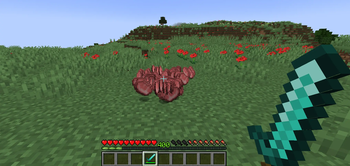
Every item drop from a broken block or killed mob is multiplied by your XP level.
Level 10 means ten times the drops. Containers count too — breaking a chest or
barrel multiplies the items inside along with the block's own drops. NBT data
(enchantments, etc.) is preserved on every copy.
Setting the multiplier to 0 suppresses all item drops. XP orbs are unaffected.
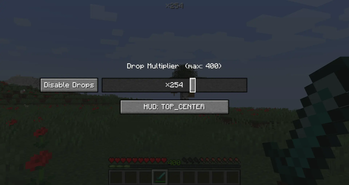
Press M (rebindable) to open the configuration screen. The slider sets your
multiplier anywhere from 1 to your current level, and the Disable Drops button
sets it to 0. Your choice persists across sessions and clamps automatically if you
lose levels. A ×N indicator sits in a corner of your screen at all times;
the position is configurable from the same screen.
Enchantment changes
Level cap raised to 64. All multi-level enchantments (Sharpness, Protection,
Efficiency, etc.) now go up to 64. Combine books the normal way to climb:
Sharpness V + V = VI, and so on. The /enchant command respects the new cap too.
Single-level enchantments are untouched.
No "Too Expensive!". Anvil cost is based only on enchantment rarities, never
the accumulated repair penalty, so nothing is ever blocked by cost.
Roman numeral display. Levels above X are shown as XI (11) through
LXIV (64) so the number is always clear.
Notes
Install on both client and server in multiplayer. The HUD and keybind are
client-only and won't appear on a dedicated server.
Available Versions
How to Install Leveled Drops on Your Server
Order Server
Order a Minecraft Java server with at least 3 GB RAM (4 GB recommended).
Set forge Loader
In the panel under "Egg", select the forge loader and matching Minecraft version (1.20.1).
Install Mod
Open the mod browser in the dashboard and search for "Leveled Drops". Click "Install" – done! Alternatively, upload the .jar via SFTP to the /mods folder.
Compatibility
Mod Loaders
Minecraft Versions
1.20.1
Server-side
✓ RequiredRecommended RAM
4 GB(min. 3 GB)Frequently Asked Questions
Leveled Drops server crashes on startup – what to do?
Most common cause: wrong forge version or insufficient RAM. Check the server log (latest.log) for "OutOfMemoryError" or "Mixin" errors. With Mado Hosting: ensure at least 3 GB RAM is allocated and the loader matches the mod version (1.20.1). You can switch loaders with one click in the panel.
Is Leveled Drops compatible with forge?
Leveled Drops officially supports forge for Minecraft 1.20.1. The Mado dashboard automatically detects incompatible loader combinations.
Server lagging with Leveled Drops – how to optimize performance?
Recommended RAM: 4 GB (per 8 players). Use /spark profiler to check if Leveled Drops consumes the most tick time. Common fixes: reduce server view-distance to 8-10, install "performant" or "starlight" as supplementary mods on Forge. With Mado Hosting, your server runs on NVMe SSDs with dedicated CPU cores for minimal latency.
Similar Mods




Rent Modded Server
Install Leveled Drops with just one click on your server.