
Vertical Slabs
Yet another vertical slab mod.
Screenshots
About this Mod
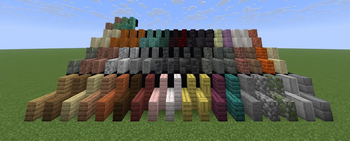
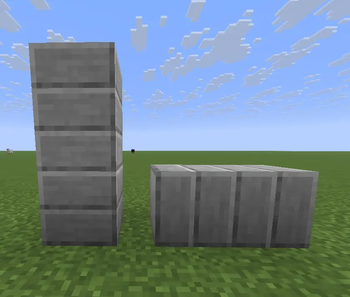
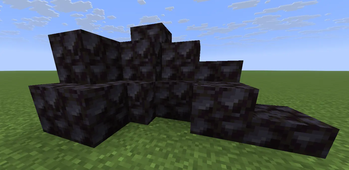
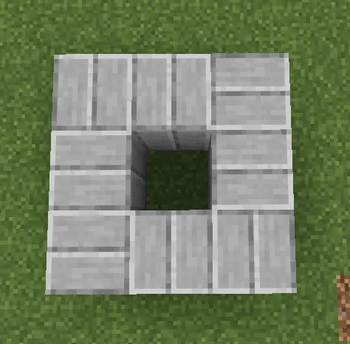
Works like you would expect from regular slabs, but rotated! Placing the slab will orient it in the opposite direction you are facing (north/south, east/west). Depending on the hit placement (e.g. where you clicked on the block), the slab will be placed as a top or bottom slab. Similar to how vanilla slab placement works (looking at top half of block places top slab, and vice versa).
Additional features:
- Crafting recipes for chiseled blocks and other blocks made from horizontal slabs now exist to craft from vertical slab variants
- Stonecutting from base blocks now have vertical slabs at the same ratio of vanilla slabs
- Vertical copper slab variants can be oxidized and waxed like normal copper
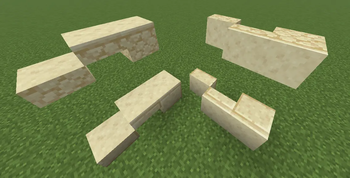
- Vertical smooth stone, sandstone slabs and their variants (red and cut) are now directional
- A decision was made to keep blackstone non-directional.. because I thought it looks better that way..
- Walls will connect to vertical slabs on their sides
- Depend on this mod to create your own vertical slabs
Known issues:
- Placing a vertical slab while having the player hitbox near the new wall hitbox after connection will cause the player to be able to walk through the wall. This issues exists in vanilla as well, which can be replicated by using a regular block instead.
Issues addressed:
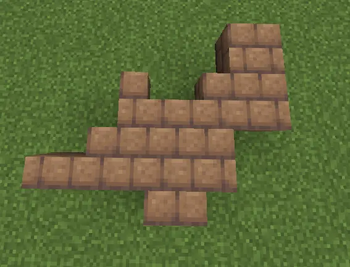
- Mud bricks use a north west mirrored model, but its variants use the regular cube model (MC-250692). Vertical mud brick slabs use the north west mirrored model.
Available Versions
How to Install Vertical Slabs on Your Server
Order Server
Order a Minecraft Java server with at least 3 GB RAM (4 GB recommended).
Set fabric Loader
In the panel under "Egg", select the fabric loader and matching Minecraft version (26.1.2).
Install Mod
Open the mod browser in the dashboard and search for "Vertical Slabs". Click "Install" – done! Alternatively, upload the .jar via SFTP to the /mods folder.
Compatibility
Mod Loaders
Minecraft Versions
26.1.2, 26.1.1, 26.1 (+1 more)
Server-side
✓ RequiredRecommended RAM
4 GB(min. 3 GB)Frequently Asked Questions
Vertical Slabs server crashes on startup – what to do?
Most common cause: wrong fabric version or insufficient RAM. Check the server log (latest.log) for "OutOfMemoryError" or "Mixin" errors. With Mado Hosting: ensure at least 3 GB RAM is allocated and the loader matches the mod version (26.1.2). You can switch loaders with one click in the panel.
Is Vertical Slabs compatible with fabric?
Vertical Slabs officially supports fabric for Minecraft 26.1.2, 26.1.1, 26.1. The Mado dashboard automatically detects incompatible loader combinations.
Server lagging with Vertical Slabs – how to optimize performance?
Recommended RAM: 4 GB (per 8 players). Use /spark profiler to check if Vertical Slabs consumes the most tick time. Common fixes: reduce server view-distance to 8-10, install "performant" or "starlight" as supplementary mods on Forge. With Mado Hosting, your server runs on NVMe SSDs with dedicated CPU cores for minimal latency.
Similar Mods

![[ETF] Entity Texture Features](https://cdn.modrinth.com/data/BVzZfTc1/af683d206d50b05258d865b0d6e4aa2f2cee12f2_96.webp)
![[EMF] Entity Model Features](https://cdn.modrinth.com/data/4I1XuqiY/6e5bbd0d06b1741bfdab6c0cfab6de8fdaf0064c_96.webp)



Rent Modded Server
Install Vertical Slabs with just one click on your server.