
LifeLedger
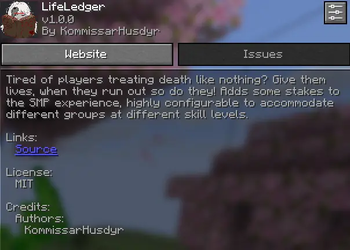
Tired of players treating death like nothing? Give them lives (stocks)! when they run out so do they! Adds some stakes to the SMP experience.
Screenshots


About this Mod
LifeLedger
A Fabric Minecraft mod that gives each player a finite amount of lives, called "stocks". Lose them all and you're permanently banned. No exceptions.
Built to test my theory that having meaningful deaths is a positive impact on the typical 2-week SMP to increase longevity and meaningful gameplay. By emulating the hardcore experience
Photosensitivity warning: This mod includes impact frames, a brief flash effect when you are hit and marked with a "Death sentence" item. If you are sensitive to flashing lights, disable this in Mod Menu → LifeLedger → Client Settings before playing :)
How it works
Every player is assigned a stock count when they first join. Each death removes one stock. Hit zero and the server bans you. Stock data is tied to UUID and is saved in config/lifeledger-stocks.json there is no natural way to get them back unless an admin intervenes and gives you more.
Death filtering
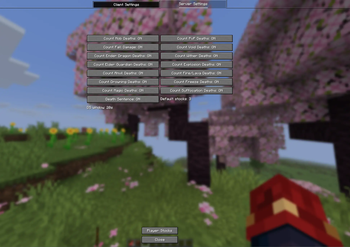
Not every death has to count. Each death type can be toggled independently:
| Death Type | Toggle |
|---|---|
| Mob kills | countMobDeaths |
| PvP | countPvpDeaths |
| Fall damage | countFallDamage |
| Void | countVoidDeaths |
| Explosions | countExplosionDeaths |
| Fire | countFireDeaths |
| Drowning | countDrownDeaths |
| Freezing | countFreezeDeaths |
| Magic | countMagicDeaths |
| Suffocation | countSuffocationDeaths |
| Anvil | countAnvilDeaths |
| Ender Dragon | countEnderDragonDeaths |
| Wither | countWitherDeaths |
| Elder Guardian | countElderGuardianDeaths |
Every toggleable is visible when using the mod as a client, the death check runs on a general hierarchy for example disabling MobDeaths but having Wither, Ender Dragon or Elder Guardian deaths enabled will override MobDeaths for its specific case. (the Wither status effect from unrelated sources doesn't count for its case either)
If you come across something you feel like i should add here let me know, or push it yourself on github.
Death Sentence
The check for PvP deaths is extremely direct (checks source.getEntity()) by design to prevent gray zone deaths from counting we don't want to stop players from doing funny business "friendly" cliff pushing, tnt traps all that. We solve this by introducing and enforcing player intent. This is handled through "Death Sentence".
Rename ANY item to the configured trigger name (default: '"Death Sentence"') (not case sensitive) and brutally punch your friend; they are now marked. If they die within the configured time window from any cause a stock is lost regardless of what the death filter says.
The mark persists across melee hits, projectiles, TNT, and End Crystal detonations and is refreshed by continued aggression from any source originating from the player who applied it. It clears if it times out, on death or disconnect (might remove this disconnect thing to disincentivize abuse).
The idea is again to let players express intent: if you're actively bloodthirsty and want to see someone lose a stock, toggling off PvP deaths shouldn't save them.
The time window is 20 by default, and can be changed using/lifeledger config deathsentencewindow <seconds>
Tab List Display
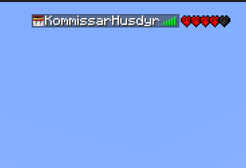
Players can optionally see everyone's remaining stocks as little heart icons directly in the tab list (with names and ping and such). Full hearts = remaining stocks, grey hearts = expended stocks. Capped at 10 displayed. Toggled per-client and requires the mod on the client side as well.
Configuration
The mod is inherently server-authoritative. The server config lives at 'config/lifeledger.json' Admins can change settings at runtime via:
- Mod Menu A built-in config screen accessible through the Mod Menu mod (optional, client side). OPs see editable toggles; non-OPs see read only so they know what's off or on. Client settings (impact frames, tab list display) are also here under a separate tab.
- In-game commands '/lifeledger config (key) (true|false)' for all death filter toggles.
Non-op commands:
/lifeledger stocks (name) - checks and outputs the stock count of the player, if no name is given it checks the calling player's stock count
Admin commands:
/lifeledger default - set default stocks for new players
/lifeledger set - set a specific player's stocks
/lifeledger give - add stocks to a player
/lifeledger take - remove stocks from a player
/lifeledger get - check a player's current stocks
/lifeledger config (true|false) - toggle a death filter setting
/lifeledger config deathsentencewindow - sets the time window for death sentence
/lifeledger testimpact - triggers the impact frame on yourself, used for testing but; meh why not have it there
Todo:
Fix the rather badly implemented impact frames. Do hard shader stuff >:(
Available Versions
How to Install LifeLedger on Your Server
Order Server
Order a Minecraft Java server with at least 3 GB RAM (4 GB recommended).
Set fabric Loader
In the panel under "Egg", select the fabric loader and matching Minecraft version (26.1.2).
Install Mod
Open the mod browser in the dashboard and search for "LifeLedger". Click "Install" – done! Alternatively, upload the .jar via SFTP to the /mods folder.
Compatibility
Mod Loaders
Minecraft Versions
26.1.2
Server-side
✓ RequiredRecommended RAM
4 GB(min. 3 GB)Frequently Asked Questions
LifeLedger server crashes on startup – what to do?
Most common cause: wrong fabric version or insufficient RAM. Check the server log (latest.log) for "OutOfMemoryError" or "Mixin" errors. With Mado Hosting: ensure at least 3 GB RAM is allocated and the loader matches the mod version (26.1.2). You can switch loaders with one click in the panel.
Is LifeLedger compatible with fabric?
LifeLedger officially supports fabric for Minecraft 26.1.2. The Mado dashboard automatically detects incompatible loader combinations.
Server lagging with LifeLedger – how to optimize performance?
Recommended RAM: 4 GB (per 8 players). Use /spark profiler to check if LifeLedger consumes the most tick time. Common fixes: reduce server view-distance to 8-10, install "performant" or "starlight" as supplementary mods on Forge. With Mado Hosting, your server runs on NVMe SSDs with dedicated CPU cores for minimal latency.
Similar Mods




Rent Modded Server
Install LifeLedger with just one click on your server.