
Light Level 2025
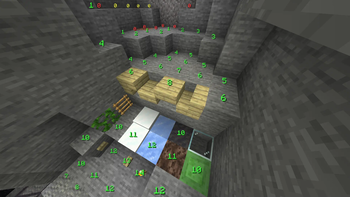
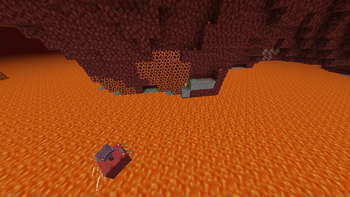
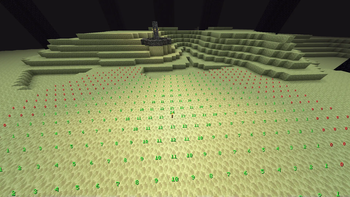
displays block-light level on top of the solid blocks
Screenshots
About this Mod




Light Level 2025
Press F9 to see the block light levels.
Inspired by LightLevel By parzivail, with
some improvements implemented.

Dependencies
You can find the dependencies in the description of each release.
Fabric Loader
Download from fabricmc.netFabric API
Download from modrinth
View source on GitHub
Features
Dimension-Specific Color Coding
The colors used to represent the light levels can be customized in config/light-level-2025.yaml as
hex color codes.
Overworld
Hostile mobs cannot spawn
- color: green
- conditions:
- block light >= 1
- config field:
text.color.safe
Hostile mobs can spawn at night
- color: yellow
- conditions:
- block light = 0
- sky light >= 8
- config field:
text.color.warning
Hostile mobs can always potentially spawn
- color: red
- conditions:
- block light = 0
- sky light <= 7
- config field:
text.color.danger
The Nether
Mobs cannot spawn
- color: green
- conditions:
- block light >= 12
- config field:
text.color.safe
Mobs can always potentially spawn
- color: red
- conditions:
- block light <= 11
- config field:
text.color.danger
The End
Mobs cannot spawn
- color: green
- conditions:
- block light >= 1
- config field:
text.color.safe
Mobs can always potentially spawn
- color: red
- conditions:
- block light = 0
- config field:
text.color.danger
Adjustable Text Height
If a block that doesn't have a collision box is above the target block and its appearance
obstructs the text, the light
level will be shown above its visual.
Debug Mode
Press F3 to show both the block light and the sky light levels.
Technical Features
Block Exclusion Conditions
The rendering on a target block will be skipped if:
The target block is one of the following (config field:
block.blacklist):minecraft:airminecraft:barrierminecraft:bedrockminecraft:chain_command_blockminecraft:command_blockminecraft:end_portalminecraft:nether_portalminecraft:repeating_command_block
The target block is not opaque and visually transparent.
- Examples Excluded:
minecraft:glassminecraft:ice
- Examples Not Excluded:
minecraft:glowstoneminecraft:packed_ice
- Examples Excluded:
The target block does not have a full square top surface.
- Examples Excluded:
- bottom slabs
- right-side-up stairs
- Examples Not Excluded:
- top slabs
- up-side-down stairs
- Examples Excluded:
A block above the target block has a collision shape.
- Examples Excluded:
minecraft:ladderminecraft:snow(layers count >= 2)
- Examples Not Excluded:
minecraft:vineminecraft:snow(layers count = 1)
- Examples Excluded:
Caching
This mod caches information about block positions and the text to be rendered, storing it in memory
for faster access.
By setting the cache update frequency in frames, the update rate automatically adjusts based on
FPS — updating more frequently in high-FPS environments and less frequently in low-FPS environments.
You can change the update frequency via cache.update_interval_frames in the config file.
Rendering Culling
This mod does not render the light level for a target block that is invisible to the player.
Configuration
You can customize the mod behavior via config/light-level-2025.yaml.
render_distancehorizontal: Maximum horizontal distance for rendering- Default:
16
- Default:
vertical: Maximum vertical distance for rendering- Default:
4
- Default:
blockblacklist: Blocks to exclude from rendering- Default:
minecraft:airminecraft:barrierminecraft:bedrockminecraft:chain_command_blockminecraft:command_blockminecraft:end_portalminecraft:nether_portalminecraft:repeating_command_block
- Default:
whitelist: Blocks to include in rendering- Default:
minecraft:mudminecraft:slime_blockminecraft:soul_sand
- Default:
textcolor:safe: Light level where hostile mobs cannot spawn- Default:
40FF40
- Default:
warning: Light level where hostile mobs can spawn at night in Overworld- Default:
FFFF40
- Default:
danger: Light level where hostile mobs can always potentially spawn- Default:
FF4040
- Default:
neutral: Display color for unknown or unsupported dimensions- Default:
FFFFFF
- Default:
scale:normal: Text size for normal state- Default:
0.03125
- Default:
debug: Text size for debug screen- Default:
0.020833334
- Default:
offset_y_base: Height to offset the text from the block- Default:
0.1
- Default:
hide_safe: Hides light level values that are considered "safe"- Default:
false
- Default:
cacheupdate_interval_frames: Frequency in frames to update the block cache- Default:
20
- Default:
Contribution
We welcome contributions from the community!
To contribute, please fork the repository and create a pull request on GitHub.
We appreciate your help in making this project even better!
Please note that when we use a LLM for code proofreading, aspects of the code might change.
This isn't a reflection of any dissatisfaction or shortcomings with your original code.
Available Versions
How to Install Light Level 2025 on Your Server
Order Server
Order a Minecraft Java server with at least 3 GB RAM (4 GB recommended).
Set fabric Loader
In the panel under "Egg", select the fabric loader and matching Minecraft version (25w37a).
Install Mod
Open the mod browser in the dashboard and search for "Light Level 2025". Click "Install" – done! Alternatively, upload the .jar via SFTP to the /mods folder.
Compatibility
Mod Loaders
Minecraft Versions
25w37a, 25w35a, 25w34b (+13 more)
Server-side
✗ UnsupportedRecommended RAM
4 GB(min. 3 GB)Frequently Asked Questions
Light Level 2025 server crashes on startup – what to do?
Most common cause: wrong fabric version or insufficient RAM. Check the server log (latest.log) for "OutOfMemoryError" or "Mixin" errors. With Mado Hosting: ensure at least 3 GB RAM is allocated and the loader matches the mod version (25w37a). You can switch loaders with one click in the panel.
Is Light Level 2025 compatible with fabric?
Light Level 2025 officially supports fabric for Minecraft 25w37a, 25w35a, 25w34b. The Mado dashboard automatically detects incompatible loader combinations.
Server lagging with Light Level 2025 – how to optimize performance?
Recommended RAM: 4 GB (per 8 players). Use /spark profiler to check if Light Level 2025 consumes the most tick time. Common fixes: reduce server view-distance to 8-10, install "performant" or "starlight" as supplementary mods on Forge. With Mado Hosting, your server runs on NVMe SSDs with dedicated CPU cores for minimal latency.
Similar Mods




Rent Modded Server
Install Light Level 2025 with just one click on your server.