
Light Machine
Automate torching up your world!
Screenshots
About this Mod
🌟 Light Machine
An autonomous, radius-wide torch placer for painless spawn-proofing.
What It Does
- Adds a single new block: the Light Machine.
- Light Machine scans for blocks with a light level ≤ 4 in a 512-block radius (horizontal & vertical).
- When it finds a dark spot, it automatically places one of its own torches there.
Perfect for lighting vast caves, open fields, or entire bases without manual labor.
Inventory & Torch Supply
| Capacity | Accepted Item | Behavior when Empty |
|---|---|---|
| 9 Slots | Vanilla torch item | Machine pauses until torches are supplied |
Torches are consumed one-for-one as they are placed—no duplicates, no infinity.
How to Use
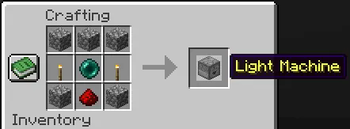
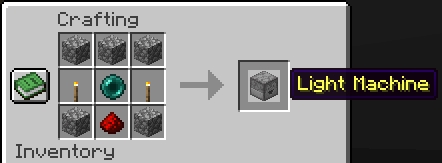
- Craft the Light Machine.
- Place the block in the world.
- Open its GUI and load torches into any slot.
- Walk away—the machine quietly lights up the darkness around you over time.
Ideal For
- 100 % spawn-proof bases and farms
- Hassle-free cave illumination before mining
- Server administrators who want safer spawn areas without world-editing
Happy lighting, and goodbye to surprise creepers! 💡
See my other mods
Available Versions
How to Install Light Machine on Your Server
Order Server
Order a Minecraft Java server with at least 3 GB RAM (4 GB recommended).
Set datapack Loader
In the panel under "Egg", select the datapack loader and matching Minecraft version (1.21.11).
Install Mod
Open the mod browser in the dashboard and search for "Light Machine". Click "Install" – done! Alternatively, upload the .jar via SFTP to the /mods folder.
Compatibility
Mod Loaders
Minecraft Versions
1.21.11, 1.21.10, 1.21.9 (+7 more)
Server-side
✓ RequiredRecommended RAM
4 GB(min. 3 GB)Frequently Asked Questions
Light Machine server crashes on startup – what to do?
Most common cause: wrong datapack version or insufficient RAM. Check the server log (latest.log) for "OutOfMemoryError" or "Mixin" errors. With Mado Hosting: ensure at least 3 GB RAM is allocated and the loader matches the mod version (1.21.11). You can switch loaders with one click in the panel.
Is Light Machine compatible with datapack and fabric and forge and neoforge and quilt?
Light Machine officially supports datapack, fabric, forge, neoforge, quilt for Minecraft 1.21.11, 1.21.10, 1.21.9. Note: Forge and Fabric mods are NOT cross-compatible – pick one loader and stick with it. The Mado dashboard automatically detects incompatible loader combinations.
Server lagging with Light Machine – how to optimize performance?
Recommended RAM: 4 GB (per 8 players). Use /spark profiler to check if Light Machine consumes the most tick time. Common fixes: reduce server view-distance to 8-10, install "performant" or "starlight" as supplementary mods on Forge. With Mado Hosting, your server runs on NVMe SSDs with dedicated CPU cores for minimal latency.
Similar Mods




Rent Modded Server
Install Light Machine with just one click on your server.