
Limitless Anvil
Fix overly expensive and high level enchantments being downgraded
Screenshots
About this Mod
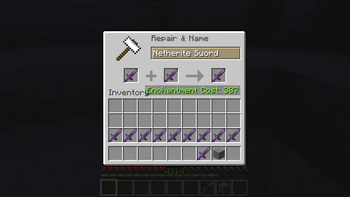
Two changes/fixes have been made to this module:
- no longer overly expensive, level penalties now accrue normally, even over level 40
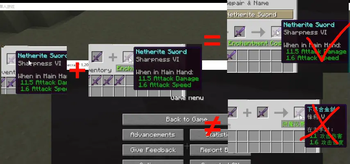
- high level enchantments are no longer downgraded when merged on the anvil (since the vanilla checked the level of an enchantment and downgraded it to the max level when it exceeded the max level, this led to the problem that if there was a high level enchantment it would be downgraded as soon as it did something on the anvil)
Ask & Answer
- Q: There is already a module with similar functionality, why do you need to write another one?
- A: The author of NoExpensive has no intention of fixing the bug in version 1.20.1 (when merging, lower level enchantments will overwrite higher level enchantments, e.g. [Sharpness 3] + [Sharpness 2 Durability 2] outputs Sharpness 2 Durability 2), and there is no substitute for fixing the high level downgrade problem.
This module can be installed on the server side only. Clients without this module will normally display the “Too Expensive!” tag, but it does not affect merge operations.
The author only wrote this module for his own regular version, so it is not fully supported. Missing versions can be suggested in the comments, and the author will add them when he has time, but NoExpensive will not be added to the version that is not problematic (duplication of functionality), and more features may be added in the future.
This module is open source using the MIT protocol. Please visit: Txt-Text/Limitless-Anvil
Available Versions
How to Install Limitless Anvil on Your Server
Order Server
Order a Minecraft Java server with at least 3 GB RAM (4 GB recommended).
Set fabric Loader
In the panel under "Egg", select the fabric loader and matching Minecraft version (1.21.1).
Install Mod
Open the mod browser in the dashboard and search for "Limitless Anvil". Click "Install" – done! Alternatively, upload the .jar via SFTP to the /mods folder.
Compatibility
Mod Loaders
Minecraft Versions
1.21.1, 1.20.1
Server-side
✓ RequiredRecommended RAM
4 GB(min. 3 GB)Frequently Asked Questions
Limitless Anvil server crashes on startup – what to do?
Most common cause: wrong fabric version or insufficient RAM. Check the server log (latest.log) for "OutOfMemoryError" or "Mixin" errors. With Mado Hosting: ensure at least 3 GB RAM is allocated and the loader matches the mod version (1.21.1). You can switch loaders with one click in the panel.
Is Limitless Anvil compatible with fabric?
Limitless Anvil officially supports fabric for Minecraft 1.21.1, 1.20.1. The Mado dashboard automatically detects incompatible loader combinations.
Server lagging with Limitless Anvil – how to optimize performance?
Recommended RAM: 4 GB (per 8 players). Use /spark profiler to check if Limitless Anvil consumes the most tick time. Common fixes: reduce server view-distance to 8-10, install "performant" or "starlight" as supplementary mods on Forge. With Mado Hosting, your server runs on NVMe SSDs with dedicated CPU cores for minimal latency.
Similar Mods




Rent Modded Server
Install Limitless Anvil with just one click on your server.