
LinguaChat
Fabric mod for automatic bidirectional chat translation. Supports multiple providers: Google Translate, DeepL, and Kagi.
Screenshots
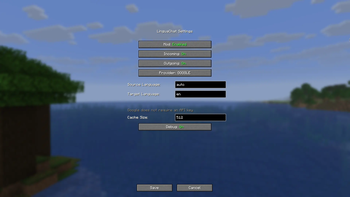
About this Mod
LinguaChat makes your communication in Minecraft accessible in any language, automatically translating chat messages without interrupting gameplay!
You can configure the translation directions for both sides (Client/Server) in the configuration file See description below.
📥 Installation
- Install Fabric Loader for your Minecraft version
- Install Fabric API matching your version
- Download LinguaChat for your version
For official Minecraft Launcher:
- Place the JAR file in your
modsfolder:- Windows:
%APPDATA%\.minecraft\mods - Linux:
~/.minecraft/mods - macOS:
~/Library/Application Support/minecraft/mods
- Windows:
For Prism Launcher and other instance-based launchers:
- Open instance settings → Mods tab
- Click Add / Install Mods and select the JAR file
- Make sure Fabric API is installed for this instance
Final step:
- Launch Minecraft with Fabric profile
📝 Usage Example
When properly configured, the mod automatically translates messages:
Player1: привет
[Chat for you]: hello

Player2: hello
[Chat for you]: привет
[!TIP]
The original text of the message is available by hovering over the translated message!
⚙️ Configuration
Mod settings are accessible via the K key in-game.
You can also edit the file directly: config/linguachat.json
Keybinds
| Key | Action |
|---|---|
| K | Open settings screen |
| N | Toggle outgoing message translation |
Settings
| Parameter | Default | Description |
|---|---|---|
enabled |
true |
Enable/disable the mod |
translateIncoming |
true |
Translate incoming messages |
translateOutgoing |
true |
Translate outgoing messages |
defaultSourceLang |
"auto" |
Source language (auto for detection) |
defaultTargetLang |
"en" |
Target language for both incoming messages (messages from other players) and outgoing messages (your messages sent to server) |
preferredTranslator |
"google" |
Provider: google, deepl, kagi |
deeplApiKey |
"" |
DeepL API key |
kagiApiKey |
"" |
Kagi API token |
kagiSessionToken |
"" |
Kagi session token |
showOriginalOnHover |
true |
Show original on hover |
cacheSize |
512 |
Translation cache size |
debugMode |
false |
Debug logging |
Translation Providers
| Provider | Cost | API Key | Languages |
|---|---|---|---|
| Free | Not required | 100+ | |
| DeepL | Free/Paid | Get API Key | 30+ |
| Kagi | Kagi Pass | API Token (settings/api) or Session Token (settings/user_details) | Multiple |
🐛 Reporting Issues
Found a bug or have a suggestion? Create an issue:
👉 https://github.com/Lintech-1/LinguaChat/issues
Please include:
- Minecraft version
- Mod version
- Log excerpts
- Steps to reproduce
Available Versions
How to Install LinguaChat on Your Server
Order Server
Order a Minecraft Java server with at least 3 GB RAM (4 GB recommended).
Set fabric Loader
In the panel under "Egg", select the fabric loader and matching Minecraft version (1.21.11).
Install Mod
Open the mod browser in the dashboard and search for "LinguaChat". Click "Install" – done! Alternatively, upload the .jar via SFTP to the /mods folder.
Compatibility
Mod Loaders
Minecraft Versions
1.21.11, 1.21.5, 1.21.4 (+5 more)
Server-side
✗ UnsupportedRecommended RAM
4 GB(min. 3 GB)Frequently Asked Questions
LinguaChat server crashes on startup – what to do?
Most common cause: wrong fabric version or insufficient RAM. Check the server log (latest.log) for "OutOfMemoryError" or "Mixin" errors. With Mado Hosting: ensure at least 3 GB RAM is allocated and the loader matches the mod version (1.21.11). You can switch loaders with one click in the panel.
Is LinguaChat compatible with fabric?
LinguaChat officially supports fabric for Minecraft 1.21.11, 1.21.5, 1.21.4. The Mado dashboard automatically detects incompatible loader combinations.
Server lagging with LinguaChat – how to optimize performance?
Recommended RAM: 4 GB (per 8 players). Use /spark profiler to check if LinguaChat consumes the most tick time. Common fixes: reduce server view-distance to 8-10, install "performant" or "starlight" as supplementary mods on Forge. With Mado Hosting, your server runs on NVMe SSDs with dedicated CPU cores for minimal latency.
Similar Mods




Rent Modded Server
Install LinguaChat with just one click on your server.