
Linked Portals
A Server side mod that allows creating linked portals
Screenshots
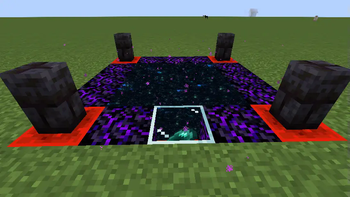
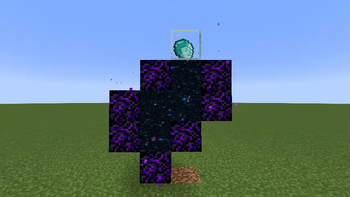
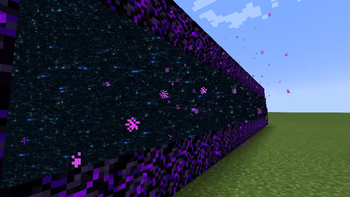
About this Mod
Portals!
This is a server-side portal mod. Portal types and size limits can be controlled through datapacks. This mod is still very much a work in progress so if you see any issues, please be sure to report it.
Usage
Linking portals
Each portal is activated by providing an item, and will link to all other portals using the same item. Customizing the name of the item and/or adding Custom Model Data will distinguish the item from other items.
Example:
Portal Auses aPapernamedNether PortalsPortal Buses aPaperwithout a namePortal Cuses aPapernamedNether Portals
Portal A and Portal C will link. Portal B will be unlinked. Beware, attempting to use an unlinked portal may result in unforseen consequences.
Locking
Portal types that support locking can be locked by sneaking and using the controller block. Items cannot be removed from locked controllers. Players with the proper permissions can lock any portal controller, regardless of the portal type (as long as they have the ability to modify blocks in that space). By default this is controlled through one of the following permissions:
Single PlayersOperatorlinkedportals.masterkeypermission node in a permission mod like luckperms
Datapack configuration:
Block Tags:
linkedportals:valid_frames- Identifies valid frame blocks for the default portal type.linkedportals:portal_controller_base- Identifies blocks that can be converted to portal control blocks. Breaking a controller block will drop the original block.
Item Tags:
linkedportals:valid_activators- Identifies items that are spent to convert base blocks to controllers.
Portal Types:
Portal types are configured with json files in the data/<namespace>/linkedportals/types/<portal_type_name>.json path. Each portal type will be its own file. The default portal type can be disabled by overwriting the default.json portal type or by replacing the linkedportals:valid_frames tag with an empty tag.
Portal types use rule tests to check for valid frames or internal blocks. This supports any custom rule tests added by mods or the standard structure processor tests. The most common will be block_match, blockstate_match, or tag_match.
valid_frame_ruleRule test to validate frame blocks.valid_interior_ruleRule test to validate blocks inside the frame. Defaults to a block test for air.size_limitControls the maximum size of the portal frame width and height. Defaults to 21.lockableControls whether this portal type is lockable by players. Defaults totrue.
Format
{
  "valid_frame_rule": {
    "predicate_type": "minecraft:tag_match",
    "tag": "linkedportals:valid_frames"
  },
  "valid_interior_rule": {
    "predicate_type": "minecraft:blockstate_match",
    "block_state": {
      "Name": "minecraft:air"
    }
  }
  "size_limit": 21,
  "lockable": false
}
Available Versions
How to Install Linked Portals on Your Server
Order Server
Order a Minecraft Java server with at least 3 GB RAM (4 GB recommended).
Set fabric Loader
In the panel under "Egg", select the fabric loader and matching Minecraft version (1.20.4).
Install Mod
Open the mod browser in the dashboard and search for "Linked Portals". Click "Install" – done! Alternatively, upload the .jar via SFTP to the /mods folder.
Compatibility
Mod Loaders
Minecraft Versions
1.20.4
Server-side
✓ RequiredRecommended RAM
4 GB(min. 3 GB)Frequently Asked Questions
Linked Portals server crashes on startup – what to do?
Most common cause: wrong fabric version or insufficient RAM. Check the server log (latest.log) for "OutOfMemoryError" or "Mixin" errors. With Mado Hosting: ensure at least 3 GB RAM is allocated and the loader matches the mod version (1.20.4). You can switch loaders with one click in the panel.
Is Linked Portals compatible with fabric?
Linked Portals officially supports fabric for Minecraft 1.20.4. The Mado dashboard automatically detects incompatible loader combinations.
Server lagging with Linked Portals – how to optimize performance?
Recommended RAM: 4 GB (per 8 players). Use /spark profiler to check if Linked Portals consumes the most tick time. Common fixes: reduce server view-distance to 8-10, install "performant" or "starlight" as supplementary mods on Forge. With Mado Hosting, your server runs on NVMe SSDs with dedicated CPU cores for minimal latency.
Similar Mods





Rent Modded Server
Install Linked Portals with just one click on your server.