
Litematica Printer Addon
A Forge port of the Forgematica Printer mod, bringing automatic block placement functionality to older Minecraft versions for faster schematic building.
Screenshots

About this Mod
Litematica Printer Addon
An unofficial backport of the Forgematica Printer mod to Minecraft Forge 1.16.5 & 1.18.2.
This project is an independent adaptation derived from the open-source work by ThinkingStudios. It is not affiliated with, endorsed by, or supported by the original authors of Litematica or Forgematica Printer.
This addon extends Forgematica by adding automated “printing” functionality—allowing players to construct large schematics more efficiently by automatically placing correct blocks around the player.
Because this version targets Forge 1.18.2, it required extensive adjustments to rendering logic, mixins, and Forge APIs to function correctly in this older environment.
It is not a direct repost, but a custom reimplementation for compatibility with the 1.18.2 ecosystem.
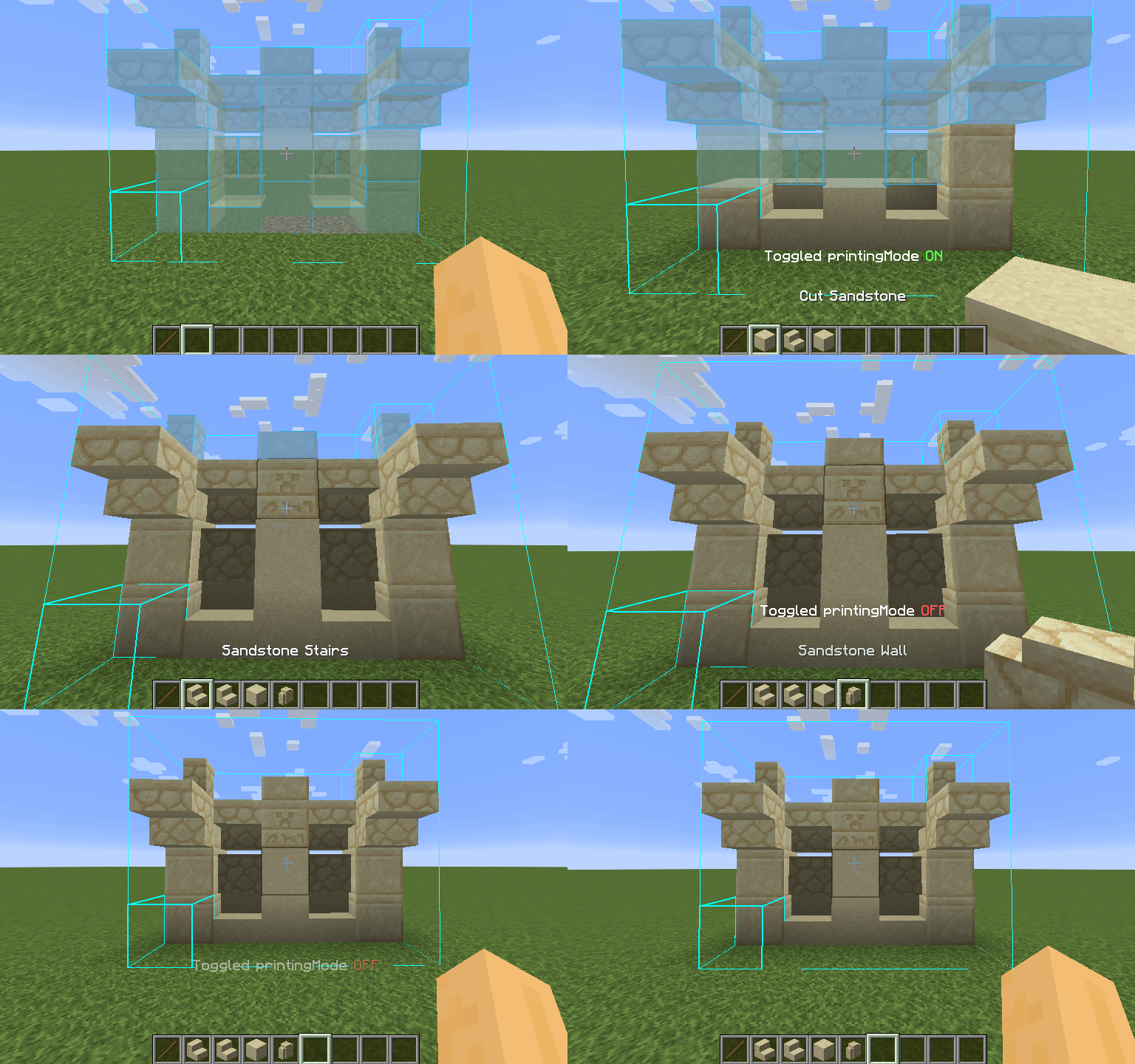
How to Use
- Toggle Printer: Press
CAPS_LOCK(default) to enable or disable the printer. - Quick Print: Hold
V(default) to print temporarily, regardless of toggle state. - Configure Settings: Open Forgematica’s settings with
M + C, then navigate to the Generic tab.
Printer options—such as printing speed and range—are located at the bottom.
You can also rebind the toggle key under the Hotkeys tab.
Reporting Issues
Please do not contact maruohon (the creator of Litematica) or the authors of the original Forgematica Printer regarding issues with this fork.
All bug reports, feature requests, and feedback for this version should be submitted via the GitHub Issues page.
Before creating an issue, ensure you are running the latest version of this mod. When reporting bugs, please include:
- Minecraft version
- Forgematica version
- Printer version
- Detailed steps to reproduce
- Any relevant logs, screenshots, or problematic schematics
Known Issues
Some features are still incomplete or nonfunctional in this version:
- Placing liquids (printing in liquids works)
- Printing without support directly in air (
printInAir) - Rail placement algorithm occasionally fails to handle complex layouts safely
- “Legit mode” (anticheat-friendly printing) not implemented
Note: Features such as automatic excavation or auto-correction of misplaced blocks are intentionally out of scope for this project.
Available Versions
How to Install Litematica Printer Addon on Your Server
Order Server
Order a Minecraft Java server with at least 3 GB RAM (4 GB recommended).
Set forge Loader
In the panel under "Egg", select the forge loader and matching Minecraft version (1.18.2).
Install Mod
Open the mod browser in the dashboard and search for "Litematica Printer Addon". Click "Install" – done! Alternatively, upload the .jar via SFTP to the /mods folder.
Compatibility
Mod Loaders
Minecraft Versions
1.18.2, 1.18.1, 1.18 (+1 more)
Server-side
✗ UnsupportedRecommended RAM
4 GB(min. 3 GB)Frequently Asked Questions
Litematica Printer Addon server crashes on startup – what to do?
Most common cause: wrong forge version or insufficient RAM. Check the server log (latest.log) for "OutOfMemoryError" or "Mixin" errors. With Mado Hosting: ensure at least 3 GB RAM is allocated and the loader matches the mod version (1.18.2). You can switch loaders with one click in the panel.
Is Litematica Printer Addon compatible with forge?
Litematica Printer Addon officially supports forge for Minecraft 1.18.2, 1.18.1, 1.18. The Mado dashboard automatically detects incompatible loader combinations.
Server lagging with Litematica Printer Addon – how to optimize performance?
Recommended RAM: 4 GB (per 8 players). Use /spark profiler to check if Litematica Printer Addon consumes the most tick time. Common fixes: reduce server view-distance to 8-10, install "performant" or "starlight" as supplementary mods on Forge. With Mado Hosting, your server runs on NVMe SSDs with dedicated CPU cores for minimal latency.
Similar Mods




![[ETF] Entity Texture Features](https://cdn.modrinth.com/data/BVzZfTc1/af683d206d50b05258d865b0d6e4aa2f2cee12f2_96.webp)
![[EMF] Entity Model Features](https://cdn.modrinth.com/data/4I1XuqiY/6e5bbd0d06b1741bfdab6c0cfab6de8fdaf0064c_96.webp)
Rent Modded Server
Install Litematica Printer Addon with just one click on your server.