
Litematica RawMaterials
A Litematica addon that expands the material list into the raw materials you need to gather, following crafting recipes.
Screenshots
About this Mod
Litematica RawMaterials
A Litematica addon that expands the material list into raw materials.
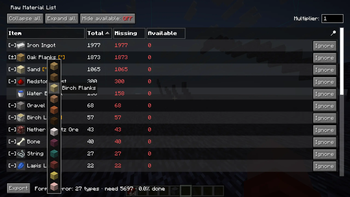
Litematica's material list shows what a schematic is made of, but anything you'd normally craft (a block of redstone, a hopper, a chest) is listed as-is. RawMaterials follows the crafting recipes and shows the total raw materials you need to gather, minus what's already in your inventory.
Requirements
- Minecraft 26.2 (Fabric)
- malilib 0.29.0+
- Litematica 0.28.0+
Features
Recipe expansion
Crafted items are broken down into their ingredients, recursively, down to raw materials.
Inventory netting
Items already in your inventory are subtracted, so the list shows what's actually left to gather. Fully covered branches stop expanding and turn green.
Expand and fold
Open or collapse individual rows, or the whole list at once.
Tag ingredients
When a recipe accepts a tag (any planks, any log), you choose which item to count toward it.
Usage
Open a material list in Litematica first; RawMaterials uses the most recently opened one. Then press M + K to open it as a raw-material list.
Inside the list:
- Left-click a row to expand it into its ingredients.
- Right-click a row to fold it back into the crafted item.
- Middle-click a tag row to pick which item to use.
Press M + J to open the settings screen, where you can rebind both keys.
Notes
Recipes come from your client's recipe book, the same source Litematica uses. On a vanilla multiplayer server, recipes you haven't unlocked won't expand, so some totals may not be fully broken down until you've unlocked them.
Building
./gradlew build
The mod jar is written to build/libs/ (e.g. rawmats-fabric-26.2-0.1.0.jar). Put it in your mods folder along with malilib and Litematica for the same Minecraft version.
Available Versions
How to Install Litematica RawMaterials on Your Server
Order Server
Order a Minecraft Java server with at least 3 GB RAM (4 GB recommended).
Set fabric Loader
In the panel under "Egg", select the fabric loader and matching Minecraft version (26.2).
Install Mod
Open the mod browser in the dashboard and search for "Litematica RawMaterials". Click "Install" – done! Alternatively, upload the .jar via SFTP to the /mods folder.
Compatibility
Mod Loaders
Minecraft Versions
26.2
Server-side
✗ UnsupportedRecommended RAM
4 GB(min. 3 GB)Frequently Asked Questions
Litematica RawMaterials server crashes on startup – what to do?
Most common cause: wrong fabric version or insufficient RAM. Check the server log (latest.log) for "OutOfMemoryError" or "Mixin" errors. With Mado Hosting: ensure at least 3 GB RAM is allocated and the loader matches the mod version (26.2). You can switch loaders with one click in the panel.
Is Litematica RawMaterials compatible with fabric?
Litematica RawMaterials officially supports fabric for Minecraft 26.2. The Mado dashboard automatically detects incompatible loader combinations.
Server lagging with Litematica RawMaterials – how to optimize performance?
Recommended RAM: 4 GB (per 8 players). Use /spark profiler to check if Litematica RawMaterials consumes the most tick time. Common fixes: reduce server view-distance to 8-10, install "performant" or "starlight" as supplementary mods on Forge. With Mado Hosting, your server runs on NVMe SSDs with dedicated CPU cores for minimal latency.
Similar Mods




![[ETF] Entity Texture Features](https://cdn.modrinth.com/data/BVzZfTc1/af683d206d50b05258d865b0d6e4aa2f2cee12f2_96.webp)
![[EMF] Entity Model Features](https://cdn.modrinth.com/data/4I1XuqiY/6e5bbd0d06b1741bfdab6c0cfab6de8fdaf0064c_96.webp)
Rent Modded Server
Install Litematica RawMaterials with just one click on your server.