
lite's Fabricator
Item & Block Duplication, inspired by the 1.19 Shulker Dupe mod.
Screenshots
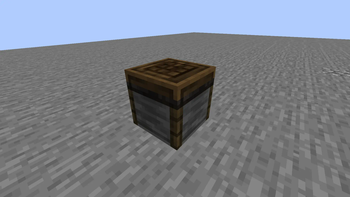
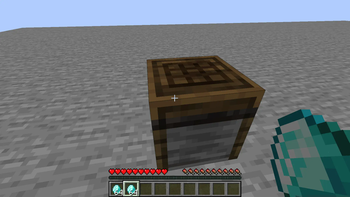
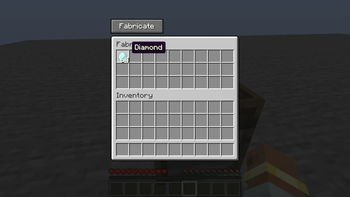
About this Mod
Fabricator
This mod introduces the Fabricator block, a block which, similarly to the infamous 1.19 Shulker Dupe mod, allows players to dupe blocks, items and storage blocks too!
Recipe
This one's pretty easy to craft, but with a twist - you have to get your hands on a special item!

The mod, being inspired by the Shulker Dupe mod, keeps the same premise of having to achieve an important feat in order to gather all the required pieces. I thought it was a fun mechanic to keep.
Usage
- Create the Fabricator.
- Place it down in a safe spot.
- Fill one (or all) the storage slots with your desired material.
- Click on the Fabricate button.
- If done properly, the GUI should close, with your inventory having a double of the given itemstack.
Information
For many, the access to unlimited resources is a controversial topic - Way too many people think of Minecraft as a game purely based on skill progression (achievements etc) and omit the creative aspect. They get bored easily, hence why all modern media portray Minecraft as this "two-week-phase" game while it really doesn't need to be that. Minecraft is about the love for creation and adventure, not just through thrilling experiences but also through passion and dedication, through time spent with friends on that one world you never leave.
When the Shulker Dupe came out, my friends and I had the idea of running a shady trade company in our school SMP server. It was the most fun I ever had in Minecraft; planning out our system, building HQs in every dimension, thinking of crazy things we could implement to make people buy more from us. I have since lost contact with them, and others don't have time to dedicate into playing the game again.
This mod is a love letter to these times. My friends were also the kind of people who wouldn't enjoy Minecraft without a linear progression, but they enjoyed themselves whenever it came to working on our faction.
Credits
MinecraftLite - Development
My lovely wife - ♡
Available Versions
How to Install lite's Fabricator on Your Server
Order Server
Order a Minecraft Java server with at least 3 GB RAM (4 GB recommended).
Set forge Loader
In the panel under "Egg", select the forge loader and matching Minecraft version (1.20.1).
Install Mod
Open the mod browser in the dashboard and search for "lite's Fabricator". Click "Install" – done! Alternatively, upload the .jar via SFTP to the /mods folder.
Compatibility
Mod Loaders
Minecraft Versions
1.20.1
Server-side
✓ RequiredRecommended RAM
4 GB(min. 3 GB)Frequently Asked Questions
lite's Fabricator server crashes on startup – what to do?
Most common cause: wrong forge version or insufficient RAM. Check the server log (latest.log) for "OutOfMemoryError" or "Mixin" errors. With Mado Hosting: ensure at least 3 GB RAM is allocated and the loader matches the mod version (1.20.1). You can switch loaders with one click in the panel.
Is lite's Fabricator compatible with forge?
lite's Fabricator officially supports forge for Minecraft 1.20.1. The Mado dashboard automatically detects incompatible loader combinations.
Server lagging with lite's Fabricator – how to optimize performance?
Recommended RAM: 4 GB (per 8 players). Use /spark profiler to check if lite's Fabricator consumes the most tick time. Common fixes: reduce server view-distance to 8-10, install "performant" or "starlight" as supplementary mods on Forge. With Mado Hosting, your server runs on NVMe SSDs with dedicated CPU cores for minimal latency.
Similar Mods




Rent Modded Server
Install lite's Fabricator with just one click on your server.