
Live Stream Notifications
Live Stream Notifications adds commands for stream notifications in Minecraft chat. The mod allows streamers to quickly announce stream starts with links and platform information.
Screenshots

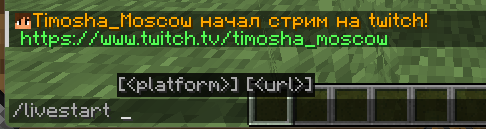
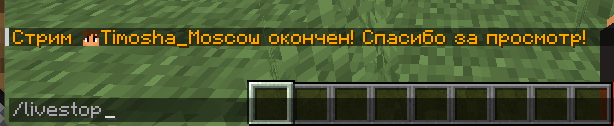
About this Mod
[ENG]
Live Stream Notifications is a practical Minecraft mod that adds special commands for streamers. The mod allows you to easily notify all players on the server about the start and end of a broadcast. When using the /livestart command, a message about the stream start appears in the chat, indicating the platform and with the ability to add a direct link to the broadcast. The /livestop command sends a notification about the end of the stream. The mod is especially useful for content creators who stream on Minecraft servers, as it helps viewers quickly find the broadcast and join the viewing.
[RU]
Live Stream Notifications - это практичный мод для Minecraft, который добавляет специальные команды для стримеров. Мод позволяет легко уведомлять всех игроков на сервере о начале и окончании трансляции. При использовании команды /livestart в чате появляется сообщение о начале стрима с указанием платформы и возможностью добавить прямую ссылку на трансляцию. Команда /livestop отправляет уведомление об окончании стрима. Мод особенно полезен для контент-создателей, которые проводят стримы на Minecraft-серверах, так как помогает зрителям быстро найти трансляцию и присоединиться к просмотру.
Available Versions
How to Install Live Stream Notifications on Your Server
Order Server
Order a Minecraft Java server with at least 3 GB RAM (4 GB recommended).
Set forge Loader
In the panel under "Egg", select the forge loader and matching Minecraft version (1.20.6).
Install Mod
Open the mod browser in the dashboard and search for "Live Stream Notifications". Click "Install" – done! Alternatively, upload the .jar via SFTP to the /mods folder.
Compatibility
Mod Loaders
Minecraft Versions
1.20.6, 1.20.5, 1.20.4 (+3 more)
Server-side
✓ RequiredRecommended RAM
4 GB(min. 3 GB)Frequently Asked Questions
Live Stream Notifications server crashes on startup – what to do?
Most common cause: wrong forge version or insufficient RAM. Check the server log (latest.log) for "OutOfMemoryError" or "Mixin" errors. With Mado Hosting: ensure at least 3 GB RAM is allocated and the loader matches the mod version (1.20.6). You can switch loaders with one click in the panel.
Is Live Stream Notifications compatible with forge?
Live Stream Notifications officially supports forge for Minecraft 1.20.6, 1.20.5, 1.20.4. The Mado dashboard automatically detects incompatible loader combinations.
Server lagging with Live Stream Notifications – how to optimize performance?
Recommended RAM: 4 GB (per 8 players). Use /spark profiler to check if Live Stream Notifications consumes the most tick time. Common fixes: reduce server view-distance to 8-10, install "performant" or "starlight" as supplementary mods on Forge. With Mado Hosting, your server runs on NVMe SSDs with dedicated CPU cores for minimal latency.
Similar Mods




![[ETF] Entity Texture Features](https://cdn.modrinth.com/data/BVzZfTc1/af683d206d50b05258d865b0d6e4aa2f2cee12f2_96.webp)
![[EMF] Entity Model Features](https://cdn.modrinth.com/data/4I1XuqiY/6e5bbd0d06b1741bfdab6c0cfab6de8fdaf0064c_96.webp)
Rent Modded Server
Install Live Stream Notifications with just one click on your server.