
LiveprankMod
Tentatively, the mod is “Live Interference”.
Screenshots
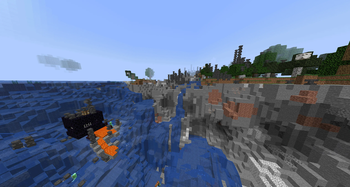
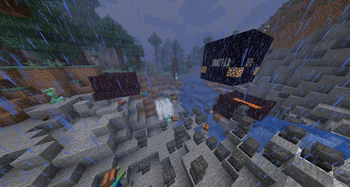
About this Mod
🎮 Ultimate Stream Prank Mod: Instant Chaos at Your Fingertips
🔥 Why Choose This Mod?
✅ Super easy to use: No complicated commands - full-screen effects with just number keys and arrow keys
✅ Endless prank possibilities: Hilarious anti-gravity fun + devastating nukes for any stream style
✅ Interactive entertainment: Let viewers suggest keys via chat for ultimate stream engagement
✅ Visually stunning effects: Lightning storms, lava pools, anvil rain and more for jaw-dropping moments
💻 Numeric Keypad
- 0️⃣:Summon zombies💀
- 1️⃣:Summon skeleton🎯
- 2️⃣:Stun player🕳️
- 3️⃣:Blindness🕳️🔮
- 4️⃣:Entangle player in webs🕷️
- 5️⃣:Summon charged creepers⚡💥
- 6️⃣:Launch player into the sky🚀
- 7️⃣:Activate "Rocket Boost" anti-gravity mode🛸
- 8️⃣:Spawn lava pool beneath feet🔥
- 9️⃣:Build obsidian prison🔨
🎮 Arrow Keys
- ← Left:Rain of lightning strikes🌩️⚡
- ↓ Down:Detonate nuke to destroy terrain💣
- → Right:Anvil rain from above🔨
- ↑ Up:Randomly replace inventory items🎒
💡 Prank Tips:Combine keys for maximum chaos! Try 0️⃣ zombies + → Right anvils + ↓ Down nuke for total annihilation~
Available Versions
How to Install LiveprankMod on Your Server
Order Server
Order a Minecraft Java server with at least 3 GB RAM (4 GB recommended).
Set forge Loader
In the panel under "Egg", select the forge loader and matching Minecraft version (1.16.5).
Install Mod
Open the mod browser in the dashboard and search for "LiveprankMod". Click "Install" – done! Alternatively, upload the .jar via SFTP to the /mods folder.
Compatibility
Mod Loaders
Minecraft Versions
1.16.5
Server-side
✓ RequiredRecommended RAM
4 GB(min. 3 GB)Frequently Asked Questions
LiveprankMod server crashes on startup – what to do?
Most common cause: wrong forge version or insufficient RAM. Check the server log (latest.log) for "OutOfMemoryError" or "Mixin" errors. With Mado Hosting: ensure at least 3 GB RAM is allocated and the loader matches the mod version (1.16.5). You can switch loaders with one click in the panel.
Is LiveprankMod compatible with forge?
LiveprankMod officially supports forge for Minecraft 1.16.5. The Mado dashboard automatically detects incompatible loader combinations.
Server lagging with LiveprankMod – how to optimize performance?
Recommended RAM: 4 GB (per 8 players). Use /spark profiler to check if LiveprankMod consumes the most tick time. Common fixes: reduce server view-distance to 8-10, install "performant" or "starlight" as supplementary mods on Forge. With Mado Hosting, your server runs on NVMe SSDs with dedicated CPU cores for minimal latency.
Similar Mods




![[ETF] Entity Texture Features](https://cdn.modrinth.com/data/BVzZfTc1/af683d206d50b05258d865b0d6e4aa2f2cee12f2_96.webp)
![[EMF] Entity Model Features](https://cdn.modrinth.com/data/4I1XuqiY/6e5bbd0d06b1741bfdab6c0cfab6de8fdaf0064c_96.webp)
Rent Modded Server
Install LiveprankMod with just one click on your server.