
Living Ores
A mod that adds living ore blocks to the game that makes ore resources in minecraft farmable by spreading to neighboring blocks
Screenshots
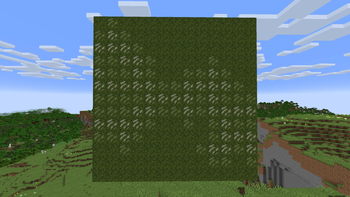
About this Mod
Living Ores
Living Ores is a mod that adds new blocks to the game as a way to farm resources not possible or not as easily in vanilla.
How It Works
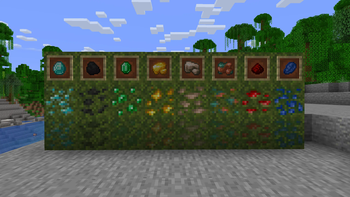
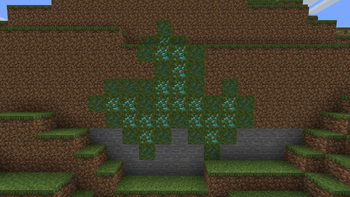
The mod adds a new variant of each ore block in the game (excluding ancient debris and nether gold ore) which is known as a Living Ore Block. Once placed down these blocks won't do anything as they begin exhausted. Though after being activated via being right clicked on by their resource counterpart (e.g Diamond Living ore is activated by a diamond), it will begin to spread to neighboring natural blocks and turn them into living blocks. Most of the time the blocks will be spread as their exhausted counterpart, though they have a small chance to spread as the alive version and continue spreading. On spreading the source block will also have a chance at exhausting itself, or if it tries to spread to a neighboring block that it can't spread to, it will have a chance at exhausting itself.
What They Drop
If mined by a pickaxe with no enchantments, it will drop the same drop the normal variant of the ore would drop. If mined via fortune it would have the same effect as the standard block version too. However, if mined using silk touch it will not drop the living block and will drop the Deepslate or Netherack variant instead. Thus meaning once you place a block it cannot be moves, though spreading it a distance is possible.
How To Obtain Them
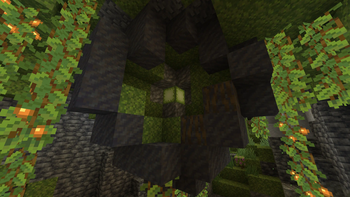
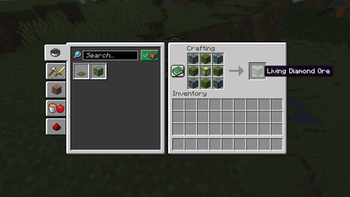
Around the world a new structure will spawn being a Living Spore Geode. These only spawn inside of Lush Cave Biomes, but inside of them they are fairly common. They aren't always exposed to air but they do make a sound and can be located that way (The sound is a higher pitched version of chorus fruit growing). Once found they will be a sphere of mud and mangrove root mud. Inside of there will be a layer of moss and then tuff. Then the center block will be a Living Spore block which can be mined using a Netherite Pickaxe. Anything below Netherite will break the block and you won't pick it up. This block can be used with 4 Deepslate Or Netherite ore plus 4 moss blocks to craft 1 living ore block of whatever type you want.
Why They Are Useful
The Living Ores are a new way to farm resources that are either a pain to farm normally or are almost not possible like diamonds. They can be pushed via piston, and can override stone blocks so a simple farm should be possible to do.
Extra Information
There is a gamerule called exhaustOnSpread which is true by default. If toggled to false it will disable the source block having a chance at exhausting itself on spread meaning the original blocks once activated will never stop spreading to neighboring blocks. (The new blocks that are spread though will still mostly be exhausted) It is balanced however, that statistically the blocks if placed just on a field or something should never spread forever.
Youtube
For a more visual look at the mod I have videos about it on my Youtube Channel LINK along with other mods I make.
Available Versions
How to Install Living Ores on Your Server
Order Server
Order a Minecraft Java server with at least 4 GB RAM (6 GB recommended).
Set fabric Loader
In the panel under "Egg", select the fabric loader and matching Minecraft version (1.20.4).
Install Mod
Open the mod browser in the dashboard and search for "Living Ores". Click "Install" – done! Alternatively, upload the .jar via SFTP to the /mods folder.
Compatibility
Mod Loaders
Minecraft Versions
1.20.4, 1.20.2, 1.20.1
Server-side
✓ RequiredRecommended RAM
6 GB(min. 4 GB)Frequently Asked Questions
Living Ores server crashes on startup – what to do?
Most common cause: wrong fabric version or insufficient RAM. Check the server log (latest.log) for "OutOfMemoryError" or "Mixin" errors. With Mado Hosting: ensure at least 4 GB RAM is allocated and the loader matches the mod version (1.20.4). You can switch loaders with one click in the panel.
Is Living Ores compatible with fabric?
Living Ores officially supports fabric for Minecraft 1.20.4, 1.20.2, 1.20.1. The Mado dashboard automatically detects incompatible loader combinations.
Server lagging with Living Ores – how to optimize performance?
Recommended RAM: 6 GB (per 5 players). Use /spark profiler to check if Living Ores consumes the most tick time. Common fixes: reduce server view-distance to 8-10, install "performant" or "starlight" as supplementary mods on Forge. With Mado Hosting, your server runs on NVMe SSDs with dedicated CPU cores for minimal latency.
Similar Mods




Rent Modded Server
Install Living Ores with just one click on your server.