
Locations
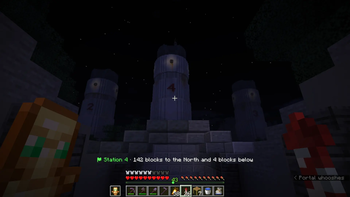
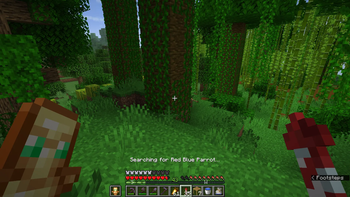
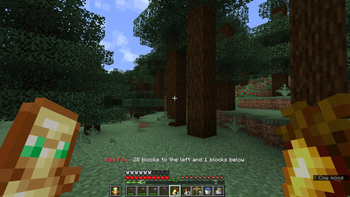
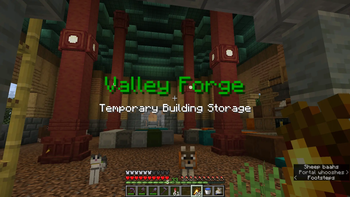
Mod adds a versatile /location command to add, edit, guide and share specific locations in the world.
Screenshots
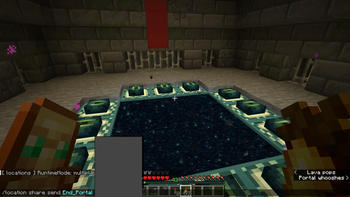
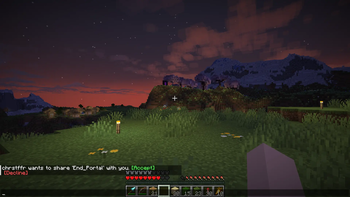
About this Mod
Locations
Found the perfect spot to build, made a mental or physical note of the coordinates, and still somehow lost them when you need them again?
Have you ever stumbled onto something incredible and wished you could share the coordinates with your friends, even if they are offline?
Did you just die in the middle of nowhere and cannot find your way back to your stuff?
Are you collecting and taming all wolf variants? Now you can track that last one you can't find!
Locations is a versatile and highly customizable mod that lets you save named locations in-game — private ones only you can see, and public ones the whole server can access. When you want to head back, they can guide you with a waypoint using the Locator Bar. It lets you search and track a specific mob or mob variant.
There are several ways of using this mod:
Singleplayer
- Some restrictions apply; like sharing, and public locations.
Multiplayer (installed only on client)
- Some restrictions apply; like sharing, public locations, and Locator Bar waypoints (but guiding/tracking still works).
- Your locations are stored in profiles locally. You can have multiple and switch when you switch servers.
Multiplayer (installed only on server)
- Works for all connected players.
- Have admin config to allow/disallow certain features.
Multiplayer (both on client and server)
- Supports migrating local profiles to server.
Requirements
- Minecraft 26.1.2
- Fabric Loader 0.19.2+
- Fabric API 0.146.1+26.1.2+
Command Overview
All commands support tab-completion where applicable.
Base command tree:
/location add
/location list
/location show
/location teleport
/location guide start
/location guide stop
/location track start
[variant] /location track stop
/location edit
... /location option ...
/location share ...
/location profile ...
/location help [topic]
/location admin ...
Location Commands
Add and list
/location add
- Saves your current position.
/location list
- Shows your locations, visible public locations, visible shared locations, and enabled dynamic entries.
/location list overworld
/location list nether
/location list end
- Filter list by dimension.
/location list hidden
- Shows hidden public or shared locations.
- This subcommand appears only when you have hidden entries.
Show and teleport
/location show
- Shows full details including coordinates, dimension, biome, color, symbol, distance, description, and owner when applicable.
/location teleport
- Teleports to an accessible location.
- Only when allowTeleport is enabled.
Edit owned locations
- /location edit
color - /location edit
symbol - /location edit
description - /location edit
arrival - /location edit
public <true|false> - /location edit
rename - /location edit
remove
Guide Commands
/location guide start
- Starts a live waypoint guide in your current dimension.
- Requires allowGuiding.
/location guide stop
- Stops active guidance.
Tracking Commands
/location track start
[variant] - Searches for the nearest entity of the given type within the tracking radius.
- Displays live distance to the entity on the action bar.
- Entity names use Minecraft's registry format, e.g.
cow,zombie,minecraft:horse. - Variant is optional; supported for horses (
black,brown,chestnut,creamy,darkbrown,gray,white), wolves, cats, and similar typed mobs. - Requires allowTracking.
- Starting tracking stops any active guide.
/location track stop
- Stops active tracking and clears the action bar.
- Starting a guide also stops tracking.
Option Commands
/location option
- Lists your current option values.
/location option get
/location option set
Supported option keys:
- locationColor
- textColor
- successColor
- failureColor
- accentColor
- linkColor
- headingColor
- symbol
- deathSymbol
- respawnSymbol
- arrivalDistance
- foundDistance
- distanceMode
- deathRetention
- respawnRetention
- autoDecline
- mobColor
- biomeColor
- guideOnDeath
Share Commands
/location share
/location share
- Sends a share invite with optional message.
/location share accept
/location share decline
/location share remove
- Removes an accepted shared location from your shared list.
/location share revoke
- Revokes a pending invite you sent.
Profile Commands
Profiles are client-side location sets stored locally. They are used when playing on a server without Locations installed. On a modded server, all /location commands go to the server directly.
/location profile status
- Shows the current mode and active local profile name.
/location profile create
- Creates a new local profile. Names may contain lowercase letters, digits,
.,_, and-.
- Creates a new local profile. Names may contain lowercase letters, digits,
/location profile switch
- Switches to a different local profile.
/location profile delete
- Deletes a local profile and its saved locations.
/location-migration request
- Sends a migration request to a server admin.
- Only available if both client and server has the mod installed. Useful when you have accumulated locations before server install the mod.
Help Commands
- /location help
- /location help admin
- /location help biome
- /location help edit
- /location help guide
- /location help profile (client-only)
- /location help share
- /location help track
Admin Commands
Admin access requires operator permission or allowAdmin for the player.
/location admin
- Lists full server config.
/location admin get
/location admin set
<true|false> - Flags:
- allowPublic
- allowGuiding
- allowTracking
- allowSharing
- allowTeleport
- allowAnnouncement
- allowMigration
- debug
- Flags:
/location admin set arrivalDistance
/location admin set foundDistance
/location admin set searchRadius
/location admin set defaultLocationColor
/location admin set defaultTextColor
/location admin set defaultSuccessColor
/location admin set defaultFailureColor
/location admin set defaultAccentColor
/location admin set defaultLinkColor
/location admin set defaultHeadingColor
/location admin set defaultSymbol
/location admin set defaultDeathSymbol
/location admin set defaultRespawnSymbol
/location admin set distanceMode <compass|relative|simple>
/location admin grant
[value] - Perms:
- admin
- guiding
- public
- sharing
- teleport
- Perms:
/location admin remove
/location admin cleanup
/location admin cleanup ignore
Data Files
Server
Server config:
/data/dev.chrstffr.locations/config.json
Share queue:
/data/dev.chrstffr.locations/shares.json
Player data-blocked:
/data/dev.chrstffr.locations/players/ .json
Player data includes locations, shared entries, hidden entries, death snapshot, and personal defaults.
Client
Stored in the Minecraft config folder when the mod is installed on the client:
Client config (active profile + last death):
- config/locations/config.json
Profile location data-blocked:
- config/locations/profiles/
.json
- config/locations/profiles/
License
CC BY-NC-SA 4.0
Copyright 2026 chrstffr
You may use, modify, and redistribute this project with attribution, non-commercial use, and share-alike terms.
Available Versions
How to Install Locations on Your Server
Order Server
Order a Minecraft Java server with at least 3 GB RAM (4 GB recommended).
Set fabric Loader
In the panel under "Egg", select the fabric loader and matching Minecraft version (26.1.2).
Install Mod
Open the mod browser in the dashboard and search for "Locations". Click "Install" – done! Alternatively, upload the .jar via SFTP to the /mods folder.
Compatibility
Mod Loaders
Minecraft Versions
26.1.2
Server-side
~ OptionalRecommended RAM
4 GB(min. 3 GB)Frequently Asked Questions
Locations server crashes on startup – what to do?
Most common cause: wrong fabric version or insufficient RAM. Check the server log (latest.log) for "OutOfMemoryError" or "Mixin" errors. With Mado Hosting: ensure at least 3 GB RAM is allocated and the loader matches the mod version (26.1.2). You can switch loaders with one click in the panel.
Is Locations compatible with fabric?
Locations officially supports fabric for Minecraft 26.1.2. The Mado dashboard automatically detects incompatible loader combinations.
Server lagging with Locations – how to optimize performance?
Recommended RAM: 4 GB (per 8 players). Use /spark profiler to check if Locations consumes the most tick time. Common fixes: reduce server view-distance to 8-10, install "performant" or "starlight" as supplementary mods on Forge. With Mado Hosting, your server runs on NVMe SSDs with dedicated CPU cores for minimal latency.
Similar Mods




![[ETF] Entity Texture Features](https://cdn.modrinth.com/data/BVzZfTc1/af683d206d50b05258d865b0d6e4aa2f2cee12f2_96.webp)
![[EMF] Entity Model Features](https://cdn.modrinth.com/data/4I1XuqiY/6e5bbd0d06b1741bfdab6c0cfab6de8fdaf0064c_96.webp)
Rent Modded Server
Install Locations with just one click on your server.
Details
- License
- Creative Commons Attribution Non Commercial Share Alike 4.0 International
- Server-side
- Optional