
Locator Bar Plus
A client side mod. This mod can customize locator bar.
Screenshots
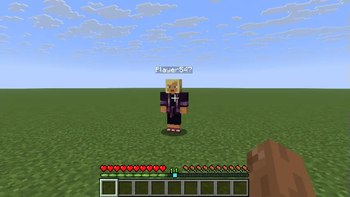
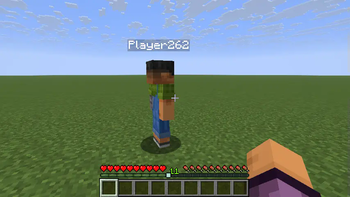
About this Mod
Locator Bar Plus
Locator Bar Plus is a Minecraft Fabric mod that enhances and customizes the in-game locator bar and experience bar display.
Features
- Toggle the visibility of the locator bar and experience bar.
- Adjust the transparency of the experience bar overlay.
- Integrates with Mod Menu for easy configuration.
- All settings are configurable in-game.
Implemented Functionality
- Enable or disable the mod entirely.
- Option to always hide the locator bar.
- Adjustable experience bar transparency (default: 0.5).
- Mod Menu integration for configuration UI.
How to Change Settings
- In-Game (Recommended):
- Open the Mod Menu from the Minecraft main menu.
- Find "Locator Bar Plus" in the mod list and click the gear icon to open the configuration screen.
- Adjust the settings such as "Mod Enabled", "Always Hide Locator Bar", and "Experience Bar Transparency" as desired.
- Changes are applied immediately.
- Manual Edit:
- Edit the
locatorbarplus.jsonfile in therun/config/directory. - Restart Minecraft for changes to take effect if edited manually.
- Edit the
Contribution
Contributions are welcome! If you have suggestions, bug reports, or would like to submit a pull request, please follow these steps:
- Fork this repository and create your branch from
master. - Make your changes with clear commit messages.
- Ensure your code builds and passes any existing checks.
- Submit a pull request with a description of your changes.
For major changes, please open an issue first to discuss what you would like to change.
License
This project is licensed under the MIT License. See LICENSE.txt for details.
Available Versions
How to Install Locator Bar Plus on Your Server
Order Server
Order a Minecraft Java server with at least 3 GB RAM (4 GB recommended).
Set fabric Loader
In the panel under "Egg", select the fabric loader and matching Minecraft version (1.21.7).
Install Mod
Open the mod browser in the dashboard and search for "Locator Bar Plus". Click "Install" – done! Alternatively, upload the .jar via SFTP to the /mods folder.
Compatibility
Mod Loaders
Minecraft Versions
1.21.7, 1.21.6
Server-side
✗ UnsupportedRecommended RAM
4 GB(min. 3 GB)Frequently Asked Questions
Locator Bar Plus server crashes on startup – what to do?
Most common cause: wrong fabric version or insufficient RAM. Check the server log (latest.log) for "OutOfMemoryError" or "Mixin" errors. With Mado Hosting: ensure at least 3 GB RAM is allocated and the loader matches the mod version (1.21.7). You can switch loaders with one click in the panel.
Is Locator Bar Plus compatible with fabric?
Locator Bar Plus officially supports fabric for Minecraft 1.21.7, 1.21.6. The Mado dashboard automatically detects incompatible loader combinations.
Server lagging with Locator Bar Plus – how to optimize performance?
Recommended RAM: 4 GB (per 8 players). Use /spark profiler to check if Locator Bar Plus consumes the most tick time. Common fixes: reduce server view-distance to 8-10, install "performant" or "starlight" as supplementary mods on Forge. With Mado Hosting, your server runs on NVMe SSDs with dedicated CPU cores for minimal latency.
Similar Mods




![[ETF] Entity Texture Features](https://cdn.modrinth.com/data/BVzZfTc1/af683d206d50b05258d865b0d6e4aa2f2cee12f2_96.webp)

Rent Modded Server
Install Locator Bar Plus with just one click on your server.