
Locator Triangulation
A client-side Fabric mod that allows determining players' coordinates using data from the locator and triangulation
Screenshots

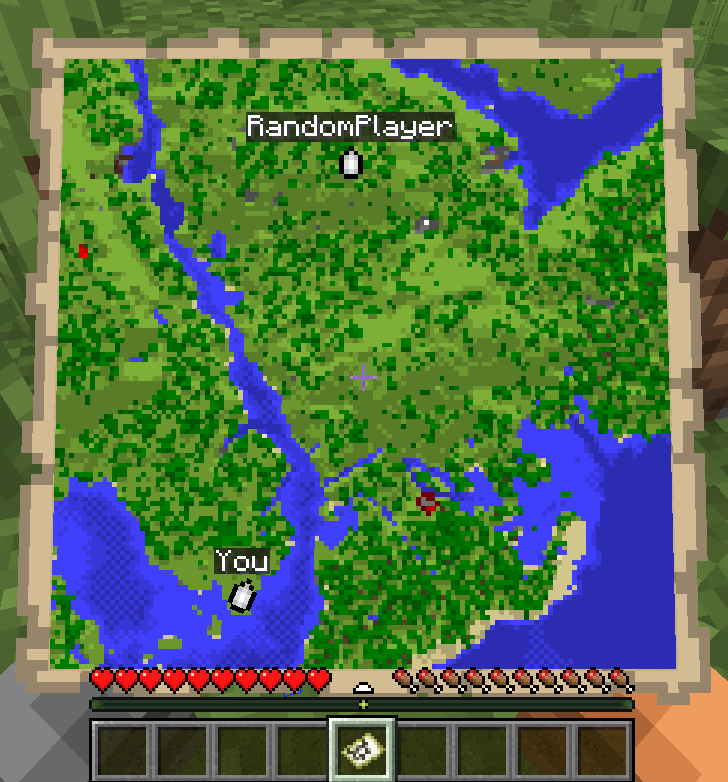

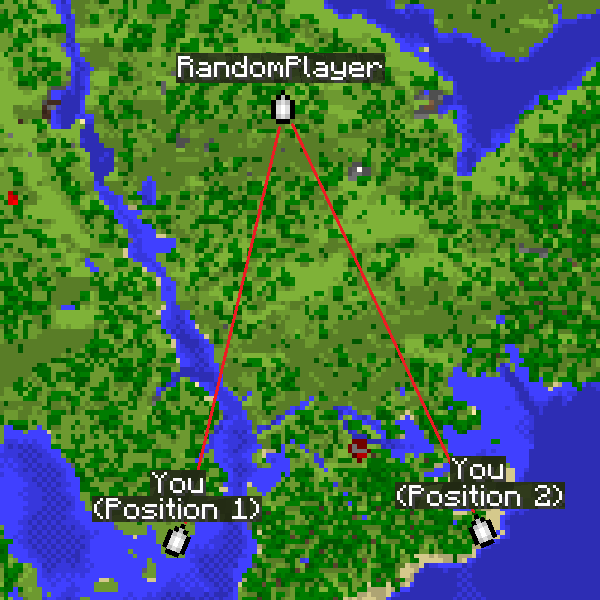
About this Mod
Locator Triangulation
A client-side Fabric mod that allows determining players' coordinates using triangulation.
The mod calculates coordinates using publicly available data accessible to regular vanilla players and acts solely as a calculator.
If the vanilla locator is disabled on the server or a player has hidden from it, the mod will not be able to determine their coordinates.
Essentially, all calculations performed by the mod can be done manually with a calculator and the vanilla client.

Quick start
The map is for example purposes only.
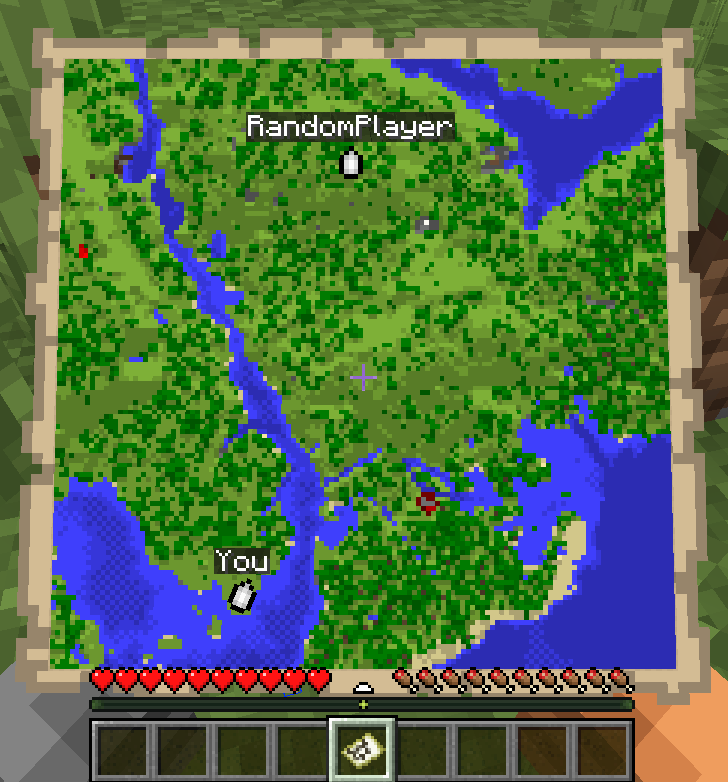
- Run
/locator_pos1- the mod will remember the locator's state, your current position and your view yaw. - Move away as far as possible so the angle to the target becomes as large as possible, then run
/locator_pos2. - Run:
/locator_locate <name>- attempt to compute the coordinates of player<name>, or/locator_locate_all- attempt to compute coordinates of all known targets.
/locator_pos1
/locator_pos2
/locator_locate RandomPlayer

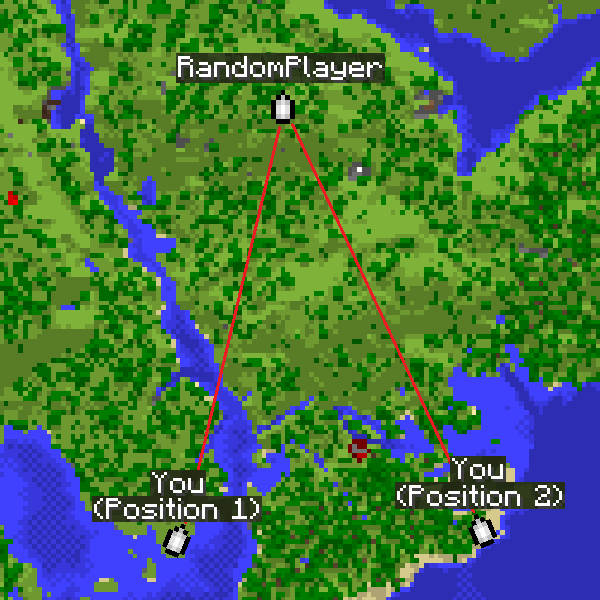
The larger the angle between directions from the two points, the more accurate the coordinates.
For regular triangulation use the same commands but with the triangulation prefix.
Command description
Locator commands
/locator_data- print current locator state/locator_pos1- save the first position (locator state and your coordinates)/locator_pos2- save the second position (locator state and your coordinates)/locator_get_poses- print the saved positions/locator_clear_pos1- clear the first position/locator_clear_pos2- clear the second position/locator_clear_poses- clear both positions/locator_locate <name>- compute coordinates of player<name>(if both positions are saved)/locator_locate_all- compute coordinates for all known targets (if both positions are saved)
Regular triangulation commands
/triangulation_pos1- save the first position (your coordinates + yaw)/triangulation_pos2- save the second position (your coordinates + yaw)/triangulation_get_poses- print the saved positions/triangulation_clear_pos1- clear the first position/triangulation_clear_pos2- clear the second position/triangulation_clear_poses- clear both positions/triangulation_locate— compute the intersection coordinates of the view directions (if both positions are saved)
Keybinds
For convenience, keybinds have been added for locator and triangulation.
The purpose is to simplify the process of setting points and calculating results.
How it works:
- The first press of the selected key will set the first point.
- Pressing the key with Shift will skip setting the second point.
- Pressing the key again will reset the first point.
- Pressing it again will set the second point.
- If both points are already set, pressing the key with Ctrl will return the calculated result for those two points.
Accuracy notes
Triangulation accuracy strongly depends on the angle between view directions from the two positions.
Good results are achieved with an angle between directions from 20° to 150°.
Near-perfect accuracy occurs at about 70-100°.
If the angle is too small (less than 20°) or too large (150° and above), accuracy drops significantly.
For maximum accuracy, take positions so that the target is roughly at a right angle relative to you.
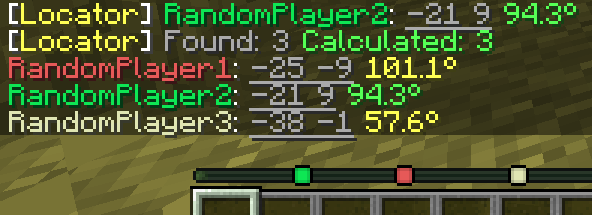
The corner color in the message indicates the calculation quality.
Green means near-perfect accuracy, yellow is acceptable but may include a small error, and red indicates poor accuracy.
How to hide from the locator
There are several ways to hide from the radar: sneaking (Shift), a mob's or another player's head, a carved pumpkin, or an invisibility potion.
Available Versions
How to Install Locator Triangulation on Your Server
Order Server
Order a Minecraft Java server with at least 3 GB RAM (4 GB recommended).
Set fabric Loader
In the panel under "Egg", select the fabric loader and matching Minecraft version (26.1.2).
Install Mod
Open the mod browser in the dashboard and search for "Locator Triangulation". Click "Install" – done! Alternatively, upload the .jar via SFTP to the /mods folder.
Compatibility
Mod Loaders
Minecraft Versions
26.1.2, 26.1.1, 26.1 (+3 more)
Server-side
✗ UnsupportedRecommended RAM
4 GB(min. 3 GB)Frequently Asked Questions
Locator Triangulation server crashes on startup – what to do?
Most common cause: wrong fabric version or insufficient RAM. Check the server log (latest.log) for "OutOfMemoryError" or "Mixin" errors. With Mado Hosting: ensure at least 3 GB RAM is allocated and the loader matches the mod version (26.1.2). You can switch loaders with one click in the panel.
Is Locator Triangulation compatible with fabric?
Locator Triangulation officially supports fabric for Minecraft 26.1.2, 26.1.1, 26.1. The Mado dashboard automatically detects incompatible loader combinations.
Server lagging with Locator Triangulation – how to optimize performance?
Recommended RAM: 4 GB (per 8 players). Use /spark profiler to check if Locator Triangulation consumes the most tick time. Common fixes: reduce server view-distance to 8-10, install "performant" or "starlight" as supplementary mods on Forge. With Mado Hosting, your server runs on NVMe SSDs with dedicated CPU cores for minimal latency.
Similar Mods




![[ETF] Entity Texture Features](https://cdn.modrinth.com/data/BVzZfTc1/af683d206d50b05258d865b0d6e4aa2f2cee12f2_96.webp)
![[EMF] Entity Model Features](https://cdn.modrinth.com/data/4I1XuqiY/6e5bbd0d06b1741bfdab6c0cfab6de8fdaf0064c_96.webp)
Rent Modded Server
Install Locator Triangulation with just one click on your server.