
Lock & Block Security
Adds fun and creative security features to protect your stuff
Screenshots
About this Mod



Description:
Lock & Block introduces fun and creative security features to protect your Minecraft world!
Features:
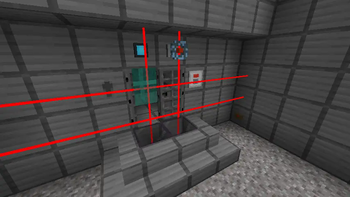
- Keycards & readers: Program keycard readers to only accept your keycard to access your secret stuff
- Keypads: Set a secret code to emit redstone; open doors or do whatever you need to secure
- Tesla Coil: Protect areas by zapping anyone nearby when powered by redstone
- Force fields: Create an unbreakable wall that you can disable and enable at will
- Mines: Protect you stuff with explosives, using laser trip mines, land mines, and proximity mines
- Player Sensor: Detect when a player is near and trigger a redstone contraption
- Detonator Mine: Use a detonator to remotely detonate land mines
- Laser Sensor: Detect when players or entities touch a laser with a redstone signal
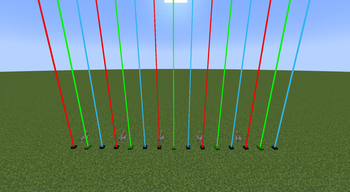
- Redstone Laser: Protect an area with painful lasers
- Reinforced Iron: Reinforced iron blocks are much harder to break than iron
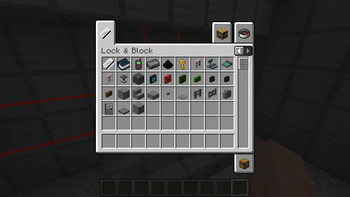
- Keys and locks Lock reinforced iron door with keys, and activate redstone with keys
Requirements:
Downloads
Contributing and Feedback:
- Feel free to submit issues or feature requests on GitHub.
- Contributions are welcome! Fork the repository and submit a pull request with your changes.
Planned Possible Features:
- Some kind of security cameras
Please note that these features are planned possibilities and not guaranteed. As a solo developer, I'll do my best to
implement them, but development priorities may change.
Support:
For any questions or support, you can reach out to us on GitHub. Your
feedback is highly valued!
Available Versions
How to Install Lock & Block Security on Your Server
Order Server
Order a Minecraft Java server with at least 3 GB RAM (4 GB recommended).
Set fabric Loader
In the panel under "Egg", select the fabric loader and matching Minecraft version (1.21.1).
Install Mod
Open the mod browser in the dashboard and search for "Lock & Block Security". Click "Install" – done! Alternatively, upload the .jar via SFTP to the /mods folder.
Compatibility
Mod Loaders
Minecraft Versions
1.21.1, 1.20.1
Server-side
✓ RequiredRecommended RAM
4 GB(min. 3 GB)Frequently Asked Questions
Lock & Block Security server crashes on startup – what to do?
Most common cause: wrong fabric version or insufficient RAM. Check the server log (latest.log) for "OutOfMemoryError" or "Mixin" errors. With Mado Hosting: ensure at least 3 GB RAM is allocated and the loader matches the mod version (1.21.1). You can switch loaders with one click in the panel.
Is Lock & Block Security compatible with fabric?
Lock & Block Security officially supports fabric for Minecraft 1.21.1, 1.20.1. The Mado dashboard automatically detects incompatible loader combinations.
Server lagging with Lock & Block Security – how to optimize performance?
Recommended RAM: 4 GB (per 8 players). Use /spark profiler to check if Lock & Block Security consumes the most tick time. Common fixes: reduce server view-distance to 8-10, install "performant" or "starlight" as supplementary mods on Forge. With Mado Hosting, your server runs on NVMe SSDs with dedicated CPU cores for minimal latency.
Similar Mods

![[ETF] Entity Texture Features](https://cdn.modrinth.com/data/BVzZfTc1/af683d206d50b05258d865b0d6e4aa2f2cee12f2_96.webp)
![[EMF] Entity Model Features](https://cdn.modrinth.com/data/4I1XuqiY/6e5bbd0d06b1741bfdab6c0cfab6de8fdaf0064c_96.webp)



Rent Modded Server
Install Lock & Block Security with just one click on your server.