
LockyLocks
Secure your treasures with durable locks and forged keys, a personal touch of protection.
Screenshots
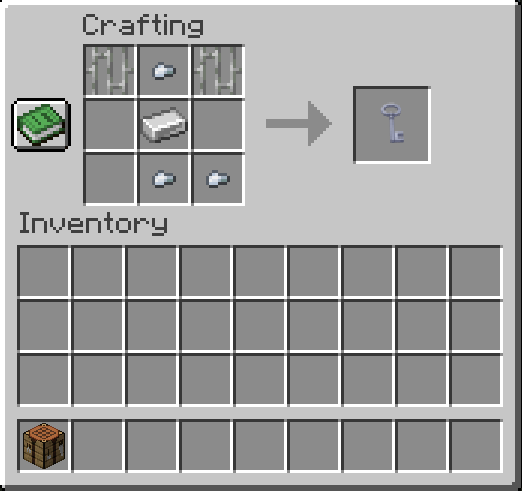
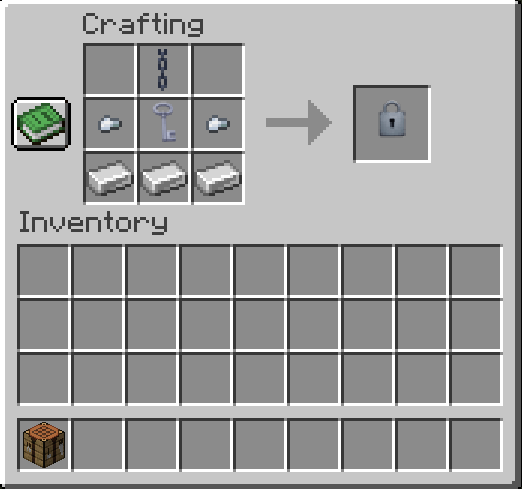

About this Mod
🔒 LockyLocks
Secure your containers with style and control! LockyLocks is a lightweight yet powerful utility mod that lets you lock containers like Chests, Barrels, and Shulker Boxes using customizable locks and keys.
✨ Features
🧱 Two Types of Locks:
Iron Lock: More durable, lasts maximum 36 Minecraft days.
Copper Lock: Less durable, lasts maximum 24 Minecraft days.
🗝️ One Key to Unlock Each Lock:
Only one key type currently: Iron Key.
Key must have exact same name as the lock (case-sensitive) and be used by the player who locked it.
Even if someone else gets a correctly named key, they can’t unlock it unless they are the owner.
🛡️ Break Protection:
By default, locked containers cannot be broken.
Can be toggled via config file:
/config/lockylocks-common.toml →
protectLockedContainers = false
- to disable protection.
⚙️ Durability Mechanics:
Locks wear down daily while active. Once broken, the container unlocks automatically.
Keys can be used 35 times before breaking.
📦 Supported Containers:
- Works with Chests, Double Chests, Barrels, and Shulker Boxes.
📸 Recipes
- Please see the Gallery section
⚒️ Configurable Options
Located in:
/config/lockylocks-common.toml
Available settings:
protectLockedContainers = true
→ Set to false if you want players to break locked containers.
☕ Fuel My Code with Coffee!
Liked the mod? Keep me caffeinated and semi-functional 😴 by dropping a coffee here. Thanks, you legend! 😎
Available Versions
How to Install LockyLocks on Your Server
Order Server
Order a Minecraft Java server with at least 3 GB RAM (4 GB recommended).
Set neoforge Loader
In the panel under "Egg", select the neoforge loader and matching Minecraft version (1.21.1).
Install Mod
Open the mod browser in the dashboard and search for "LockyLocks". Click "Install" – done! Alternatively, upload the .jar via SFTP to the /mods folder.
Compatibility
Mod Loaders
Minecraft Versions
1.21.1
Server-side
✓ RequiredRecommended RAM
4 GB(min. 3 GB)Frequently Asked Questions
LockyLocks server crashes on startup – what to do?
Most common cause: wrong neoforge version or insufficient RAM. Check the server log (latest.log) for "OutOfMemoryError" or "Mixin" errors. With Mado Hosting: ensure at least 3 GB RAM is allocated and the loader matches the mod version (1.21.1). You can switch loaders with one click in the panel.
Is LockyLocks compatible with neoforge?
LockyLocks officially supports neoforge for Minecraft 1.21.1. The Mado dashboard automatically detects incompatible loader combinations.
Server lagging with LockyLocks – how to optimize performance?
Recommended RAM: 4 GB (per 8 players). Use /spark profiler to check if LockyLocks consumes the most tick time. Common fixes: reduce server view-distance to 8-10, install "performant" or "starlight" as supplementary mods on Forge. With Mado Hosting, your server runs on NVMe SSDs with dedicated CPU cores for minimal latency.
Similar Mods




Rent Modded Server
Install LockyLocks with just one click on your server.