
Loginar Storage
Storage and inventory improvements... and alien squid dudes
Screenshots
About this Mod
Requirements
Minecraft Forge and Silent Lib are mandatory. Mod loaders other than Forge are not supported.
Introduction
Loginar Storage aims to improve inventory management by adding new ways to store and transport items. The mod is meant to "fit in" with vanilla, while also being useful in a heavily modded environment.
Mobs
Loginar


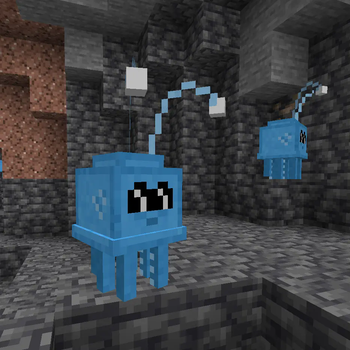
These short, squid-like creatures come from a hot, blue star, far away from our own. It is unclear what they want with our world, but they are not particularly hostile unless perturbed. They appear to gather deep underground in certain, seemingly-random areas. Listen for the unique purring sound they make!
Loginars drop two different items when killed, antennae and tentacles. A loginar antenna is a very important item for crafting and may have some other uses. Loginar tentacles can be cooked and eaten; eating them without cooking is ill-advised.
Blocks and Items
Loginar Urns

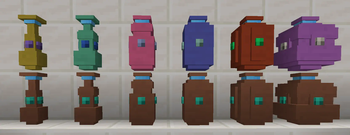
Loginar urns are for storing and transporting items. Any items stored in the urns are retained when the urn is broken and picked up (just like shulker boxes).
They come in multiple sizes. The smallest urn stores only 9 items (1 row) while the largest stores 54 (6 rows). The smaller sizes are easier to craft than shulker boxes. Larger sizes are more difficult to acquire.
Crafting
Use JEI to see exact recipes.
Tiny Loginar Urns are crafted with (assuming no data pack modifications) a loginar antenna, terracotta, and a gem. The color of the terracotta and the gem will affect the final appearance of the urn. Larger urn sizes require the previous size and additional items to craft.

Recoloring
Urns can be recolored by crafting them with dyes or gems. Multiple dyes can be applied to create custom colors.

Upgrades
To apply an upgrade to a loginar urn, simply craft the urn with the upgrade item.

List of Upgrades
- Backpack - Allows the urn to be opened without placing it. Simply hold the urn in your hand, look away from any blocks, and right-click. If you right-click on a block, the urn will still be placed as normal.
- Vacuum - Not working at time of writing (version 0.2.2). Causes nearby items to be drawn towards the urn and inserted into its inventory.
- Item Swapper - Press the "Swap Urn Items" keybinding (defaults to "X", check your controls menu) to bring up the swapper menu. Click an item and it will be swapped with your current held item. Very useful for tools that you use occasionally, but not enough to dedicate a hotbar slot to them. The urn with the swapper upgrade may be in your offhand or anywhere in your inventory except your main hand (obviously).
Available Versions
How to Install Loginar Storage on Your Server
Order Server
Order a Minecraft Java server with at least 3 GB RAM (4 GB recommended).
Set forge Loader
In the panel under "Egg", select the forge loader and matching Minecraft version (26.1.2).
Install Mod
Open the mod browser in the dashboard and search for "Loginar Storage". Click "Install" – done! Alternatively, upload the .jar via SFTP to the /mods folder.
Compatibility
Mod Loaders
Minecraft Versions
26.1.2, 26.1.1, 26.1 (+8 more)
Server-side
✓ RequiredRecommended RAM
4 GB(min. 3 GB)Frequently Asked Questions
Loginar Storage server crashes on startup – what to do?
Most common cause: wrong forge version or insufficient RAM. Check the server log (latest.log) for "OutOfMemoryError" or "Mixin" errors. With Mado Hosting: ensure at least 3 GB RAM is allocated and the loader matches the mod version (26.1.2). You can switch loaders with one click in the panel.
Is Loginar Storage compatible with forge and neoforge?
Loginar Storage officially supports forge, neoforge for Minecraft 26.1.2, 26.1.1, 26.1. The Mado dashboard automatically detects incompatible loader combinations.
Server lagging with Loginar Storage – how to optimize performance?
Recommended RAM: 4 GB (per 8 players). Use /spark profiler to check if Loginar Storage consumes the most tick time. Common fixes: reduce server view-distance to 8-10, install "performant" or "starlight" as supplementary mods on Forge. With Mado Hosting, your server runs on NVMe SSDs with dedicated CPU cores for minimal latency.
Similar Mods
![[EMF] Entity Model Features](https://cdn.modrinth.com/data/4I1XuqiY/6e5bbd0d06b1741bfdab6c0cfab6de8fdaf0064c_96.webp)


Rent Modded Server
Install Loginar Storage with just one click on your server.