
Longview
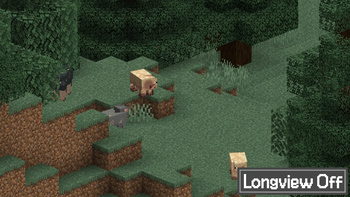
Fixes flickering, jaggies and Z-fighting on long distances using the Reverse Z technique.
Screenshots


About this Mod


Longview is a mod for Minecraft 26.1 that fixes glitches such as Z-fighting and jaggies on far distances.
This is accomplished through two techniques:
- By changing the Z coordinate limits from [-1,1] to [0,1] using the
GL_ARB_CLIP_CONTROLextension (officially part of OpenGL 4.5) - By applying the reversed Z technique, where the far plane and the near plane are swapped in the renderer.
This ensures that the depth buffer will be evenly distributed no matter the distance, fixing all sorts of glitches that happens from a distance!
Compatibility
This mod is no longer needed in Minecraft 26.2+ since the game has implemented the same fixes that Longview implements! This mod will continue to work in Minecraft 26.1.
This mod requires a device supporting either the GL_ARB_CLIP_CONTROL extension or OpenGL 4.5 in order to apply Technique 1.
On devices that don't support either, like ones running macOS, Technique 2 will still be applied, although since the Z coordinate limits will remain as [-1,1], flipping them will do nothing at all considering said limit is effectively symmetric.
As of Longview 1.1.0, this mod is semi-compatible with Iris Shaders and it will disable itself if a shader pack is active. Proper compatibility will be worked on in the future.
This mod is fully compatible with custom graphics backends and will implement Technique 2 by default, although said custom backends are required to implement Technique 1 themselves.
Acknowledgements
- This Godot Engine blog post for introducing me to the reverse Z technique.
- Depth Precision Visualized: an excellent article covering the topic of depth precision as well as the reverse Z technique.
- The many people who have independently discovered and popularized this technique, including goddamn Quake developers.
- qendolin for putting together the farz-poc proof-of-concept and for starting discussions involving Mojang developers.
- IMS for he's a jolly good fellow, which nobody can deny.
Available Versions
How to Install Longview on Your Server
Order Server
Order a Minecraft Java server with at least 3 GB RAM (4 GB recommended).
Set fabric Loader
In the panel under "Egg", select the fabric loader and matching Minecraft version (26.1.2).
Install Mod
Open the mod browser in the dashboard and search for "Longview". Click "Install" – done! Alternatively, upload the .jar via SFTP to the /mods folder.
Compatibility
Mod Loaders
Minecraft Versions
26.1.2, 26.1.1, 26.1 (+11 more)
Server-side
✗ UnsupportedRecommended RAM
4 GB(min. 3 GB)Frequently Asked Questions
Longview server crashes on startup – what to do?
Most common cause: wrong fabric version or insufficient RAM. Check the server log (latest.log) for "OutOfMemoryError" or "Mixin" errors. With Mado Hosting: ensure at least 3 GB RAM is allocated and the loader matches the mod version (26.1.2). You can switch loaders with one click in the panel.
Is Longview compatible with fabric and neoforge?
Longview officially supports fabric, neoforge for Minecraft 26.1.2, 26.1.1, 26.1. The Mado dashboard automatically detects incompatible loader combinations.
Server lagging with Longview – how to optimize performance?
Recommended RAM: 4 GB (per 8 players). Use /spark profiler to check if Longview consumes the most tick time. Common fixes: reduce server view-distance to 8-10, install "performant" or "starlight" as supplementary mods on Forge. With Mado Hosting, your server runs on NVMe SSDs with dedicated CPU cores for minimal latency.
Similar Mods




![[ETF] Entity Texture Features](https://cdn.modrinth.com/data/BVzZfTc1/af683d206d50b05258d865b0d6e4aa2f2cee12f2_96.webp)
![[EMF] Entity Model Features](https://cdn.modrinth.com/data/4I1XuqiY/6e5bbd0d06b1741bfdab6c0cfab6de8fdaf0064c_96.webp)
Rent Modded Server
Install Longview with just one click on your server.