Lootables
API for creating featureful loot rewards that go beyond item drops, and can be provided randomly or via loot box choice mechanics.
About this Mod
Lootables
Simple Data-Driven Loot API that add a more featureful loot system. Reward players with anything, not just items, and supply loot randomly or with a choice-based GUI.


Easy Table Creation
With a straightforward and well-documented Lootable Table json format, easily create and use your loot.
- Reuse pools! Lootable pools have their own IDs, so can be referenced by that ID in multiple tables.
- Add to and overwrite tables and pools. A frustration with loot tables is the inability to change content without overwriting the whole table. Lootable Tables are composed during loading like Tags. Add to an existing table, overwrite one pool in a table, even change one field in one pool in one table.
- See the Wiki for details.
Diverse Rewards
Current reward types include
- A Single Item
- Roll a Loot Pool
- Roll a Loot Table
- Grant Player XP
- Heal the Player
- Attribute boost, temporary or permanent
- Status effect buff
- Grant an advancement
- Apply item modifiers to player-equipped items
- Custom pool types defined and registered in-code
- Mix and match pools as you see fit
- Intricate weighting system for carefully defining loot chances
Loot Choice GUI
Vanilla loot always rolls randomly. Lootables adds a loot-choice system like TFT augments, Slay the Spire deck upgrades, etc.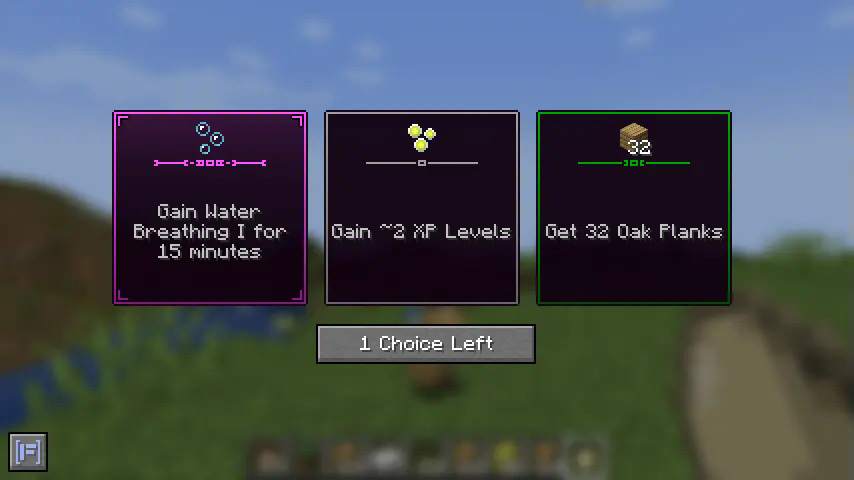
Available Versions
How to Install Lootables on Your Server
Order Server
Order a Minecraft Java server with at least 3 GB RAM (4 GB recommended).
Set fabric Loader
In the panel under "Egg", select the fabric loader and matching Minecraft version (1.21.1).
Install Mod
Open the mod browser in the dashboard and search for "Lootables". Click "Install" – done! Alternatively, upload the .jar via SFTP to the /mods folder.
Compatibility
Mod Loaders
Minecraft Versions
1.21.1, 1.21
Server-side
✓ RequiredRecommended RAM
4 GB(min. 3 GB)Frequently Asked Questions
Lootables server crashes on startup – what to do?
Most common cause: wrong fabric version or insufficient RAM. Check the server log (latest.log) for "OutOfMemoryError" or "Mixin" errors. With Mado Hosting: ensure at least 3 GB RAM is allocated and the loader matches the mod version (1.21.1). You can switch loaders with one click in the panel.
Is Lootables compatible with fabric and neoforge?
Lootables officially supports fabric, neoforge for Minecraft 1.21.1, 1.21. The Mado dashboard automatically detects incompatible loader combinations.
Server lagging with Lootables – how to optimize performance?
Recommended RAM: 4 GB (per 8 players). Use /spark profiler to check if Lootables consumes the most tick time. Common fixes: reduce server view-distance to 8-10, install "performant" or "starlight" as supplementary mods on Forge. With Mado Hosting, your server runs on NVMe SSDs with dedicated CPU cores for minimal latency.
Similar Mods




Rent Modded Server
Install Lootables with just one click on your server.