
Mailbox
Add mailboxes to your world to easily communicate with your friends
Screenshots
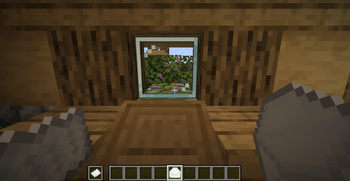
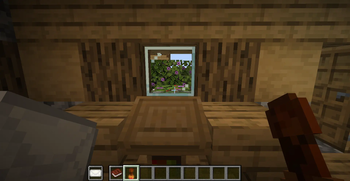
About this Mod
Send mail to your friend to easily communicate with them.
This datapack add 5 new items to allow you and your friends to exchange informations even if your are not connected at the same time :
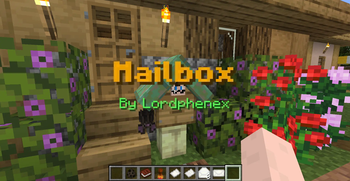
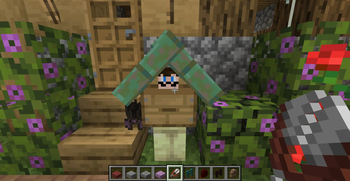
- The Mailbox : place this new block wherever you want in the world. You will receive your mails here. When installing your first mailbox, you will need to register yourself to the postal office by using a default stamp on the box.
The bat hanging from your mailbox will allow you to send mail across the server. However, bats can only transport mails that have been sealed by using a registered stamp.
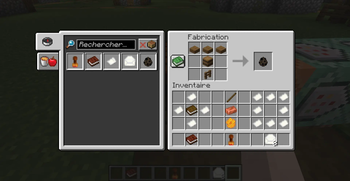
Mailboxes can be customised by changing their stand and roof material (any fence/wall block and any slab) by right clicking their stand with the desired material in hand. To reset their default appearance, you can use shears - The Stamp : craft this item with a stick, a copper ingot and some honeycomb. It will allow you to 1) register your mailbox ; 2) ensure to your friends that the mail is coming from you. This item cannot be used by other players once you register it (right click on your mailbox)
Right click with it while holding a filled envelope in your offhand to stamp it. Using a default stamp will result in an anonymous mail. Anonymous mail cannot be given to bats but can be put directly inside mailboxes - The Letter paper : needed to write your letters. Use it like a default writable book
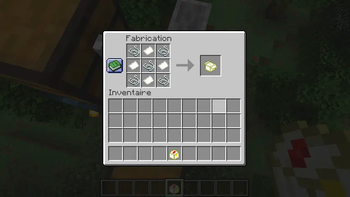
- The Envelope : needed to keep your letters safe when sending them across the server. Right click with the envelope while holding a letter in your offhand to put it inside the envelope
- The Stamp book : needed to choose to whom you will send the mail. Mails can also be put directly in your friends mailbox with no need of the stamp book
Available Versions
How to Install Mailbox on Your Server
Order Server
Order a Minecraft Java server with at least 3 GB RAM (4 GB recommended).
Set datapack Loader
In the panel under "Egg", select the datapack loader and matching Minecraft version (26.2-pre-4).
Install Mod
Open the mod browser in the dashboard and search for "Mailbox". Click "Install" – done! Alternatively, upload the .jar via SFTP to the /mods folder.
Compatibility
Mod Loaders
Minecraft Versions
26.2-pre-4, 26.2-snapshot-7, 26.1.2 (+16 more)
Server-side
✓ RequiredRecommended RAM
4 GB(min. 3 GB)Frequently Asked Questions
Mailbox server crashes on startup – what to do?
Most common cause: wrong datapack version or insufficient RAM. Check the server log (latest.log) for "OutOfMemoryError" or "Mixin" errors. With Mado Hosting: ensure at least 3 GB RAM is allocated and the loader matches the mod version (26.2-pre-4). You can switch loaders with one click in the panel.
Is Mailbox compatible with datapack and fabric and forge and neoforge and quilt?
Mailbox officially supports datapack, fabric, forge, neoforge, quilt for Minecraft 26.2-pre-4, 26.2-snapshot-7, 26.1.2. Note: Forge and Fabric mods are NOT cross-compatible – pick one loader and stick with it. The Mado dashboard automatically detects incompatible loader combinations.
Server lagging with Mailbox – how to optimize performance?
Recommended RAM: 4 GB (per 8 players). Use /spark profiler to check if Mailbox consumes the most tick time. Common fixes: reduce server view-distance to 8-10, install "performant" or "starlight" as supplementary mods on Forge. With Mado Hosting, your server runs on NVMe SSDs with dedicated CPU cores for minimal latency.
Similar Mods

![[ETF] Entity Texture Features](https://cdn.modrinth.com/data/BVzZfTc1/af683d206d50b05258d865b0d6e4aa2f2cee12f2_96.webp)
![[EMF] Entity Model Features](https://cdn.modrinth.com/data/4I1XuqiY/6e5bbd0d06b1741bfdab6c0cfab6de8fdaf0064c_96.webp)



Rent Modded Server
Install Mailbox with just one click on your server.
Details
- License
- Creative Commons Attribution Non Commercial No Derivatives 4.0 International
- Server-side
- Required