Lost Cursor Fix
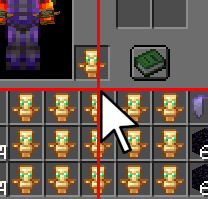
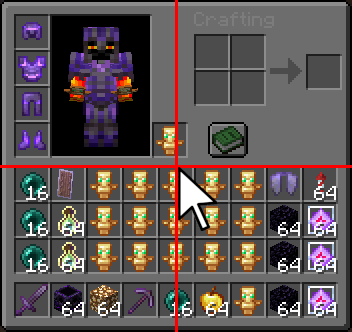
Fixes Minecraft's inconsistent inventory cursor position by automatically centering the mouse whenever an inventory screen is opened.
Screenshots
About this Mod

🎯 Lost Cursor Fix
Stop losing your mouse cursor.
Ever opened a chest or your inventory and had to search for your cursor first?
Vanilla Minecraft often places the mouse inconsistently when opening GUI screens — especially inventories, chests, furnaces, and other containers.
Lost Cursor Fix solves this by automatically centering your cursor every time a handled screen opens. Clean, simple, and seamless.
✨ Features
🎯 Perfect Cursor Centering
Automatically moves the mouse cursor to the exact center of the screen whenever an inventory GUI opens.
⚡ Easy Toggle Commands
Enable or disable the mod instantly with simple chat commands — no config menu needed.
🛠 Commands
| Command | Description |
|---|---|
/lcf toggle |
Toggle the mod on or off |
/lcf on |
Enable Lost Cursor Fix |
/lcf off |
Disable Lost Cursor Fix |
/lcf report |
Get the Discord support link |
Aliases:
/lostcursorfix toggle/lostcursorfix on/lostcursorfix off
📦 Compatibility
✅ Supported Versions
- Minecraft
1.21→1.21.11
🧪 Experimental Support
- Compatible with Fabric
26.x - Works with special/April Fools experimental releases
💻 Environment
- Client-side only
- Does not need to be installed on servers
💬 Support
Join our Discord for support, bug reports, or suggestions:
🌐 https://discord.gg/mP23dpVQ6V
🇩🇪 Lost Cursor Fix (Deutsch)
Schluss mit der Suche nach dem Mauszeiger.
Du öffnest eine Kiste oder dein Inventar — und dein Cursor ist plötzlich irgendwo am Bildschirmrand?
Minecraft positioniert den Mauszeiger in GUI-Menüs oft unzuverlässig und inkonsistent.
Lost Cursor Fix behebt dieses Problem, indem der Mauszeiger beim Öffnen eines Inventars automatisch exakt in die Bildschirmmitte gesetzt wird.
✨ Funktionen
🎯 Perfekte Zentrierung
Setzt den Mauszeiger automatisch in die Mitte des Bildschirms, sobald ein Inventar geöffnet wird.
⚡ Einfache Steuerung
Aktiviere oder deaktiviere die Mod jederzeit über praktische Chat-Befehle.
🛠 Befehle
| Befehl | Beschreibung |
|---|---|
/lcf toggle |
Mod ein-/ausschalten |
/lcf on |
Mod aktivieren |
/lcf off |
Mod deaktivieren |
/lcf report |
Discord-Supportlink anzeigen |
📦 Kompatibilität
✅ Unterstützte Versionen
- Minecraft
1.21bis1.21.11
🧪 Experimentelle Unterstützung
- Kompatibel mit Fabric
26.x - Unterstützt experimentelle/April-Fools-Versionen
💻 Installation
- Rein clientseitig
- Keine Serverinstallation erforderlich
💬 Support
Trete unserem Discord bei für Hilfe, Fehlerberichte oder Vorschläge:
🌐 https://discord.gg/mP23dpVQ6V
❓ Can I use this mod in a modpack? 📦
Of course! Please feel free to include this mod in your modpacks! 💜✨
You may:
- ✅ Use this mod in public and private modpacks
- ✅ Upload modpacks containing this mod to Modrinth, CurseForge, etc.
- ✅ Use it on servers and with friends
Just please:
- ❌ Do not reupload the mod itself
- ❌ Do not claim the mod as your own
Have fun! 🌟
Available Versions
How to Install Lost Cursor Fix on Your Server
Order Server
Order a Minecraft Java server with at least 3 GB RAM (4 GB recommended).
Set fabric Loader
In the panel under "Egg", select the fabric loader and matching Minecraft version (1.21.11).
Install Mod
Open the mod browser in the dashboard and search for "Lost Cursor Fix". Click "Install" – done! Alternatively, upload the .jar via SFTP to the /mods folder.
Compatibility
Mod Loaders
Minecraft Versions
1.21.11, 1.21.10, 1.21.9 (+9 more)
Server-side
✗ UnsupportedRecommended RAM
4 GB(min. 3 GB)Frequently Asked Questions
Lost Cursor Fix server crashes on startup – what to do?
Most common cause: wrong fabric version or insufficient RAM. Check the server log (latest.log) for "OutOfMemoryError" or "Mixin" errors. With Mado Hosting: ensure at least 3 GB RAM is allocated and the loader matches the mod version (1.21.11). You can switch loaders with one click in the panel.
Is Lost Cursor Fix compatible with fabric?
Lost Cursor Fix officially supports fabric for Minecraft 1.21.11, 1.21.10, 1.21.9. The Mado dashboard automatically detects incompatible loader combinations.
Server lagging with Lost Cursor Fix – how to optimize performance?
Recommended RAM: 4 GB (per 8 players). Use /spark profiler to check if Lost Cursor Fix consumes the most tick time. Common fixes: reduce server view-distance to 8-10, install "performant" or "starlight" as supplementary mods on Forge. With Mado Hosting, your server runs on NVMe SSDs with dedicated CPU cores for minimal latency.
Similar Mods




Rent Modded Server
Install Lost Cursor Fix with just one click on your server.