
LoTAS-Light
Tools for creating Tool-Assisted Speedruns in MC 1.21+
Screenshots
About this Mod
LoTAS-Light
Continuation of LoTAS for versions higher than 1.20.3, but with a reduced feature set
Needs Fabric-API
Why remove features?
- Updating LoTAS to new versions was always very tedious due to the large feature set… Testing and verifying each feature was hard and with Mojangs faster release schedule, we could not keep up (especially if Mojang rewrites everything between minor versions)
- Mojang patched a lot of things, so LoTAS's features would be reduced either way
Features
Improved /tick command
/tick ratesupports tickrates lower than 1- A second
/tick freezeby simply typing/tick rate 0, which also freezes the player - Tickrates higher than 20 also affect the player
Tickrate keybinds
Same deal as LoTAS
.increases the tickrate,decreases the tickrateF8toggles/tick rate 0F9advances 1 tick while the game is frozen
Savestates
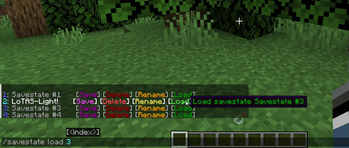
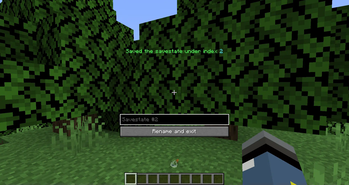
/savestatecommand for "quicksaving" and "quickloading" a minecraft worldJandKfor saving and loading respectively
Item Duplication
- Press Pause to save the game with the item in your inventory
- Throw out the item out of your inventory or put it in a chest
- Press
O - Rejoin the world
Config
/lotaslightfor changing the config
No Multiplayer support!!
The reason why this mod doesn't support multiplayer is simply: Savestates.
Basically Mojang never intended a quickloading feature, so to load a different world,
it is intended that you stop the Minecraft server (Imagine restarting and reconnecting to the server for every savestate).
Changing this requires a lot of work, more than I am willing to put into this mod.
If you want to see (somewhat) working multiplayer savestates, check out TASmod
Translations
Help translate this mod with Weblate
Contributions
- Chinese Simplified
- Blom
- BoredYukolin
- JustaSqu1d
- French
- Elvee
- German
- ScribbleTAS
- Italian
- LeoAnimates
- Japanese
- Naruyoko
- Korean
- swwgdxed
- LOLCAT
- ScribbleTAS
- Polish
- 4NTJ
- NULLderef
Bug reports and TASing help
Bugs can preferably reported on GitHub, but you can also use Discord, where we also provide help!
Available Versions
How to Install LoTAS-Light on Your Server
Order Server
Order a Minecraft Java server with at least 3 GB RAM (4 GB recommended).
Set fabric Loader
In the panel under "Egg", select the fabric loader and matching Minecraft version (26.1.2).
Install Mod
Open the mod browser in the dashboard and search for "LoTAS-Light". Click "Install" – done! Alternatively, upload the .jar via SFTP to the /mods folder.
Compatibility
Mod Loaders
Minecraft Versions
26.1.2, 26.1.1, 26.1 (+16 more)
Server-side
✓ RequiredRecommended RAM
4 GB(min. 3 GB)Frequently Asked Questions
LoTAS-Light server crashes on startup – what to do?
Most common cause: wrong fabric version or insufficient RAM. Check the server log (latest.log) for "OutOfMemoryError" or "Mixin" errors. With Mado Hosting: ensure at least 3 GB RAM is allocated and the loader matches the mod version (26.1.2). You can switch loaders with one click in the panel.
Is LoTAS-Light compatible with fabric?
LoTAS-Light officially supports fabric for Minecraft 26.1.2, 26.1.1, 26.1. The Mado dashboard automatically detects incompatible loader combinations.
Server lagging with LoTAS-Light – how to optimize performance?
Recommended RAM: 4 GB (per 8 players). Use /spark profiler to check if LoTAS-Light consumes the most tick time. Common fixes: reduce server view-distance to 8-10, install "performant" or "starlight" as supplementary mods on Forge. With Mado Hosting, your server runs on NVMe SSDs with dedicated CPU cores for minimal latency.
Similar Mods




![[ETF] Entity Texture Features](https://cdn.modrinth.com/data/BVzZfTc1/af683d206d50b05258d865b0d6e4aa2f2cee12f2_96.webp)
![[EMF] Entity Model Features](https://cdn.modrinth.com/data/4I1XuqiY/6e5bbd0d06b1741bfdab6c0cfab6de8fdaf0064c_96.webp)
Rent Modded Server
Install LoTAS-Light with just one click on your server.