
Lotus Blooms
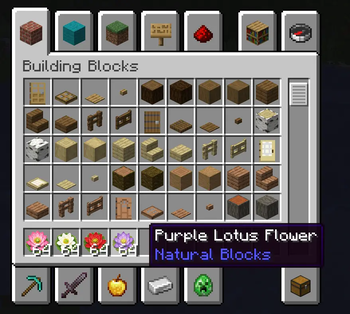
Decorate ponds, gardens, and waterside builds with detailed 3D pink, white, red, and purple lotus flowers.
Screenshots





About this Mod
Lotus Blooms
Bring peaceful color and life to your Minecraft waterscapes with Lotus & Pond, a lightweight decorative Fabric mod featuring beautifully modeled lotus flowers for ponds, gardens, courtyards, temples, and nature-inspired builds.
Whether you are creating a quiet garden pond, an elegant courtyard water feature, or an atmospheric lakeside landscape, these lotus flowers provide a simple way to add natural detail and charm to your world.
Available Lotus Flowers
Choose from four decorative lotus flower variants:
- Pink Lotus Flower — soft and classic, perfect for natural ponds and gardens
- White Lotus Flower — clean and elegant, suitable for peaceful or temple-inspired builds
- Red Lotus Flower — vivid and eye-catching, adding warmth and contrast to your water features
- Purple Lotus Flower — gentle and dreamy, ideal for magical or atmospheric landscapes
Features
- Four decorative lotus flower variants: Pink, White, Red, and Purple
- Refined 3D lotus flower models created with Blockbench
- Can be placed on both land and water
- Custom inventory icons for clear and attractive item display
- English and Simplified Chinese language support
- Lightweight decorative content designed for building and landscaping
- Convenient command for quickly obtaining all lotus variants in Creative building
Great For
Lotus flowers are designed to complement:
- Garden ponds
- Courtyard water features
- Temples and Asian-inspired builds
- Lakes, rivers, and wetlands
- Nature-themed landscapes
- Peaceful, fantasy, or decorative builds
Commands
With cheats enabled or sufficient command permissions, you can quickly obtain all lotus flowers using:
/lotus_give_all
This command gives you 64 of each lotus flower variant.
You can also obtain each lotus flower individually:
/give @s lotusmod:lotus_flower 64
/give @s lotusmod:white_lotus_flower 64
/give @s lotusmod:red_lotus_flower 64
/give @s lotusmod:purple_lotus_flower 64
Visual Settings Notice
For the best visual appearance when viewing lotus flowers from a distance, it is recommended to set:
Options → Video Settings → Mipmap Levels → OFF
When Mipmap Levels are enabled, lotus textures may appear blurry or display unusual visual patterns at a distance.
Requirements
- Minecraft: 26.1.2
- Mod Loader: Fabric
- Required Dependency: Fabric API
Feedback
Thank you for trying Lotus & Pond!
Suggestions, bug reports, feedback, and screenshots of your builds are always welcome in the comments. I hope these lotus flowers help make your ponds, gardens, and landscapes feel more peaceful and beautiful.
Disclaimer
NOT AN OFFICIAL MINECRAFT PRODUCT. NOT APPROVED BY OR ASSOCIATED WITH MOJANG OR MICROSOFT.
Available Versions
How to Install Lotus Blooms on Your Server
Order Server
Order a Minecraft Java server with at least 3 GB RAM (4 GB recommended).
Set fabric Loader
In the panel under "Egg", select the fabric loader and matching Minecraft version (26.1.2).
Install Mod
Open the mod browser in the dashboard and search for "Lotus Blooms". Click "Install" – done! Alternatively, upload the .jar via SFTP to the /mods folder.
Compatibility
Mod Loaders
Minecraft Versions
26.1.2
Server-side
✓ RequiredRecommended RAM
4 GB(min. 3 GB)Frequently Asked Questions
Lotus Blooms server crashes on startup – what to do?
Most common cause: wrong fabric version or insufficient RAM. Check the server log (latest.log) for "OutOfMemoryError" or "Mixin" errors. With Mado Hosting: ensure at least 3 GB RAM is allocated and the loader matches the mod version (26.1.2). You can switch loaders with one click in the panel.
Is Lotus Blooms compatible with fabric?
Lotus Blooms officially supports fabric for Minecraft 26.1.2. The Mado dashboard automatically detects incompatible loader combinations.
Server lagging with Lotus Blooms – how to optimize performance?
Recommended RAM: 4 GB (per 8 players). Use /spark profiler to check if Lotus Blooms consumes the most tick time. Common fixes: reduce server view-distance to 8-10, install "performant" or "starlight" as supplementary mods on Forge. With Mado Hosting, your server runs on NVMe SSDs with dedicated CPU cores for minimal latency.
Similar Mods

![[ETF] Entity Texture Features](https://cdn.modrinth.com/data/BVzZfTc1/af683d206d50b05258d865b0d6e4aa2f2cee12f2_96.webp)
![[EMF] Entity Model Features](https://cdn.modrinth.com/data/4I1XuqiY/6e5bbd0d06b1741bfdab6c0cfab6de8fdaf0064c_96.webp)



Rent Modded Server
Install Lotus Blooms with just one click on your server.