
LPCTools
Le_Petit_C's client side mod, a versatile client-side utility mod offering a bunch of automated tools, all highly configurable for efficiency and convenience.
Screenshots
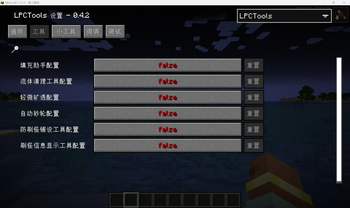
About this Mod
Description generated by Deepseek-R1 based on project configurations.
LPCTools - Your Essential Client-Side Automation, Utility & Control Suite
LPCTools is a powerful and highly configurable pure client-side utility mod designed to streamline and enhance your Minecraft experience through intelligent automation, improved information visualization, and refined controls. As part of the popular "masa mod family" ecosystem, it requires Malilib and integrates seamlessly with Litematica and MiniHUD.
Experience Enhanced Efficiency, Insight, and Precision:
Automate tedious tasks, gain critical insights into your world, prevent costly mistakes, and enjoy smoother controls – all customizable to fit your playstyle.
Core Features & Their Benefits:
Filling Assistant (FA):
Automatically detects and fills gaps in terrain or structures (like holes in the ground or walls) with blocks from your inventory. Saves immense time during building, terraforming, and repairs. Liquid Cleaner (LC): Efficiently removes water or lava within an area by strategically placing designated blocks. Massively speeds up large-scale draining projects (ocean monuments, nether lava lakes).
Anti Spawner (AS):
Places covering blocks (slabs, carpets, etc.) automatically over spawnable surfaces to prevent hostile mob spawning. Effortlessly creates safe building zones and perimeters.
Slight X-Ray (SX):
Safely highlights valuable ores (configurable) that are exposed to air or adjacent to recently broken blocks, using client-side rendering without modifying server data. Helps locate valuable resources you might otherwise miss during mining or large excavations, reducing frustration and loss - designed to be compliant and avoid cheat detection.
Auto Grindstone (AG):
Quickly removes unwanted enchantments from items based on a configurable list. Streamlines gear management and item preparation. Spawnable Area Visualizer (Can Spawn XRay - CS): Clearly marks blocks within a range that meet spawning conditions (light level, block type, etc.). Essential for designing efficient mob farms and ensuring areas are adequately lit.
Break Restriction (BR):
Protects critical structures or specific blocks by intelligently restricting player break operations (currently focused on block destruction). Define allowed/disallowed areas using MiniHUD shapes or Litematica schematics, or create block whitelists/blacklists. Prevents accidental destruction of builds, machines, or valuable blocks. (Functionality scope may expand in future development).
Additional Utilities & Tweaks:
Happy Ghast Riding Tweak:
Improves vertical controls when riding Happy Ghast entities, using sneak/jump keys for intuitive up/down movement.
Locator Points Display:
Shows locator point information conveniently on the XP or jump bar.
Block Replace Hotkey:
Assign a dedicated key to mimic the "replace block" action (simultaneous left and right mouse clicks), streamlining building tasks.
Reach Distance Adjustment:
Reach-Distance configured tools only iterates and perform operations within the distance.
Operation Speed Limiter:
Prevents getting kicked from servers due to excessive actions by throttling tool operation rates.
Independent Thread Pool:
Improves performance and prevents lag spikes caused by tools by utilizing a dedicated thread pool.
Extensive Block/Item Lists:
Highly customizable whitelists and blacklists for tools (placeable items, passable blocks, restricted blocks, enchantments, etc.).
Rich Configuration:
Deep control over every aspect of each tool via a comprehensive in-game GUI (powered by Malilib), including specialized settings for pathfinding, rendering, and area limiting.
Why Choose LPCTools?
LPCTools delivers tangible benefits:
Massive Time Savings: Automate repetitive building, draining, suppression, and disenchanting tasks. Reduced Frustration: Find resources easier, prevent accidental breaks, manage mobs effectively, and optimize controls. Enhanced Game Insight: Visualize spawning areas and safely highlight nearby ores. Superior Precision & Safety: Tailor break restrictions and tool behavior with fine-grained control. Seamless Integration: Works perfectly within the established and trusted "masa mod" framework. Install LPCTools today and transform your Minecraft client into a smarter, more efficient, more informative, and more controlled toolset!
Requirements:
Minecraft (Specific compatible versions listed on the project page under Game Versions) Malilib (Required) Litematica / MiniHUD (Highly recommended for full feature utilization, especially Block Break Restriction area limiting and Spawnable Area Visualizer shapes)
Disclaimer:
This mod is intended solely for use on Minecraft servers that explicitly permit auxiliary tools (e.g., HVH servers, certain survival technical servers). Adherence to individual server rules is mandatory, and its use in competitive scenarios is strictly prohibited. Use of this mod is at your own risk; the developer assumes no liability for any consequences arising from its usage.
Available Versions
How to Install LPCTools on Your Server
Order Server
Order a Minecraft Java server with at least 3 GB RAM (4 GB recommended).
Set fabric Loader
In the panel under "Egg", select the fabric loader and matching Minecraft version (26.1.2).
Install Mod
Open the mod browser in the dashboard and search for "LPCTools". Click "Install" – done! Alternatively, upload the .jar via SFTP to the /mods folder.
Compatibility
Mod Loaders
Minecraft Versions
26.1.2, 26.1.1, 26.1 (+19 more)
Server-side
✗ UnsupportedRecommended RAM
4 GB(min. 3 GB)Frequently Asked Questions
LPCTools server crashes on startup – what to do?
Most common cause: wrong fabric version or insufficient RAM. Check the server log (latest.log) for "OutOfMemoryError" or "Mixin" errors. With Mado Hosting: ensure at least 3 GB RAM is allocated and the loader matches the mod version (26.1.2). You can switch loaders with one click in the panel.
Is LPCTools compatible with fabric?
LPCTools officially supports fabric for Minecraft 26.1.2, 26.1.1, 26.1. The Mado dashboard automatically detects incompatible loader combinations.
Server lagging with LPCTools – how to optimize performance?
Recommended RAM: 4 GB (per 8 players). Use /spark profiler to check if LPCTools consumes the most tick time. Common fixes: reduce server view-distance to 8-10, install "performant" or "starlight" as supplementary mods on Forge. With Mado Hosting, your server runs on NVMe SSDs with dedicated CPU cores for minimal latency.
Similar Mods




![[ETF] Entity Texture Features](https://cdn.modrinth.com/data/BVzZfTc1/af683d206d50b05258d865b0d6e4aa2f2cee12f2_96.webp)
![[EMF] Entity Model Features](https://cdn.modrinth.com/data/4I1XuqiY/6e5bbd0d06b1741bfdab6c0cfab6de8fdaf0064c_96.webp)
Rent Modded Server
Install LPCTools with just one click on your server.