
Let RP come back here
Make old versions compatible with 1.21.9 mcmeta.
Screenshots
About this Mod
Let RP come back here
When the RP author is only compatible with the new metadata format and the older version cannot read the RP, it will automatically interpolate the metadata to enable it to be loaded again.
If the RP author clearly states that his RP no longer supports older versions, but you still load his RP through this mod and an error occurs, please do not report it to the RP author, as this will only cause them more trouble.
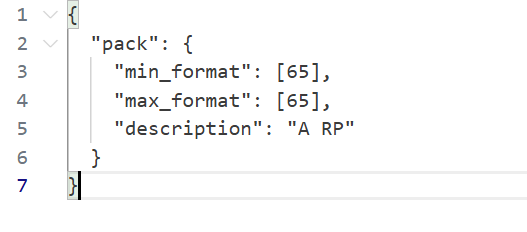
Example
Such RPs can be loaded in 1.21.9 (since pack_format is now optional), but if you need to load them in 1.21.8, you will need to manually modify the mcmeta file and add pack_format back in. This is obviously not practical if you have a lot of resource packs that need to be modified.
Once you have verified that these RPs can be used in older versions without too many errors (or no errors at all), you only need to manually add value for them. This mod does this for you automatically.
It will automatically generate the following fields according to the new mcmeta format of 1.21.9 when they are not detected:
pack_formatsupported_formats
For Modpack
If you comply with the license, you can use it freely for Modpack.
Modpacks that redistribute Minecraft game body (i.e. packages that package the entire Minecraft game including Mod files, Config, ShaderPacks, ResourcePacks, Library and launcher into a whole zip file) are not allowed to use this mod.
License
This work has a restrictive license in addition to the original license to prevent some unexpected behavior,
see 404Setup Public License
Available Versions
How to Install Let RP come back here on Your Server
Order Server
Order a Minecraft Java server with at least 3 GB RAM (4 GB recommended).
Set fabric Loader
In the panel under "Egg", select the fabric loader and matching Minecraft version (1.21.8).
Install Mod
Open the mod browser in the dashboard and search for "Let RP come back here". Click "Install" – done! Alternatively, upload the .jar via SFTP to the /mods folder.
Compatibility
Mod Loaders
Minecraft Versions
1.21.8, 1.21.7, 1.21.6 (+2 more)
Server-side
✗ UnsupportedRecommended RAM
4 GB(min. 3 GB)Frequently Asked Questions
Let RP come back here server crashes on startup – what to do?
Most common cause: wrong fabric version or insufficient RAM. Check the server log (latest.log) for "OutOfMemoryError" or "Mixin" errors. With Mado Hosting: ensure at least 3 GB RAM is allocated and the loader matches the mod version (1.21.8). You can switch loaders with one click in the panel.
Is Let RP come back here compatible with fabric and forge and neoforge and quilt?
Let RP come back here officially supports fabric, forge, neoforge, quilt for Minecraft 1.21.8, 1.21.7, 1.21.6. Note: Forge and Fabric mods are NOT cross-compatible – pick one loader and stick with it. The Mado dashboard automatically detects incompatible loader combinations.
Server lagging with Let RP come back here – how to optimize performance?
Recommended RAM: 4 GB (per 8 players). Use /spark profiler to check if Let RP come back here consumes the most tick time. Common fixes: reduce server view-distance to 8-10, install "performant" or "starlight" as supplementary mods on Forge. With Mado Hosting, your server runs on NVMe SSDs with dedicated CPU cores for minimal latency.
Similar Mods


Rent Modded Server
Install Let RP come back here with just one click on your server.