
Lucium
Fixes and utilities originating in Yttr.
Screenshots

About this Mod
Lucium was the proposed name for an alleged new element found by chemist Prosper Barrière in 1896 in the mineral monazite. Later, William Crookes confirmed that the new element was actually an impure sample of yttrium.
From Wikipedia, the free encyclopedia
Lucium is a small collection of "no-brainer" utilities originating in Yttr that I didn't want to tangle up into Fabrication. It's especially useful in dev environments and for debugging. (Fabrication currently doesn't work very well in dev environments.) For that reason, it's also available via the Sleeping Town Maven:
repositories {
	maven {
		url 'https://repo.sleeping.town'
		content {
			includeGroup 'com.unascribed'
		}
	}
}

dependencies {
	modRuntimeOnly "com.unascribed:lucium:1.1"
}
You can JIJ Lucium by wrapping it in include() if any of its fixes are important for your mod, such as the particle fix. Yttr does this because its Continuous Platforms look very bad without the particle fix.
Features
Fancy/Fast Particles Fix
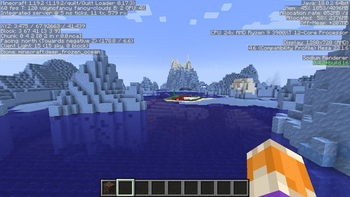
Lucium will render particles in two passes, similar to pre-1.15 versions, allowing particles to render behind translucent blocks even on Fancy and Fast graphics. Compatible with Sodium.
Debug World Fix
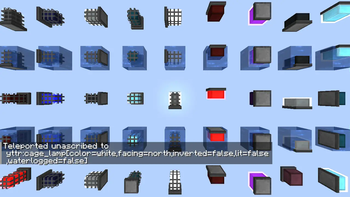
Lucium will fix the vanilla debug world to include all modded blockstates.
Customizable F3 Screen
Use Page Up and Page Down to tab through entries in the vanilla F3 screen. Home and End switch between the left and right sides, respectively. Press Delete to collapse the highlighted group of entries, and Insert to bring back the nearest one.
Smaller F3 Screen
Makes the F3 screen half the size, if the GUI scale is at least 3. (⅔ on GUI scales not divisible by 2. No effect on GUI scales not divisible by 3 or 2 — sorry, GUI Scale 5 users, but I can't do much with a prime number.)
More Tags In F3
Shows biome and entity tags in F3.
Commands
/l:dtp
Only available in debug worlds. Specify a blockstate to teleport there.
/l:goto
Requires operator or cheats. Teleports you to another dimension, putting you in a "logical" location automatically. Never /setblock ~ ~ ~ nether_portal again.
/l:devsetup
Runs the following commands:
/gamerule doTraderSpawning false/gamerule doPatrolSpawning false/gamerule doWeatherCycle false/gamerule doDaylightCycle false/time set 6000/weather clear 1000000
/l:wireframe
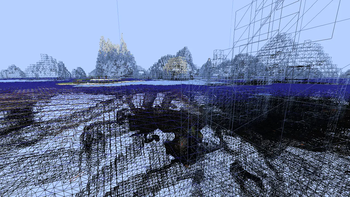
Requires Creative or Spectator mode. Switches the game's rendering to wireframe, for render debugging.
/l:profiler
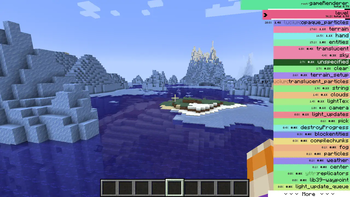
Opens a custom view for the vanilla profiler that's much more useful and easier to use.
Available Versions
How to Install Lucium on Your Server
Order Server
Order a Minecraft Java server with at least 3 GB RAM (4 GB recommended).
Set fabric Loader
In the panel under "Egg", select the fabric loader and matching Minecraft version (1.19.2).
Install Mod
Open the mod browser in the dashboard and search for "Lucium". Click "Install" – done! Alternatively, upload the .jar via SFTP to the /mods folder.
Compatibility
Mod Loaders
Minecraft Versions
1.19.2, 1.19.1
Server-side
~ OptionalRecommended RAM
4 GB(min. 3 GB)Frequently Asked Questions
Lucium server crashes on startup – what to do?
Most common cause: wrong fabric version or insufficient RAM. Check the server log (latest.log) for "OutOfMemoryError" or "Mixin" errors. With Mado Hosting: ensure at least 3 GB RAM is allocated and the loader matches the mod version (1.19.2). You can switch loaders with one click in the panel.
Is Lucium compatible with fabric and quilt?
Lucium officially supports fabric, quilt for Minecraft 1.19.2, 1.19.1. The Mado dashboard automatically detects incompatible loader combinations.
Server lagging with Lucium – how to optimize performance?
Recommended RAM: 4 GB (per 8 players). Use /spark profiler to check if Lucium consumes the most tick time. Common fixes: reduce server view-distance to 8-10, install "performant" or "starlight" as supplementary mods on Forge. With Mado Hosting, your server runs on NVMe SSDs with dedicated CPU cores for minimal latency.
Similar Mods




![[ETF] Entity Texture Features](https://cdn.modrinth.com/data/BVzZfTc1/af683d206d50b05258d865b0d6e4aa2f2cee12f2_96.webp)
![[EMF] Entity Model Features](https://cdn.modrinth.com/data/4I1XuqiY/6e5bbd0d06b1741bfdab6c0cfab6de8fdaf0064c_96.webp)
Rent Modded Server
Install Lucium with just one click on your server.