
Lucky Block Cobblemon
This mod adds Lucky Blocks to Cobblemon, with 100% configurable events via JSON.
Screenshots

About this Mod
LuckyBlock Cobblemon
Adds Lucky Blocks that spawn random Cobblemon, items, or special structures. Break and discover!
Perfect for Survival Gamemode!
The mod implements a distinctive survival progression system: as in-game days advance, the Cobblemon levels in the events increase, keeping the experience consistently challenging and engaging. (This is the default option, but you can adjust it in the config file.)
Main Features & Highlights

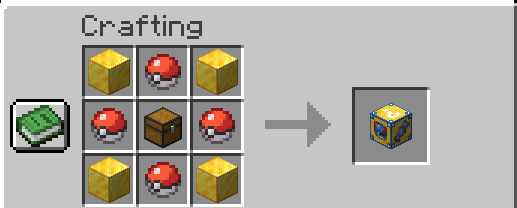
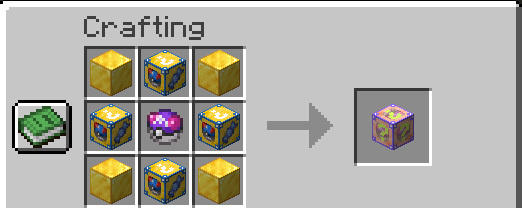
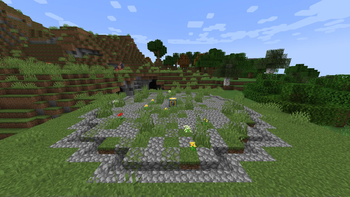
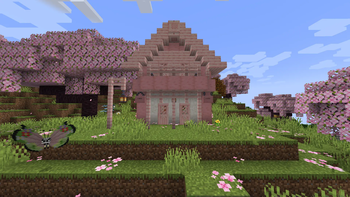
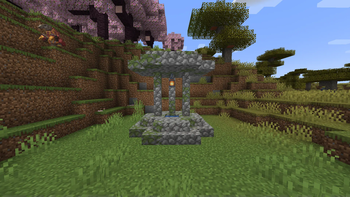
Find exclusive Lucky Block structures scattered across your world or craft your own Lucky Blocks (regular and legendary).
You can also discover naturally spawned Lucky Blocks throughout new chunks as you explore!
Experience full integration with the Cobblemon universe, earning themed items, rare Cobblemons, and even special structures — all easily customizable through simple JSON files.
Features
100% customizable event pools: Easily edit or add events (drops, Pokémon, Cobblemon items, or structures) directly through the JSON in the /config/luckblockcobblemon/ folder.
Craftable Lucky Blocks: Both the regular and legendary versions can be crafted.
Configurable shiny chance system: Set the shiny Pokémon chance directly in the JSON.
Advanced level progression: Choose between three ways to define the Pokémon level:
Fixed range (minLevel/maxLevel)
Scaling based on world days (timeLeveling) - Default option - /time set 0 (reset the scaling)
Weighted probability distribution (levelWeighting)
Multi-Pokémon events: Spawn multiple Cobblemons in a single event, if you wish.
Weighted structure generation: Events can generate different structures, each with its own weight/chance in the pool.
Configurable Break Event in Creative Gamemode: Define whether Lucky Blocks can be activated when broken in creative mode (breakCreative).
Instant config reload: Use a command to reload all Lucky Block configs without restarting the game/server.
Multiplayer-ready, easy to update and expand.
How does it work in practice?
Break a Lucky Block and a random event happens according to your configured pool.
You can get anything from simple drops to structure generation, Cobblemon item drops, or Pokémon spawns with shiny chance.
Pokémon levels can be fixed, based on world time, or weighted by chance, as you decide in the files:
luckpocket_config.json (Standard Lucky Block)
luckyblock_legendary.json (Legendary Lucky Block)
lvlconfig_types.json (only defines level logic for specific types; the Cobblemons themselves are defined in each event file)
Customize everything by editing the JSON files in /config/luckblockcobblemon/.
Attention: Always use the correct Pokémon names as per Cobblemon, without underscores (example: nidoranm).
The handler already normalizes most formats, but it's always recommended to check accepted names in the Cobblemon mod.
Example configuration
To set the level and which Cobblemons can appear when breaking a standard Lucky Block, open luckpocket_config.json and set it up like this:
{
"type": "random_cobblemonp",
"species": ["pikachu", "bulbasaur"],
"minLevel": 5,
"maxLevel": 15,
"chance": 10.0
}
In this example, any Cobblemon chosen in this event will spawn between level 5 and level 15.
You can apply this pattern in luckpocket_config.json and luckyblock_legendary.json.
The lvlconfig_types.json file only sets the level logic, while Cobblemons are defined in each event’s JSON file.
If you want a fixed level, just set "minLevel" and "maxLevel" to the same value.
Installation
Requirements:
Minecraft 1.21.1
Fabric Loader 0.16.13+
Cobblemon 1.6.0+
Fabric API
How to install:
Place the mod .jar in the mods/ folder.
Start Minecraft to generate the config files.
Customize pools, events, and chances in the JSON files.
(Optional but recommended) Use model datapacks to enhance the visual variety of Cobblemon! See suggestions below.
Main Commands
Reload configs:/luckyblock reload
Instantly reloads all Lucky Block configs.
Locate Lucky Block structures:
/locate structure luckblockcobblemon:luckblockrandom1/locate structure luckblockcobblemon:luckblockrandom2/locate structure luckblockcobblemon:luckblockrandom3/locate structure luckblockcobblemon:luckblockrandom4/luckyblocklocate [range]
Use these to quickly find the mod’s special structures.
Locked Tier Lucky Blocks:
/luckyblockgive <target> <type> <tier> [amount]
Gives locked-tier Lucky Blocks directly to players. These blocks keep their fixed Pokémon level range based on the selected tier.
Available types:
default, fire, water, grass, ground, fly, steel, eletric, fairy
Default aliases:
default, normal, base, pocket
Examples:
/luckyblockgive @s default 3 5/luckyblockgive Steve fire 4 2/luckyblockgive @a water 2 10
These commands require admin/operator permission.
Extra Recommendation – Model Datapacks
For an even richer and more immersive experience, we recommend using custom model datapacks to expand the variety of Cobblemon and items.
Check the Cobblemon community on Discord or sites like Modrinth to find and download model packs, increasing the number of Cobblemons with unique models!
FAQ
Can I create my own Lucky Block Cobblemon?
No, the mod allows you to change pools/events for existing Lucky Blocks, but not add new types.
How do I change Cobblemon levels?
Edit the config files according to the event type.
Why doesn’t my event work?
Make sure the JSON is correct and the Cobblemon name matches Cobblemon IDs (no underscores).
Does it work on Forge?
No, only for Fabric.
Can I create content or a modpack with this mod?
Yes! You’re absolutely welcome to create content or a modpack using this mod. We love seeing the community get creative!
Lucky Block Cobblemon is not affiliated with Cobblemon nor Minecraft.
Minecraft is a trademark of Mojang Synergies AB | Cobblemon is a trademark of CobbledStudios
Available Versions
How to Install Lucky Block Cobblemon on Your Server
Order Server
Order a Minecraft Java server with at least 3 GB RAM (4 GB recommended).
Set fabric Loader
In the panel under "Egg", select the fabric loader and matching Minecraft version (1.21.11).
Install Mod
Open the mod browser in the dashboard and search for "Lucky Block Cobblemon". Click "Install" – done! Alternatively, upload the .jar via SFTP to the /mods folder.
Compatibility
Mod Loaders
Minecraft Versions
1.21.11, 1.21.10, 1.21.9 (+8 more)
Server-side
✓ RequiredRecommended RAM
4 GB(min. 3 GB)Frequently Asked Questions
Lucky Block Cobblemon server crashes on startup – what to do?
Most common cause: wrong fabric version or insufficient RAM. Check the server log (latest.log) for "OutOfMemoryError" or "Mixin" errors. With Mado Hosting: ensure at least 3 GB RAM is allocated and the loader matches the mod version (1.21.11). You can switch loaders with one click in the panel.
Is Lucky Block Cobblemon compatible with fabric?
Lucky Block Cobblemon officially supports fabric for Minecraft 1.21.11, 1.21.10, 1.21.9. The Mado dashboard automatically detects incompatible loader combinations.
Server lagging with Lucky Block Cobblemon – how to optimize performance?
Recommended RAM: 4 GB (per 8 players). Use /spark profiler to check if Lucky Block Cobblemon consumes the most tick time. Common fixes: reduce server view-distance to 8-10, install "performant" or "starlight" as supplementary mods on Forge. With Mado Hosting, your server runs on NVMe SSDs with dedicated CPU cores for minimal latency.
Similar Mods




Rent Modded Server
Install Lucky Block Cobblemon with just one click on your server.