
Lumi's Lots
Backports and reworks modern features while adding new features to 1.7.10.
Screenshots
About this Mod
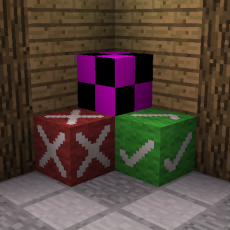
Lumi's Lots
Just things I deemed important enough to add.
Backports and reworks modern features while adding new features to 1.7.10.
Features
Backported/Reworked Features
-
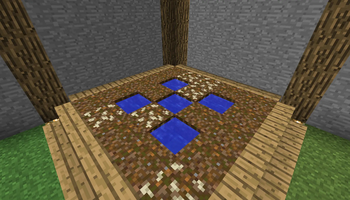
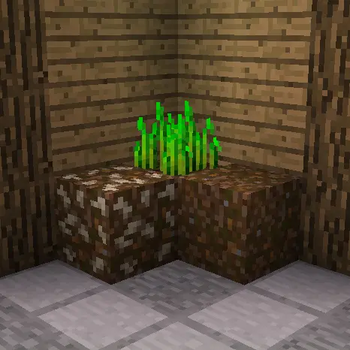
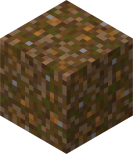
Composting Dirt
Crafted from dirt and eight compostable items.
ID:lumis_lots:composting_dirt
-
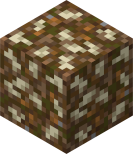
Composted Dirt
A result of letting composting dirt sit.
ID:lumis_lots:composted_dirt
-
Hoes Breaking Leaves
Hoes now break leaves at various speeds depending on material type -
Meta Key Copy/Pasting
You can now use the left and right meta key (⌘ on macOS) for copy, cutting, selecting all, and pasting -
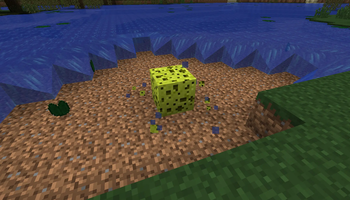
Sponge Functionality
Sponges can now be found in the creative inventory and have complete functionality. Obtainable by fishing
New Features
-
Inventory Movement
Allows the user to move within most GUIs -
No Music Cooldown
Removes the cooldown between music tracks -
Wither Bones
Dropped from wither skeletons and can be crafted into wither bonemeal
ID:lumis_lots:wither_bone

-
Wither Bonemeal
Crafted from wither bones and can be used to de-age plants, clear grass/flowers from an area, or turn plants into bushes
ID:lumis_lots:wither_bonemeal

-
Deepslate Cobblestone Generators (EtFuturum necessary)
Makes cobblestone/stone generators produce their deepslate equivalent at Y=22 and below
Gameplay guide
Compost
Composting dirt can be crafted by placing eight compostable items around a block of dirt. Once placed down it will begin to age into composted dirt, a process which can be sped up by placing a water source nearby. Once aged into composted dirt it can be broken to drop 3-5 bonemeal and a block of dirt. If you're using fortune bonemeal drops follow the formula Drop rate = Y * ⌊1.5 * Fortune level⌋, Y ∈ {3, 4, 5}.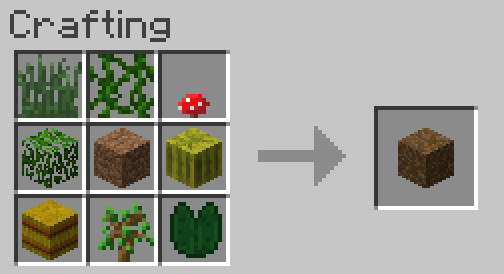
Compostable items
- Apples,
- Baked Potatoes,
- Bread,
- Brown Mushrooms,
- Cacti,
- Eggs,
- Fish,
- Flowers,
- Grass,
- Hay Blocks,
- Leaves,
- Lily Pads,
- Melon Blocks,
- Melon Seeds,
- Melon Slices,
- Nether Wart,
- Potatoes,
- Pumpkins,
- Pumpkin Seeds,
- Raw Beefs,
- Raw Chickens,
- Raw Porkchops,
- Red Mushrooms,
- Rotten Flesh,
- Saplings,
- Sugar Cane,
- Vines,
- Wheat Seeds,
- Wheat
Wither Bones & Bonemeal
When killed a wither skeleton will drop wither bones following the formula Drop rate = Y + Looting level, Y ∈ {0, 1, 2, 3}. These bones can be crafted into wither bonemeal. When used on a crop it will reverse the crop's stage, opposite to bonemeal. When placed upon the ground it will remove nearby grass and flower. Finally, if used upon a plant it will either turn it to a bush or in the case of tall grass turn it to short grass. Another use is it can be a replacement for black dye in recipes.
How to use
Add this mod to your game's mods folder along with Unimixins 0.1.23 or greater.
Available Versions
How to Install Lumi's Lots on Your Server
Order Server
Order a Minecraft Java server with at least 3 GB RAM (4 GB recommended).
Set forge Loader
In the panel under "Egg", select the forge loader and matching Minecraft version (1.7.10).
Install Mod
Open the mod browser in the dashboard and search for "Lumi's Lots". Click "Install" – done! Alternatively, upload the .jar via SFTP to the /mods folder.
Compatibility
Mod Loaders
Minecraft Versions
1.7.10
Server-side
✓ RequiredRecommended RAM
4 GB(min. 3 GB)Frequently Asked Questions
Lumi's Lots server crashes on startup – what to do?
Most common cause: wrong forge version or insufficient RAM. Check the server log (latest.log) for "OutOfMemoryError" or "Mixin" errors. With Mado Hosting: ensure at least 3 GB RAM is allocated and the loader matches the mod version (1.7.10). You can switch loaders with one click in the panel.
Is Lumi's Lots compatible with forge?
Lumi's Lots officially supports forge for Minecraft 1.7.10. The Mado dashboard automatically detects incompatible loader combinations.
Server lagging with Lumi's Lots – how to optimize performance?
Recommended RAM: 4 GB (per 8 players). Use /spark profiler to check if Lumi's Lots consumes the most tick time. Common fixes: reduce server view-distance to 8-10, install "performant" or "starlight" as supplementary mods on Forge. With Mado Hosting, your server runs on NVMe SSDs with dedicated CPU cores for minimal latency.
Similar Mods

![[ETF] Entity Texture Features](https://cdn.modrinth.com/data/BVzZfTc1/af683d206d50b05258d865b0d6e4aa2f2cee12f2_96.webp)
![[EMF] Entity Model Features](https://cdn.modrinth.com/data/4I1XuqiY/6e5bbd0d06b1741bfdab6c0cfab6de8fdaf0064c_96.webp)



Rent Modded Server
Install Lumi's Lots with just one click on your server.