
LUMP: Less Ugly Mob Proofing
Adds a block that prevents mob spawns in a large area at night without torch spam. (sky light based)
Screenshots

About this Mod
LUMP aims to eradicate torch spam around your base,
without affecting your mob grinders or other farms.
It achieves this by adding a craftable block, called the Amethyst Beacon, which prevents mob spawns within its range, but only for blocks that would be otherwise safe during the day (it is skylight based).
This means:
✅ you only need to light up the interiors of your base
✅ your mob farms should still work (as long as they are dark)
✅ caves are still dangerous until you light them up
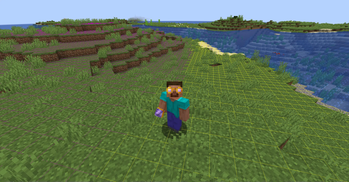
✨ This mod also includes a color-coded light overlay to see which blocks are spawnable and which are safe,
the overlay is always displayed when you have the fashionable Amethyst Goggles equipped on your head.
⛏️ This mod aims to be 100% survival friendly.
Added blocks & items
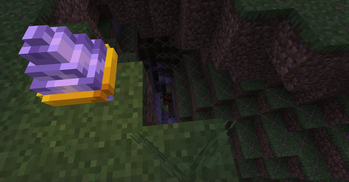
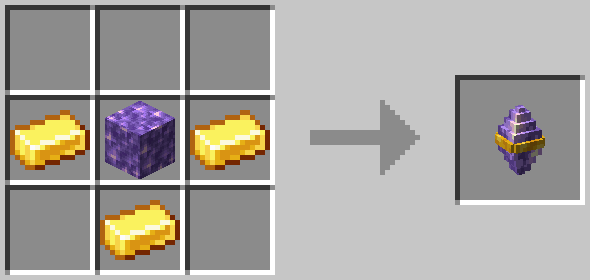
Amethyst Beacon

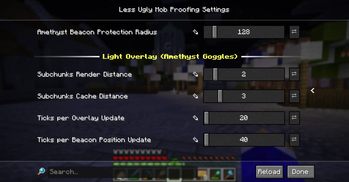
Prevents most hostile mob spawns within it's range of 128 blocks (horizontally) from where it is placed .
You can craft Amethyst Beacons from:
- 1 Block of Amethyst
- 3 Gold Ingots
Amethyst Goggles

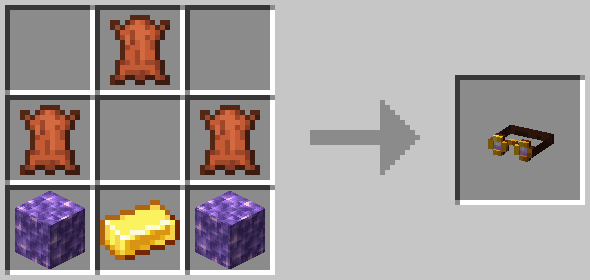
These goggles add a color-coded light overlay to the game, in an immersive & survival friendly way.
You can craft Amethyst Goggles from:
- 2 Blocks of Amethyst
- 3 pieces of Leather
- 1 Gold Ingot
They do not stack, but can be equipped on the head.
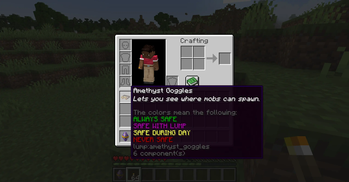
When advanced tooltips are enabled (F3 + H), the item shows the legend for the light overlay: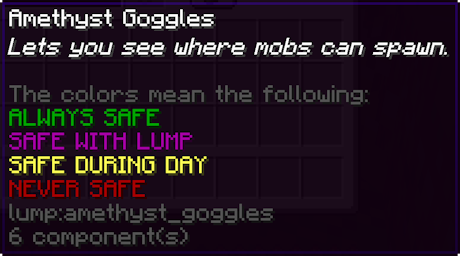
Additional Resources
For More Technical Details see: GitHub README
If you found a bug, or have a feature you think the mod is missing: Open An Issue
Available Versions
How to Install LUMP: Less Ugly Mob Proofing on Your Server
Order Server
Order a Minecraft Java server with at least 3 GB RAM (4 GB recommended).
Set fabric Loader
In the panel under "Egg", select the fabric loader and matching Minecraft version (26.1.2).
Install Mod
Open the mod browser in the dashboard and search for "LUMP: Less Ugly Mob Proofing". Click "Install" – done! Alternatively, upload the .jar via SFTP to the /mods folder.
Compatibility
Mod Loaders
Minecraft Versions
26.1.2, 26.1.1, 26.1 (+13 more)
Server-side
✓ RequiredRecommended RAM
4 GB(min. 3 GB)Frequently Asked Questions
LUMP: Less Ugly Mob Proofing server crashes on startup – what to do?
Most common cause: wrong fabric version or insufficient RAM. Check the server log (latest.log) for "OutOfMemoryError" or "Mixin" errors. With Mado Hosting: ensure at least 3 GB RAM is allocated and the loader matches the mod version (26.1.2). You can switch loaders with one click in the panel.
Is LUMP: Less Ugly Mob Proofing compatible with fabric?
LUMP: Less Ugly Mob Proofing officially supports fabric for Minecraft 26.1.2, 26.1.1, 26.1. The Mado dashboard automatically detects incompatible loader combinations.
Server lagging with LUMP: Less Ugly Mob Proofing – how to optimize performance?
Recommended RAM: 4 GB (per 8 players). Use /spark profiler to check if LUMP: Less Ugly Mob Proofing consumes the most tick time. Common fixes: reduce server view-distance to 8-10, install "performant" or "starlight" as supplementary mods on Forge. With Mado Hosting, your server runs on NVMe SSDs with dedicated CPU cores for minimal latency.
Similar Mods
![[EMF] Entity Model Features](https://cdn.modrinth.com/data/4I1XuqiY/6e5bbd0d06b1741bfdab6c0cfab6de8fdaf0064c_96.webp)


Rent Modded Server
Install LUMP: Less Ugly Mob Proofing with just one click on your server.