
Mace Window
A legal Fabric client HUD for mace PvP fall-charge timing, cooldown discipline, and landing-risk awareness.
Screenshots

About this Mod
Mace Window
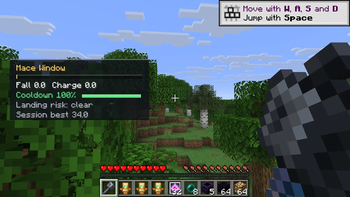
Mace Window is a client-side Fabric HUD for mace PvP that helps you read fall-charge timing without automating combat. It focuses on the part of mace fights that is easy to misjudge: whether your drop has enough pressure to be worth committing, whether your weapon cooldown is ready, and whether the landing is starting to become risky.
Features
- Fall-charge readiness panel for mace engagements
- Attack cooldown bar so manual swings are easier to time
- Landing-risk warning based on your current fall state
- Session best charge readout for quick practice feedback
- Compact HUD designed to stay out of the crosshair area
- Full Mod Menu config screen for position, scale, thresholds, and colors
PvP Fairness
Mace Window does not aim, click, move, select items, predict server-side hits, or automate any combat action. It only displays client-side timing information that is already visible through normal gameplay.
Compatibility
- Minecraft: 1.21.11
- Loader: Fabric
- Requires: Fabric API
- Optional: Mod Menu for in-game configuration
Author
Created by experiment-0011.
Available Versions
How to Install Mace Window on Your Server
Order Server
Order a Minecraft Java server with at least 3 GB RAM (4 GB recommended).
Set fabric Loader
In the panel under "Egg", select the fabric loader and matching Minecraft version (1.21.11).
Install Mod
Open the mod browser in the dashboard and search for "Mace Window". Click "Install" – done! Alternatively, upload the .jar via SFTP to the /mods folder.
Compatibility
Mod Loaders
Minecraft Versions
1.21.11
Server-side
✗ UnsupportedRecommended RAM
4 GB(min. 3 GB)Frequently Asked Questions
Mace Window server crashes on startup – what to do?
Most common cause: wrong fabric version or insufficient RAM. Check the server log (latest.log) for "OutOfMemoryError" or "Mixin" errors. With Mado Hosting: ensure at least 3 GB RAM is allocated and the loader matches the mod version (1.21.11). You can switch loaders with one click in the panel.
Is Mace Window compatible with fabric?
Mace Window officially supports fabric for Minecraft 1.21.11. The Mado dashboard automatically detects incompatible loader combinations.
Server lagging with Mace Window – how to optimize performance?
Recommended RAM: 4 GB (per 8 players). Use /spark profiler to check if Mace Window consumes the most tick time. Common fixes: reduce server view-distance to 8-10, install "performant" or "starlight" as supplementary mods on Forge. With Mado Hosting, your server runs on NVMe SSDs with dedicated CPU cores for minimal latency.
Similar Mods




Rent Modded Server
Install Mace Window with just one click on your server.