
Magical Creative Tools
A set of various tools for modders, map makers, server admins and creative gamemod players
Screenshots
About this Mod
Introduction
This is a set of tools aimed to help testing mod elements, building structures and administrating SMPs.
Features
Day And Weather Cycles Switch
Key bind (default F10)
Requires command permission to use
Can be turned off etirely in the config file
Useful while generating dozens of new worlds while testing something.
Air To Structure Void Staff
On right-click:
Changes air to structure void in 10 block radius around you.
_Useful while creating custom structures.
Anvil Staff
On right-click:
Reapair the item in your off-hand to full durability...
...or damage a full durabiliy item down to 1 durability.
_Useful for testing mod elements that revolve around damaging or repairing items.
Cave Air Staff
On right-click:
Changes air to cave air in 10 block radius around you.
_Useful while creating custom underground structures.
Clock Staff
On right-click:
Turn day time 1000 ticks forwards
On sneak + right-click:
Turn day time 1000 ticks backwards*
*it technically turns it 23000 ticks forwards
_Useful for testing daytime-releated mod elements.
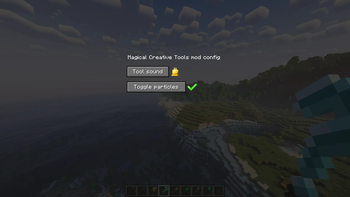
Config Staff
On right-click:
Opens the Magical Creative Tools mod config GUI.
_In the GUI you can:
_-choose one of two sounds for the tools or turn off their sounds
_-turn off particles of the tools
Death Staff
Upon hitting an entity:
Sets the hit entity's health to 0.
_Useful for testing mod elements related to mobs.
Depoisonous Staff
On right-click:
Removes all effects from you.
_Useful for testing mod elements related to effects.
Destroyer 3000
Huge knockback.
Makes the BONK meme sound on hit.
_Zero damage + Knockback X.
_Useful for punishing troublesome players on a server.
Earth Staff
On right-click:
Teleports you to the Overworld.
You may end up in a wall or in the air...
...as it teleports you to the same coordinates as your current ones.
_Useful for fast travel.
Egg Staff
Right-click a mob:
Copy its ID.
Right-click a block:
Spawn the mob on the block.
Right-click in the air:
Spawn the mob at your position.
Sneak while using this staff:
Spawn the mob with its AI toggled off.
_Useful for testing and placing mobs.
End Staff
On right-click:
Teleports you to the End.
You may end up in a wall or in the air...
...as it teleports you to the same coordinates as your current ones.
_Useful for fast travel.
Experienced Staff
On right-click:
Gain 30 levels of experience.
On sneak + right-click:
Loose all your levels of experience.
_Useful for testing experience-related mod elements.
Food Staff
On right-click:
If you're hungry - it fills the hunger and saturation bars.
If you're not hungry - it empties the hunger and saturation bars.
_Useful for testing food-related mod elements.
Healing Staff
If you're hurt - you regain full health.
If you have full health - it sets your health to 1.
_Useful for testing health-related mod elements.
Horizontal Block Rotation Staff
On right-click on block:
Rotate the block horizontally in clockwise direction.
Sneak + right-click on block:
Rotate the block horizontally in counter-clockwise direction.
_Useful for building.
Lava Staff
On right-click:
Teleports you to the Nether.
You may end up in a wall or in the air...
...as it teleports you to the same coordinates as your current ones.
_Useful for fast travel.
Mob Screenshot Staff
On right-clicking a mob:
Turn off its AI and make it look at you.
Right-click the mob while sneaking:
Turn its AI back on.
_Useful for screenshots with mobs and building maps with NPCs.
Night Vision Staff
On right-click:
Turns infinite Night Vision on or off for you.
_Useful for testing things in darkness and building in darkness.
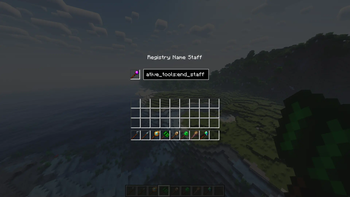
Registry Name Staff
On right-click:
Opens a GUI for checking registry names of blocks and items.
The registry name can be copied - click on it and use:
[Ctrl + A] and [Ctrl + C].
_Useful for documenting mods e.g. in a form of a WIKI.
Replace Blocks Staff
On right-click on a block:
Replaces the blocks of the same type as the one you clicked on.
They are replaced with the block you are holding in your off-hand.
The radius of replacing is the number of blocks in your off-hand.
The difference between this and the /fill command is that
the replaced blocks will keep their blockstate, rotation,
inventory and other NBT data.
_Useful for building.
Speed Staff
On right-click:
Gain +1 level of infinite Speed effect.
Sneak + right-click:
Remove the Speed effect from yourself.
_Useful for moving around.
Vertical Block Rotation Staff
On right-click on block:
Rotate the block vertically.
_Useful for building.
Water Bucket Staff
On right-click:
Extinguishes Fire blocks and entities that are on fire.
Range: 20 blocks.
_Useful for testing fire-related mod elements.
Donation
If you want to support me and help me creating even more mods consider buying me a coffee... or a fruit shake or a pizza ;D ...or whatever will I be eating at the moment xDD
Available Versions
How to Install Magical Creative Tools on Your Server
Order Server
Order a Minecraft Java server with at least 3 GB RAM (4 GB recommended).
Set forge Loader
In the panel under "Egg", select the forge loader and matching Minecraft version (1.21.1).
Install Mod
Open the mod browser in the dashboard and search for "Magical Creative Tools". Click "Install" – done! Alternatively, upload the .jar via SFTP to the /mods folder.
Compatibility
Mod Loaders
Minecraft Versions
1.21.1, 1.20.1
Server-side
✓ RequiredRecommended RAM
4 GB(min. 3 GB)Frequently Asked Questions
Magical Creative Tools server crashes on startup – what to do?
Most common cause: wrong forge version or insufficient RAM. Check the server log (latest.log) for "OutOfMemoryError" or "Mixin" errors. With Mado Hosting: ensure at least 3 GB RAM is allocated and the loader matches the mod version (1.21.1). You can switch loaders with one click in the panel.
Is Magical Creative Tools compatible with forge and neoforge?
Magical Creative Tools officially supports forge, neoforge for Minecraft 1.21.1, 1.20.1. The Mado dashboard automatically detects incompatible loader combinations.
Server lagging with Magical Creative Tools – how to optimize performance?
Recommended RAM: 4 GB (per 8 players). Use /spark profiler to check if Magical Creative Tools consumes the most tick time. Common fixes: reduce server view-distance to 8-10, install "performant" or "starlight" as supplementary mods on Forge. With Mado Hosting, your server runs on NVMe SSDs with dedicated CPU cores for minimal latency.
Similar Mods




![[ETF] Entity Texture Features](https://cdn.modrinth.com/data/BVzZfTc1/af683d206d50b05258d865b0d6e4aa2f2cee12f2_96.webp)
![[EMF] Entity Model Features](https://cdn.modrinth.com/data/4I1XuqiY/6e5bbd0d06b1741bfdab6c0cfab6de8fdaf0064c_96.webp)
Rent Modded Server
Install Magical Creative Tools with just one click on your server.