
MagicParticles
A server side cosmetics mod, that allows administrator to create custom particles using simple json files
Screenshots
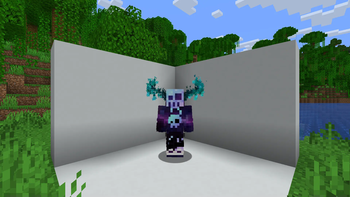
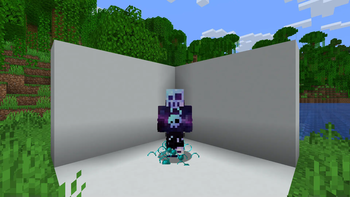
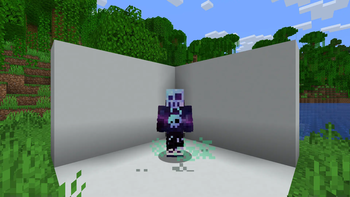
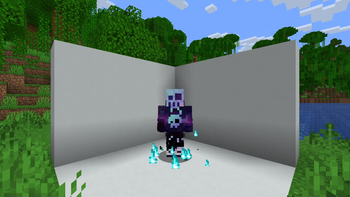
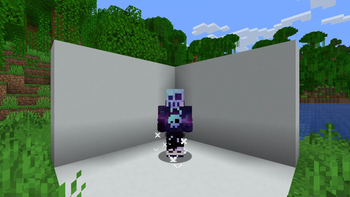
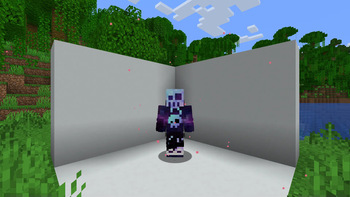
About this Mod
Magic Particles

A fabric server side cosmetics mod, that allows administrator to create custom particles using simple json files
Commands
/mp- List all available magic particles -magic-particles.root/mp set <id>- Set current magic particle -magic-particles.particle/mp disable- Disable current magic particle -magic-particles.disable/mp reload- Reload magic particles and messages -magic-particles.reload
Custom Particles
This mod includes more than 40 default particles, which can be useful example
files for understanding the format.
JSON Format
Each magic particle type needs a human friendly name and a list of particles it consists of
Root
{
  "name": "Some name", // Human friendly name
  "particles": [
    // Particle definitions
  ]
}
Particle definition
There are currently 3 particle definition types (simple, image and bezier). All of these share a couple of common
values in addition to their specialized ones.
Simple
{
  "type": "simple",
  "count": 1, // Amount of particles (optional)
  "pos": [1.0, 2.0, 0.0], // Offset from origin (affected by rotation)
  "delta": [0.1, 0.1, 0.1], // Particle area size (optional)
  "speed": 0, // Particle speed parameter, used by some particle types (optional)
  "particle_type": {
    "type": "minecraft:angry_villager" // Particle type: https://minecraft.wiki/w/Particles_(Java_Edition)#Types_of_particles
    // Some particles types have extra attributes, which need to be specified here
  },
  "anchor": "feet", // The particle origin ["feet"|"eyes"] (optional)
  "origin": [0.0, 0.5, 0.0], // Offset from origin (optional)
  "billboard": "fixed" // What rotation axis should affect "pos" ["fixed", "vertical", "horizontal", "center"] (optional)
}
Image
{
  "type": "image",
  "image": "drex.png", // Path to the image, the image needs to be in config/magic-particles/images/<image>
  "size_x": 0.8, // The width of the particle image
  "size_y": 0.8, // The height of the particle image
  "pixel_size": 0.6, // The size of each individual particle
  "pos": [1.0, 2.0, 0.0], // Offset from origin (affected by rotation)
  "anchor": "feet", // The particle origin ["feet"|"eyes"] (optional)
  "origin": [0.0, 0.5, 0.0], // Offset from origin (optional)
  "billboard": "fixed" // What rotation axis should affect "pos" ["fixed", "vertical", "horizontal", "center"] (optional)
}
Bezier
(Can't really recommend to use this, creating an image of the desired shape and using the image type is easier)
Available Versions
How to Install MagicParticles on Your Server
Order Server
Order a Minecraft Java server with at least 3 GB RAM (4 GB recommended).
Set fabric Loader
In the panel under "Egg", select the fabric loader and matching Minecraft version (26.1.2).
Install Mod
Open the mod browser in the dashboard and search for "MagicParticles". Click "Install" – done! Alternatively, upload the .jar via SFTP to the /mods folder.
Compatibility
Mod Loaders
Minecraft Versions
26.1.2, 26.1.1, 26.1 (+18 more)
Server-side
✓ RequiredRecommended RAM
4 GB(min. 3 GB)Frequently Asked Questions
MagicParticles server crashes on startup – what to do?
Most common cause: wrong fabric version or insufficient RAM. Check the server log (latest.log) for "OutOfMemoryError" or "Mixin" errors. With Mado Hosting: ensure at least 3 GB RAM is allocated and the loader matches the mod version (26.1.2). You can switch loaders with one click in the panel.
Is MagicParticles compatible with fabric and quilt?
MagicParticles officially supports fabric, quilt for Minecraft 26.1.2, 26.1.1, 26.1. The Mado dashboard automatically detects incompatible loader combinations.
Server lagging with MagicParticles – how to optimize performance?
Recommended RAM: 4 GB (per 8 players). Use /spark profiler to check if MagicParticles consumes the most tick time. Common fixes: reduce server view-distance to 8-10, install "performant" or "starlight" as supplementary mods on Forge. With Mado Hosting, your server runs on NVMe SSDs with dedicated CPU cores for minimal latency.
Similar Mods

![[ETF] Entity Texture Features](https://cdn.modrinth.com/data/BVzZfTc1/af683d206d50b05258d865b0d6e4aa2f2cee12f2_96.webp)
![[EMF] Entity Model Features](https://cdn.modrinth.com/data/4I1XuqiY/6e5bbd0d06b1741bfdab6c0cfab6de8fdaf0064c_96.webp)



Rent Modded Server
Install MagicParticles with just one click on your server.